![[UPDATE] WPChat 1.2: Go Global with RTL Support & Enhanced User Experience](https://wpchat.com/wp-content/uploads/2025/12/wpchat-1.2-go-global-with-rtl-support.png)
When we created WPChat, we had a simple goal: make it easier for people to connect with their website visitors.
As the best WordPress chat plugin in the market, WPChat has been helping business owners turn simple visits into meaningful, real-time conversations.
But we wanted to take things a step further and make it even easier for you to connect with your visitors. This is where reaching people in their native language can make a difference.
Since over half of all internet users browse in languages other than English, it’s important to have a chat assistant that can adapt to different languages and unique scripts without skipping a beat.
That’s why we’re excited to roll out WPChat 1.2 — an update designed to help you reach more people, in more languages, with even more precision.
We’ve taken the seamless chat experience you already rely on and added full RTL language support and smarter tweaks to help you create chat assistants that feel native to every visitor.
By making the visitor’s chat experience match their preferred language, you can start building trust even before they send the first message.
Full RTL Support: Connect with Every Customer, Anywhere
A great chat experience should feel like a natural part of your website.
But if you use a language that is read from right to left—such as Arabic, Hebrew, or Persian—a standard chat box can feel out of place against your site’s layout.
To help you create a more cohesive experience, we’ve introduced full RTL (Right-to-Left) Support.
While most English sites are read from left to right, many languages around the world flow the opposite way.
With this update, WPChat now recognizes those scripts and automatically “flips” the entire interface so it feels native to your visitors.

What’s more, the chat bubble, text, and icons move to the correct side, matching your visitors’ natural reading flow.
Plus, the visual customizer for the plugin also flips the layout to support RTL languages. That way, you can see exactly how your chat assistant will look to your visitors.
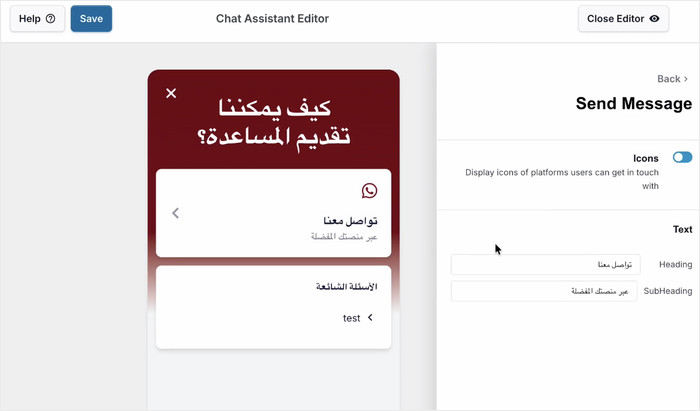
On top of supporting RTL languages, we’ve also made sure every word your visitors see is now fully translatable.
You can customize prompts, buttons, and labels to match your brand’s voice perfectly, ensuring your chat assistant feels like a native part of your page.
This simple adjustment makes your chat more intentional and polished for every visitor:
- Global E-Commerce Expansion: Build instant trust with customers by offering a shopping experience that feels native and professional.
- Frictionless User Support: Provide accessible, easy-to-navigate help for your charity or NGO portal by matching the language used by local clients.
- Build Trust & Authority: Establish credibility for your B2B agency by ensuring your chat widget looks intentionally designed for the client’s specific region.
Better Chat Experience for Your Site Visitors
On top of adding RTL language support, we’ve also focused on making the chat experience smoother for your visitors. These small tweaks go a long way in keeping users engaged on your site.
Open Chat Platforms in a New Tab
In the past, starting a chat using the assistant might take a user away from your site entirely.
After this update, when a visitor clicks to chat on a platform like WhatsApp or Telegram, it will now automatically open in a new tab.
As a result, they can message you while keeping your website open in another tab to look up relevant information.
For example, a potential customer can keep your pricing page open in the background as they ask questions about buying from you.
By keeping your site open in the background, you significantly increase the chance they will return to complete the purchase.
More Control with the New “X” Button
We’ve added a clear “X” button to the chat bubble UI, giving visitors the power to easily dismiss the chat window whenever they choose.
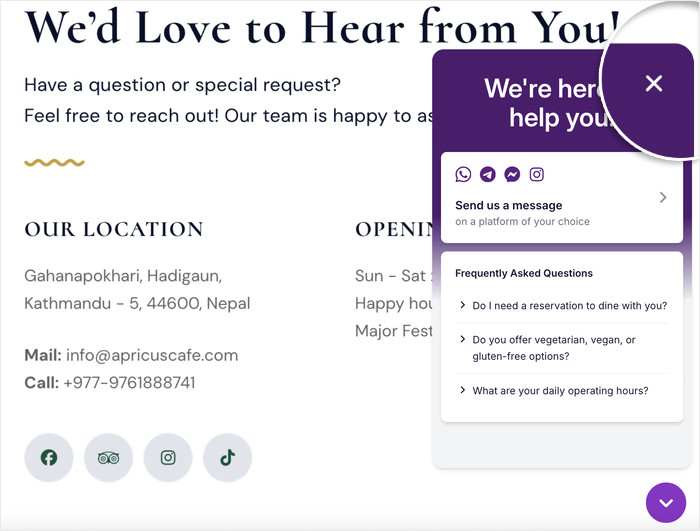
This gives your visitors a clearer view of your content as they chat on their preferred platform.
That means a visitor can clear the chat window to get a better look at your product photos, specific product features, or video testimonials.
As a result, they’ll have all the info they need as they chat with your support staff.
Easier Chat Assistant Creation & Management
We’ve also streamlined the backend so you can spend less time configuring settings and more time talking to customers and growing your business.
For one, we’ve made it even easier to build a helpful FAQ and provide instant answers to your website visitors.
As soon as you finish creating an FAQ, a new “Add Another” button appears instantly.
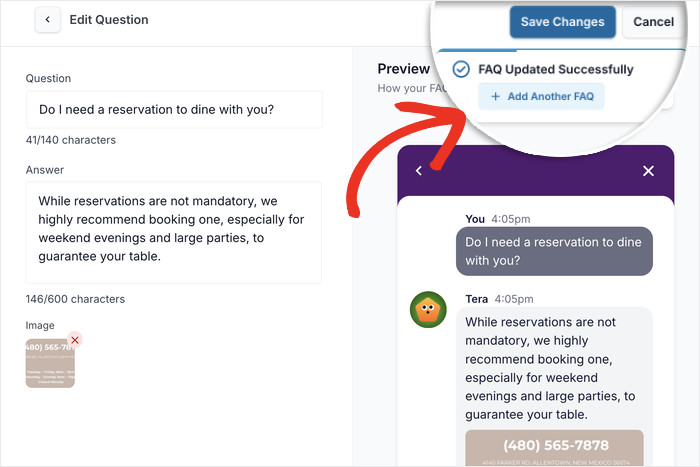
Just click on it, and you can immediately start creating another FAQ entry for your widget.
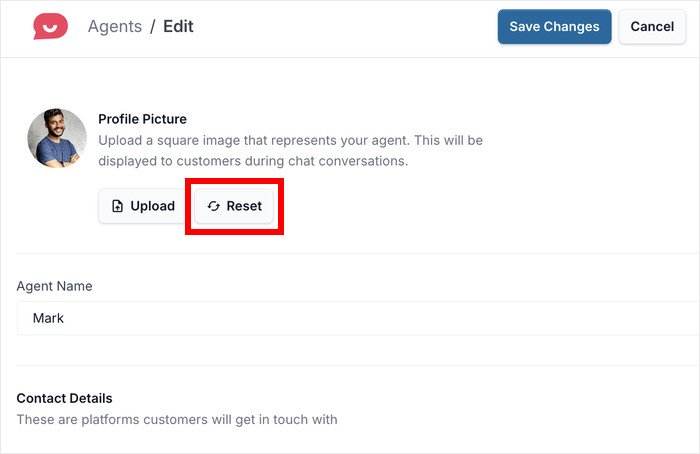
On top of that, you can now revert your chat agent’s profile picture to the default avatar with a single click.
When editing the agent, simply click on the Reset button below the profile picture.
Finally, we’ve included several behind-the-scenes polishes to ensure your chat assistant works perfectly on every device.
Whether your visitors are browsing on a desktop or switching to landscape mode on their phone, the chat UI stays perfectly aligned and easy to use.
Get Started with WPChat Today!
With the release of WPChat 1.2, your chat tools are now more flexible and accessible than ever.
By offering native RTL support and a more streamlined experience for your visitors, you can reach a wider audience while keeping them engaged on your site longer.
Whether you’re looking to connect with a local community in their own language or simply want to provide a smoother support experience, these updates give you the strategic precision you need to grow.
Ready to take your chat assistants to the next level?
If you’re already a WPChat user, just head over to your WordPress dashboard and update the plugin to the latest version.
All the new features, from RTL support to the new user experience tweaks, will be available immediately.
Thinking about getting started with the plugin? Now is the perfect time to make the switch and turn your website into a real-time conversation hub.
Finally, a huge thank you to everyone in our community. Your feedback is what helps us build the tools you need to succeed, and we can’t wait to see how you use this update to connect with your visitors!