When I first started building WordPress sites for clients, I quickly realized that a good FAQ section could be the difference between a user finding what they need and bouncing to a competitor’s site.
I spent a lot of time manually creating FAQ pages with basic HTML and CSS, only to be stuck updating and reorganizing them.
That’s when I discovered FAQ plugins—and honestly, they’ve saved me hundreds of hours since.
Over the years, I’ve tested dozens of FAQ plugins across different types of websites, from small business sites to large e-commerce stores.
The right FAQ plugin doesn’t just display questions and answers — it improves user experience, reduces support tickets, and can even boost your SEO.
In this guide, I’ve handpicked 5 of the best FAQ plugins for WordPress based on ease of use, design flexibility, and real-world performance.
Whether you’re running a membership site, an online store, or a service-based business, you’ll find a solution that fits your needs and helps your visitors get the answers they’re looking for.
In this Article:
- Why Add FAQs to Your WordPress Site?
- How I Compared These FAQ Plugin Tools
- 5 of the Best FAQ Plugins for Your WordPress Website (Compared)
- 1. WPChat – Best FAQ Plugin for Customer Support
- 2. AIOSEO – Best FAQ Plugin for Adding SEO-Optimized FAQ Sections
- 3. SeedProd – Best FAQ Plugin for Creating Beautiful Landing Pages
- 4. Thrive Architect – Best FAQ Plugin for Improved Conversion
- 5. Ultimate FAQ Accordion Plugin – Free FAQ Plugin for Simple Display
- 1. WPChat – Best FAQ Plugin for Customer Support
- What Is the Best FAQ Plugin for WordPress?
- Frequently Asked Questions
- More Resources for WordPress Websites
Why Add FAQs to Your WordPress Site?
A well-organized FAQ section does more than answer questions—it builds trust, reduces support requests, and keeps visitors on your site longer.
When users find answers quickly, they’re more likely to convert into customers or subscribers.
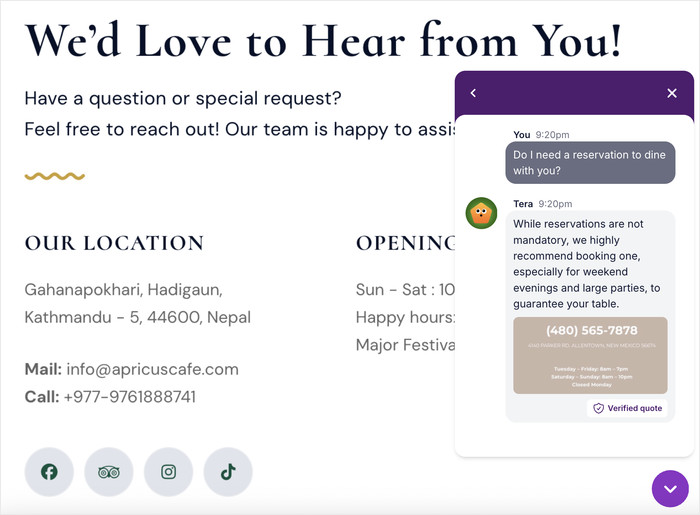
Here’s how adding FAQs can help your website and brand:
- You own your content — no third-party platform controls your FAQ data
- Plugin variety — choose from simple accordions to advanced SEO tools
- Easy updates — change answers anytime without technical knowledge
- Search-friendly — structured FAQ data can appear in Google search results
- Integration options — connect FAQs with forms, chat tools, and analytics
That’s where FAQ plugins come in—they make it easy to organize, display, and optimize your question-and-answer content.
How I Compared These FAQ Plugin Tools
I tested each plugin by installing it on a real WordPress site and building FAQ sections for different use cases.
I wanted to see which ones felt practical for beginners while still offering flexibility for more advanced needs.
- Setup Speed: I tracked how long it took to install the plugin and create a working FAQ section.
- Ease of Use: I checked whether I could add and organize questions without checking documentation.
- Display Options: I tested accordion styles, categories, search features, and mobile responsiveness.
- SEO Features: I verified schema markup support and how FAQs appeared in search results.
- Customization: I explored design controls, shortcodes, and page builder compatibility.
- Integrations: I connected each plugin with forms, analytics, and messaging tools where available.
- Performance: I measured page load times and checked for conflicts with other plugins.
This process helped me find plugins that are both powerful and realistic for everyday WordPress users.
5 of the Best FAQ Plugins for Your WordPress Website (Compared)
Now that you understand what to look for in an FAQ plugin, let’s dive into the top options I’ve tested. Each plugin offers different strengths, so you can find the one that matches your specific needs.
1. WPChat – Best FAQ Plugin for Customer Support
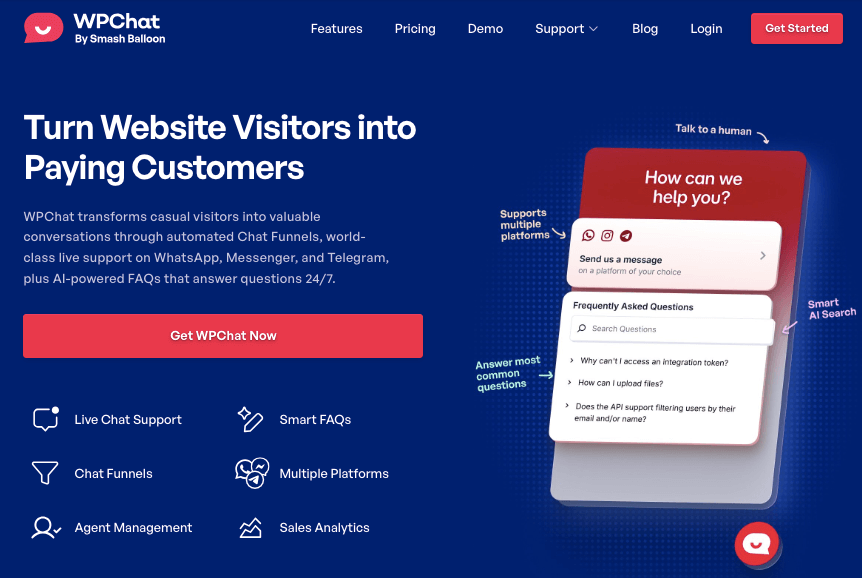
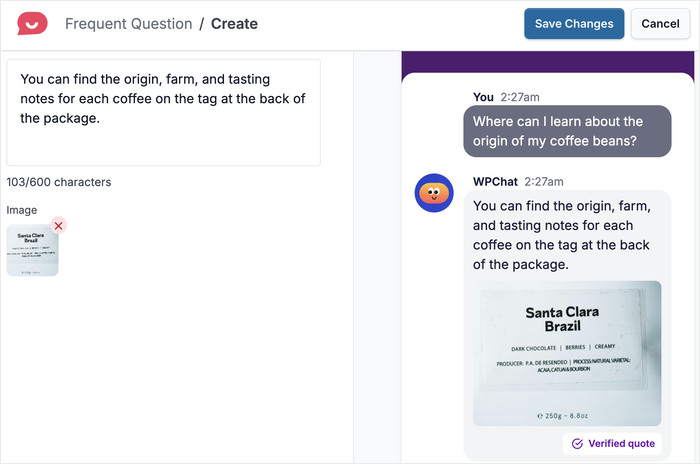
WPChat stands out if you want to combine FAQ functionality with customer support tools. It’s built for businesses that need more than just a static question-ands with messaging platforms and analytics.
When I installed it, I noticed how it focuses on interaction rather than just information. The setup guides you toward building a support system, not just a content block.
Key Features:
- FAQ Widget: Displays answers directly where visitors need them most on your site.
- Display Control: Choose which specific parts of your website show the FAQ widget.
- Analytics Dashboard: Track which questions visitors check most often to understand their needs.
- Interactive Messages: Prompt visitors to book calls or subscribe after they read answers.
- Messaging Integrations: Connect with WhatsApp, Messenger, and other platforms for follow-up conversations.
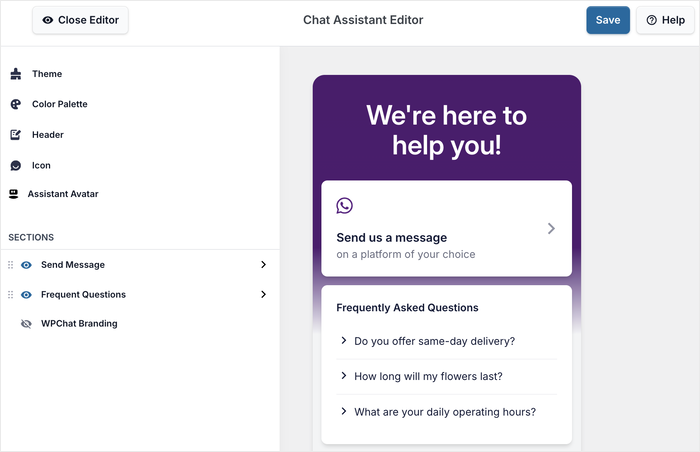
- Easy Customization: Use pre-built themes and the live customizer to choose how the FAQ widget looks on your website.
Our Verdict
WPChat works best for businesses that want FAQs to do more than just answer questions. The analytics showed me exactly what customers cared about, and the interactive funnels let me turn FAQ visitors into leads.
It also supports the biggest messaging apps out there, so WPChat was a massive help when it comes to customer support.
Pricing
You can start using WPChat for a price of $49/year.
Get started with WPChat today and turn your FAQ section into a customer support and lead generation tool.
To learn more, you can check out this beginner’s guide on how to add an FAQ widget to your website.
2. AIOSEO – Best FAQ Plugin for Adding SEO-Optimized FAQ Sections
AIOSEO is perfect if you want your FAQ sections to work for both visitors and search engines.
It’s designed to help your site show up better in Google by adding the right structured data to your questions and answers.
I’ve used AIOSEO on multiple projects, and the FAQ feature integrates seamlessly with posts and pages. Setup took just a few minutes, and I didn’t need to touch any code.
Key Features:
- Seamless FAQ Integration: Add FAQ sections directly to posts and pages without extra plugins.
- Advanced SEO Tools: Enhance search engine visibility with built-in optimization features across your site.
- Schema Markup Support: Automatically add FAQ schema to boost your chances of appearing in search results.
- User-Friendly Interface: Set up and manage FAQs easily with an intuitive dashboard designed for beginners.
Our Verdict
AIOSEO works best if you want FAQs that improve your search rankings. The schema markup helped my FAQ content appear in Google’s rich results, which increased click-through rates. The interface made adding questions simple, and I didn’t need to learn technical SEO concepts.
Pricing
Starts at $49.50/year, and a free plan is available with basic features.
Grab your copy of AIOSEO here and make your FAQ sections work harder for your search rankings.
3. SeedProd – Best FAQ Plugin for Creating Beautiful Landing Pages
SeedProd makes it easy to create beautiful landing pages that showcase your FAQs. It’s built for people who want design control without needing to code or hire a developer.
I used SeedProd to build a dedicated FAQ page, and the drag-and-drop builder made the whole process feel effortless. The design templates gave me a professional starting point right away.
Key Features:
- Drag-and-Drop Builder: Create and customize FAQ landing pages visually without touching any code.
- Design Templates: Choose from numerous pre-built templates designed specifically for FAQ integration.
- Mobile-Responsive Designs: Ensure your FAQ pages look great and work smoothly on all devices.
- Email Marketing Integration: Connect with email services to convert FAQ visitors into subscribers and leads.
- Coming Soon and Maintenance Modes: Use built-in modes to prepare your FAQ pages before going live.
Our Verdict
SeedProd works best if you want complete design control over your FAQ pages. The drag-and-drop builder let me arrange questions exactly how I wanted, and the templates saved me hours of design work.
Pricing
The premium plan starts at $39.50/year.
Get started with SeedProd today and build stunning FAQ landing pages that match.
4. Thrive Architect – Best FAQ Plugin for Improved Conversion
Thrive Architect is ideal if you want your FAQ pages to do more than just answer questions—you want them to convert visitors into customers. It’s built specifically for businesses that need calls to action and lead generation built into their FAQ design.
I tested it by creating an FAQ page for a service business, and the visual editor made it easy to add conversion elements alongside my questions and answers.
Key Features:
- Visual Editor: Build conversion-focused FAQ pages with an intuitive drag-and-drop interface designed for results.
- Pre-Designed Templates: Use ready-made FAQ page templates that are optimized specifically for conversions.
- Conversion Elements: Add calls to action, opt-in forms, and lead generation tools directly into your FAQ sections.
- A/B Testing Features: Test different FAQ page layouts and designs to optimize your conversion rates over time.
- Marketing Integrations: Connect with various marketing and automation platforms to capture and nurture leads automatically.
Our Verdict
Thrive Architect works best for businesses that treat FAQs as a conversion opportunity. The visual editor let me place opt-in forms right after key questions, which increased email signups.
The template library gave me conversion-tested layouts, and the A/B testing helped me find which FAQ designs worked best.
Pricing
For $99/year, you can get access to Thrive Architect and its features.
Get Thrive Architect for your site today and turn your FAQ pages into powerful conversion tools.
5. Ultimate FAQ Accordion Plugin – Free FAQ Plugin for Simple Display
Ultimate FAQ Accordion Plugin is perfect if you need a simple, no-fuss way to add FAQs to your site.
It focuses on doing one thing well—displaying questions and answers in a clean, accordion format that visitors can expand and collapse.
Key Features:
- Accordion-Style Display: Show FAQs in a collapsible accordion format that improves readability and saves space.
- Shortcode Support: Insert FAQs anywhere on your site easily using simple shortcodes in posts and pages.
- Categories and Tags: Organize your FAQs with categories and tags to help visitors find answers faster.
- Built-in Search Functionality: Let visitors search through your FAQs to navigate directly to the answers they need.
Our Verdict
Ultimate FAQ works best if you want a free, simple solution without unnecessary complexity.
Its accordion style kept my FAQ page clean, and the categories helped organize dozens of questions into logical groups.
The only limitation is that styling options are basic compared to premium plugins, and you’ll need paid addons for advanced customization.
Pricing
You can start using the base plugin for free.
What Is the Best FAQ Plugin for WordPress?
Out of these great options, I believe WPChat is the best FAQ plugin for most WordPress users.
It goes beyond just displaying questions and answers by combining FAQ functionality with customer support tools, analytics, and lead generation features.
The messaging platform integrations let you turn FAQ visitors into actual conversations.
If you want SEO-optimized FAQs that appear in Google search results, AIOSEO is ideal.
For businesses focused on conversions, Thrive Architect lets you turn FAQ pages into lead generation tools with built-in testing and optimization features.
To build a customer support system that works alongside your FAQs, start with WPChat and watch your engagement improve.
Frequently Asked Questions
What is an FAQ plugin?
An FAQ plugin helps you create and display frequently asked questions on your WordPress site in an organized, easy-to-read format.
Do I need an FAQ plugin for WordPress?
You don’t technically need one, but FAQ plugins save time and make it easier to organize, update, and display questions without coding.
Can FAQ plugins help with SEO?
Yes. Plugins like AIOSEO add schema markup to your FAQs, which can help them appear in Google’s rich results and increase visibility.
Which FAQ plugin is best for beginners?
WPChat is easy to set up, works right out of the box, and lets you check how effective your FAQs are with the analytics.
Can I use FAQ plugins to generate leads?
Yes. WPChat includes interactive messages and analytics that help you capture leads while visitors read your FAQs.
More Resources for WordPress Websites
Looking to improve other parts of your WordPress site? We have other helpful lists and tutorials that you can check out:
- Best Click-to-Chat Solutions for Service-Based Businesses
- AI-Powered Support: How WPChat Saves Hours on Customer Service Every Week
- WhatsApp vs Facebook Messenger: Which Chat Platform Is Best for Your Business?
- How to Add a Facebook Messenger Chat Button to WordPress