
Vous avez ajouté un widget de chat à votre site parce que quelqu'un vous a dit qu'il augmenterait les conversions. Des semaines plus tard, vous consultez vos chiffres par rapport à la date d'activation, et rien n'a bougé.
J'ai examiné cela sur une poignée de sites WordPress maintenant, et la plupart des conseils sur le sujet visent la mauvaise chose. Choisissez un meilleur widget. Rédigez une meilleure copie de salutation. Entraînez peut-être un bot. Rien de tout cela ne touche au problème réel.
Un widget de chat générique demande à un visiteur de taper dans une fenêtre contextuelle qu'il n'a jamais vue auparavant, sur une interface qui se ferme dès qu'il quitte votre onglet. La session se termine. La conversation disparaît. Le visiteur passe à autre chose, et vous vous retrouvez à fixer un plugin qui ne semble rien faire.
Il n'a jamais été question du widget que vous avez choisi. Le widget vit dans une bulle à laquelle votre visiteur n'a aucune raison de revenir.
La solution est simple : redirigez cette même conversation via une application que votre visiteur a déjà ouverte, comme WhatsApp, Messenger ou Telegram, et le résultat change.
Dans cet article
- Comment un widget de chat augmente-t-il réellement les ventes ?
- Pourquoi la plupart des widgets de chat ne convertissent pas
- Qu'est-ce qui fait qu'un widget de chat augmente réellement les ventes
- Configurer un widget de chat axé sur les ventes sur WordPress avec WPChat
- Où placer votre widget de chat pour un impact maximal sur les ventes
- FAQ
- Commencez à ajouter le chat WhatsApp à votre site dès maintenant
Comment un widget de chat augmente-t-il réellement les ventes ?
Un widget de chat augmente les ventes lorsqu'il rencontre les visiteurs sur un canal qu'ils font déjà confiance, spécifiquement WhatsApp, Messenger ou Telegram. Le chat via application de messagerie est lu presque immédiatement, maintient la conversation vivante après que le visiteur quitte votre site, et s'exécute via une application qu'il ouvre déjà des dizaines de fois par jour. Une fenêtre contextuelle générique sur site ne fait rien de tout cela.
Sur WordPress, WPChat connecte votre site à ces canaux en tant que widget de clic-pour-chatter, pas un autre tableau de bord à surveiller. La configuration prend environ 5 minutes. Voici comment cela fonctionne, et où le placer pour un impact maximal sur les ventes.
Pourquoi la plupart des widgets de chat ne convertissent pas
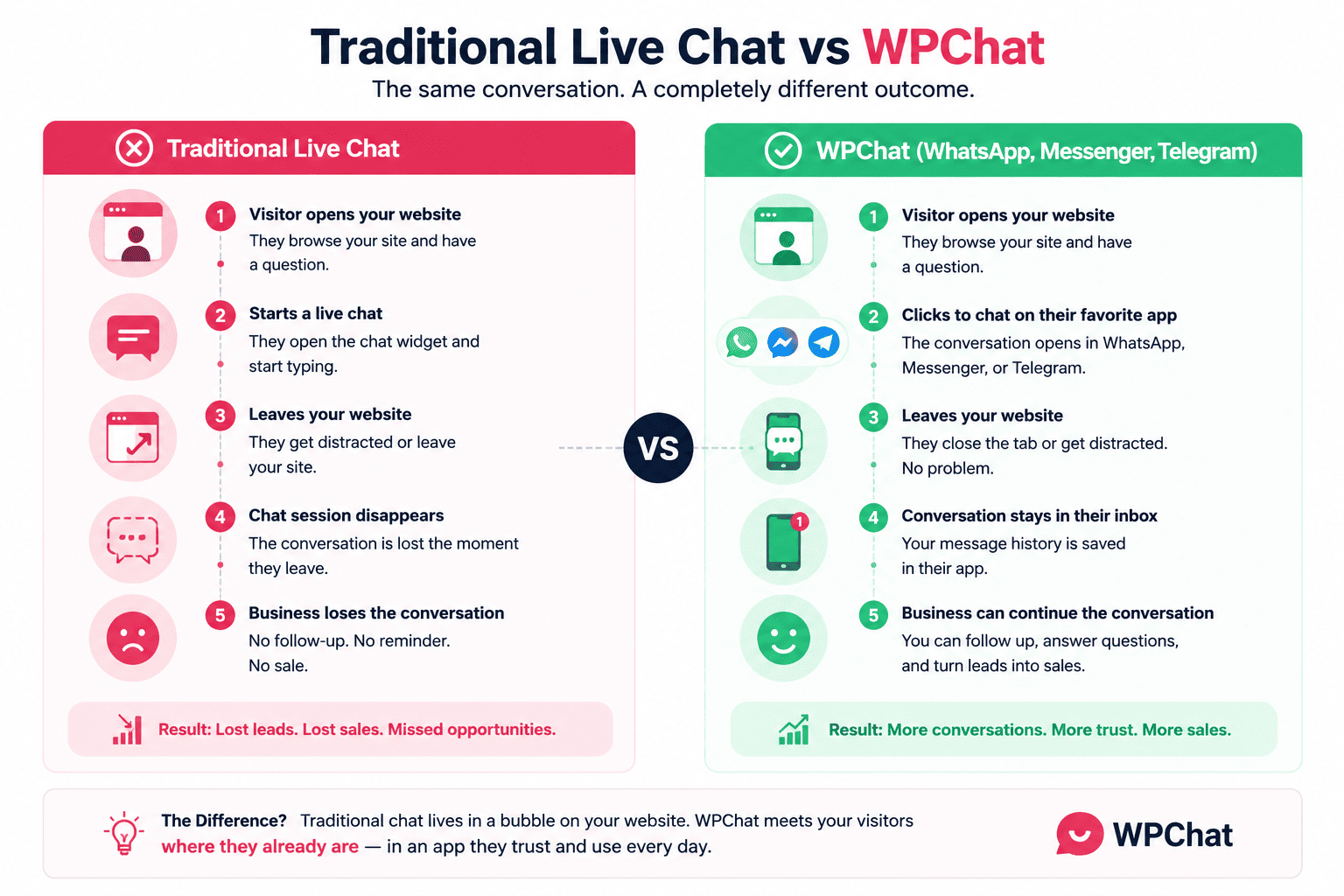
Un widget de chat générique ouvre une petite fenêtre sur votre page. Le visiteur tape dans une boîte qu'il n'a jamais utilisée ailleurs, sans savoir si quelqu'un va réellement répondre, ni quand.
S'il navigue ailleurs, ou ferme l'onglet pour comparer votre produit à celui d'un concurrent, la fenêtre se ferme avec lui. La prochaine fois qu'il atterrira sur votre site, il n'y aura aucun souvenir de tout cela. Il recommence. Ou, plus souvent, il ne prend même pas la peine.
Pensez maintenant à un bouton WhatsApp. Le visiteur a déjà WhatsApp installé. Il le consulte des dizaines de fois par jour, pour les messages de sa famille, de ses collègues, les discussions de groupe. Il tape sur votre bouton de chat et la conversation s'ouvre dans une application qu'il connaît déjà, et elle reste dans sa liste de fils de discussion après qu'il ait quitté votre site. Rien dans l'interface n'est nouveau. Il n'y a pas de connexion qu'il n'ait pas déjà.
Cet écart n'a rien à voir avec les fonctionnalités ou le texte astucieux à l'intérieur du widget. Il s'agit de savoir si le visiteur doit adopter quelque chose d'inconnu juste pour vous poser une question.
Les messages WhatsApp sont lus en environ 5 secondes, environ 98% du temps. Je n'ai jamais vu de widget de chat générique s'approcher de cela, car le visiteur n'a aucune expérience avec cette interface. C'est un étranger, chaque fois qu'il atterrit sur votre page.
Cela compte le plus lorsqu'il y a une véritable fenêtre de considération : services, produits plus chers, commandes personnalisées. Un widget qui se termine à la seconde où l'onglet se ferme convient pour une question qui prend cinq secondes à répondre. Il échoue complètement pour une décision qui prend un jour, ou une semaine.
Les outils de chat en direct dans le tableau de bord sont construits autour de ce même modèle de session, qui est exactement le modèle qui échoue ici. Ils demandent aux visiteurs de s'asseoir et d'attendre dans une fenêtre de chat hébergée, en surveillant un indicateur de frappe qui pourrait ne jamais venir.
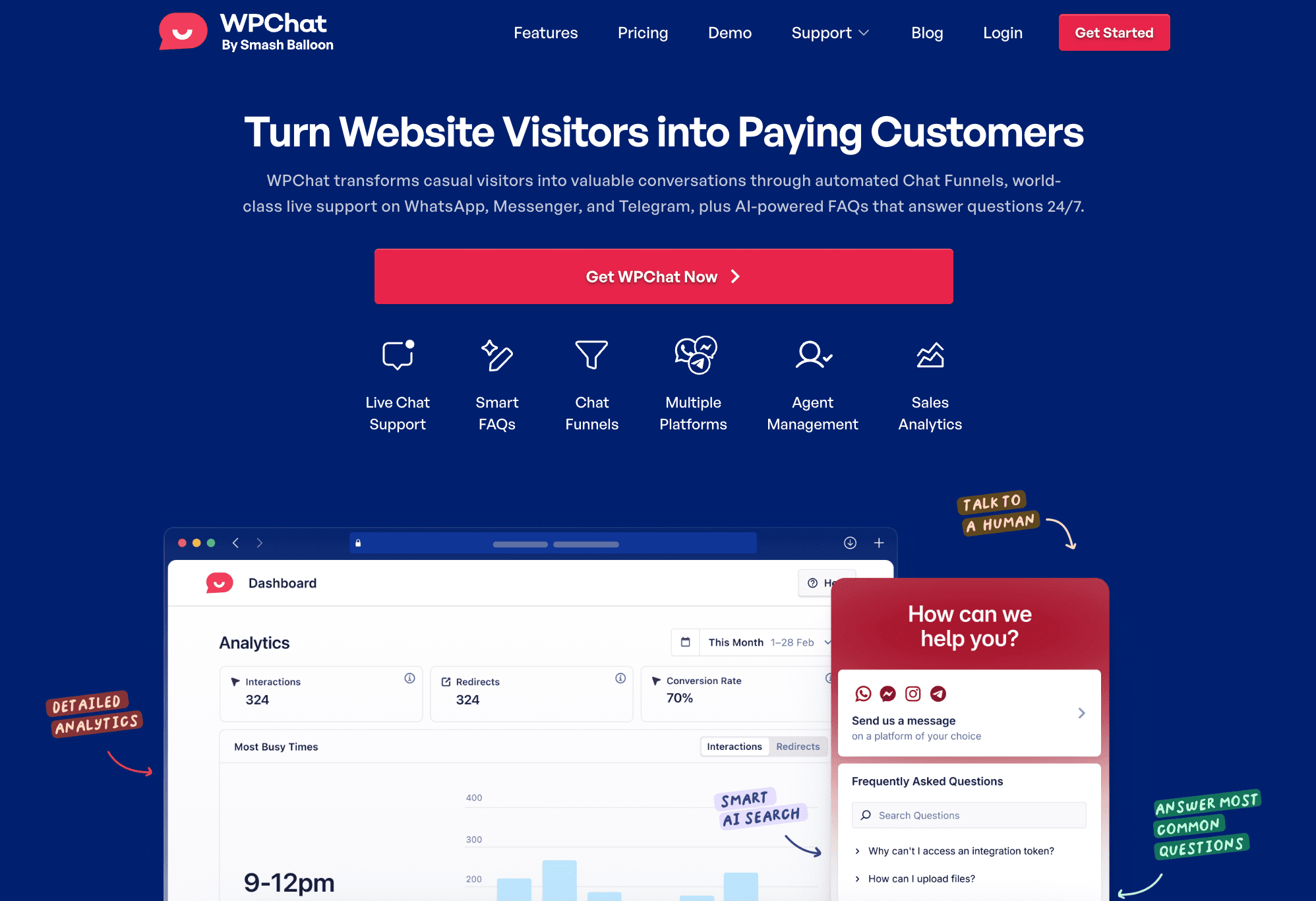
WPChat n'est pas cela. Il n'y a pas de boîte de réception à gérer et pas de chat d'équipe à pourvoir. La conversation se déplace vers WhatsApp, Facebook Messenger, ou Telegram, où elle survit longtemps après la fermeture de votre site.
Qu'est-ce qui fait qu'un widget de chat augmente réellement les ventes
Trois choses décident si un widget de chat se transforme en revenus. Aucune d'entre elles n'a quoi que ce soit à voir avec le choix du widget le plus esthétique.
Confiance du canal
L'application utilisée par votre widget est-elle celle que votre visiteur a déjà ouverte en ce moment ?
Un pop-up générique échoue immédiatement à ce test, car personne n'a de relation existante avec une fenêtre de chat qui n'existe que sur votre site. WhatsApp, Messenger et Telegram le réussissent car ils sont déjà sur le téléphone du visiteur. J'ai écrit plus sur ce compromis spécifique dans WhatsApp vs. chat en direct : lequel est le meilleur pour votre entreprise WordPress.
Version courte : lorsque WPChat redirige quelqu'un vers WhatsApp, vous ne lui demandez pas d'apprendre une nouvelle interface. Vous lui demandez de faire quelque chose qu'il fait déjà vingt fois par jour, juste avec votre entreprise de l'autre côté cette fois.
Persistance
La conversation survit-elle après que le visiteur a fermé votre onglet ? Une session de widget meurt au moment où ils naviguent ailleurs. Un fil WhatsApp reste dans leur boîte de réception jusqu'à ce que la vente se conclue, ou non, des jours plus tard. Pour tout ce qui a une véritable fenêtre de considération, la persistance est la variable que presque personne ne pense à vérifier.
J'ai comparé cela directement à l'e-mail dans WordPress live chat vs. e-mail : lequel génère le plus de conversions, et le même schéma se répète ici. L'e-mail reste, mais il est lent. Un widget est rapide, mais disparaît. WhatsApp est le seul des trois qui est les deux.
Vitesse de réponse
Un widget de chat avec une fenêtre de réponse de six heures n'est qu'un formulaire de contact déguisé. Il n'y a vraiment que deux solutions : répondre rapidement vous-même, ou laisser un système de FAQ gérer les questions qui arrivent pendant que vous dormez. Le système Smart FAQ de WPChat gère automatiquement les tâches répétitives de pré-vente, jour et nuit, de sorte que ce qui arrive sur votre WhatsApp vaut la peine d'être ouvert.
Configurer un widget de chat axé sur les ventes sur WordPress avec WPChat
La configuration elle-même prend environ 5 minutes, et j'ai déjà couvert la version étape par étape dans comment ajouter un widget de chat WhatsApp à WordPress. Une fois que votre numéro WhatsApp Business, et Facebook Messenger ou Telegram si vous en avez besoin, sont connectés, voici ce qu'il faut faire différemment lorsque l'objectif est la vente et non pas simplement d'avoir un bouton de chat quelque part sur le site.
Bref aperçu avant les détails :
- Les pages produits et tarifs reçoivent le widget en premier, pas votre page d'accueil
- Votre message d'accueil doit faire référence à la page exacte sur laquelle se trouve le visiteur
- Un court entonnoir de chat peut gérer vos questions de pré-vente les plus courantes de manière autonome
1. Affichez d'abord le widget sur les pages de produits et de tarifs
Utilisez le ciblage par page de WPChat au lieu de basculer le widget sur tout le site dès le premier jour.
Je commence toujours une configuration WPChat sur les pages produits et tarifs, puis j'ajoute la page d'accueil une semaine plus tard une fois que j'ai vu comment cela fonctionne réellement là où l'intention d'achat est la plus élevée. Quelqu'un qui compare deux niveaux de prix est beaucoup plus susceptible de poser une vraie question que quelqu'un qui parcourt votre page d'accueil pour la première fois.
Activez-le partout à la fois et vous noyez le moment qui compte vraiment sous un trafic qui n'est pas encore prêt à parler.
2. Rédigez une salutation qui fait référence à la page, pas un simple bonjour générique
Oubliez le « Salut, comment puis-je vous aider ? » Cela pourrait appartenir à n'importe quelle entreprise sur n'importe quelle page sur Internet.
Sur une page de tarifs, essayez quelque chose de plus proche de « Vous regardez ce forfait ? Je serais heureux de répondre à toutes vos questions avant de vous inscrire. »
Sur une page produit, nommez le produit. Un message d'accueil spécifique indique au visiteur que vous faites attention à ce qu'il regarde réellement, ce qui fait la différence entre un widget qui ressemble à une fenêtre pop-up et un qui donne l'impression qu'une personne l'a remarqué.
3. Créez un entonnoir de chat pour vos 3-4 questions de prévente les plus courantes
Configurez un court entonnoir qui pose quelques questions de qualification, ce qu'ils recherchent, leur budget approximatif, quand ils prévoient d'acheter, avant de transférer la conversation sur WhatsApp.
Associez-le au système de FAQ intelligentes pour répondre instantanément aux questions fréquentes sur les délais d'expédition, la politique de retour, etc., au lieu de taper la même réponse pour la cinquième fois de la journée. Le tunnel qualifie les prospects avant qu'un message n'atteigne votre téléphone, de sorte que ce qui vous parvient vaut la peine d'être répondu immédiatement.
J'ai expliqué comment le constructeur fonctionne dans les tunnels de discussion WhatsApp.
Commencez à intercepter ces conversations sur WhatsApp
Vous avez le placement, la salutation et le tunnel FAQ définis. WPChat met tout cela en ligne sur votre site en moins de 5 minutes, avec une garantie de remboursement de 14 jours.
Ajouter le chat WhatsApp à mon siteOù placer votre widget de chat pour un impact maximal sur les ventes
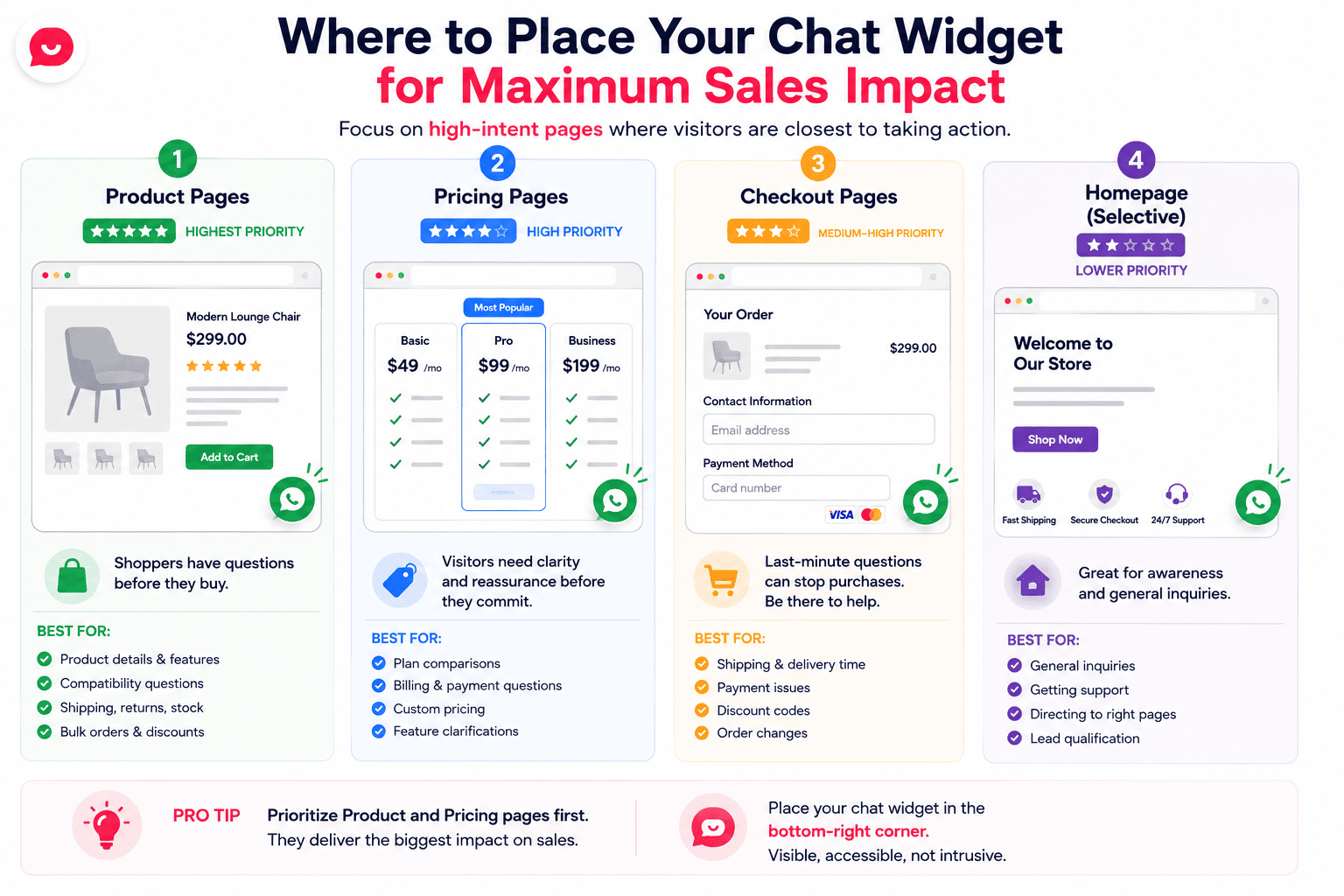
Toutes les pages ne méritent pas le même widget de chat. L'endroit où vous le placez détermine s'il intercepte une véritable question d'achat ou s'il ajoute simplement de l'encombrement.
Pages de produits et de services. L'intention d'achat est la plus élevée ici, et une question sans réponse est la chose la plus susceptible de tuer une vente. Un acheteur qui se demande si une veste taille petit, ou un visiteur qui n'est pas sûr que votre service couvre sa situation exacte, est exactement celui qu'un bouton de chat devrait intercepter. Cadrez la salutation autour du produit ou du service spécifique sur cette page.
Page de tarification. Les visiteurs ici comparent les options ou ont une objection qu'ils n'ont pas encore exprimée. Une réponse réelle, en ce moment, conclut plus de transactions que n'importe quelle quantité de texte sur les tableaux de prix. Quelqu'un coincé entre deux niveaux se débloque plus rapidement sur WhatsApp qu'en lisant votre page FAQ de bout en bout.
Page de paiement ou de réservation. L'hésitation de dernière minute est réelle, et c'est généralement quelque chose de petit : une question d'expédition, une préoccupation de paiement, une incertitude concernant les retours. Une option de chat ici intercepte le visiteur qui est proche mais qui ne s'est pas encore engagé, juste avant qu'il n'abandonne tout.
Page d'accueil. L'intention la plus faible des quatre, mais elle intercepte toujours le visiteur qui arrive pour la première fois d'un post sur les réseaux sociaux ou d'un lien de parrainage et qui ne sait pas encore où chercher. Gardez la salutation générale ici puisque vous ne savez vraiment pas ce qu'il cherche.
FAQ
WPChat fonctionne-t-il avec les pages de produits WooCommerce ?
Oui, vous pouvez ajouter le widget WPChat à n'importe quelle page produit WooCommerce, y compris le panier et le paiement. Il n'affichera pas le contenu du panier en direct ni l'historique des commandes dans la fenêtre de chat elle-même, ce n'est pas quelque chose que WPChat récupère encore, mais il démarrera une conversation WhatsApp ou Messenger juste là où un acheteur a une question sur un produit.
Et si je ne peux pas répondre immédiatement aux chats ? Cela nuira-t-il à mes conversions ?
Pas si vous le configurez correctement. La planification des agents de WPChat montre aux visiteurs vos heures réelles au lieu de prétendre que vous êtes disponible 24h/24 et 7j/7, et le système de FAQ intelligentes répond aux questions courantes par lui-même même lorsque vous êtes hors ligne. Des horaires honnêtes renforcent la confiance plus qu'une fausse promesse toujours active qui s'effondre la première fois que quelqu'un vous envoie un message à 2h du matin.
Puis-je connecter plus d'un canal de messagerie à la fois ?
Oui. Chaque plan WPChat, y compris la version gratuite, inclut les quatre canaux : WhatsApp, Messenger, Telegram et Instagram. La plupart des entreprises commencent avec WhatsApp et ajoutent Messenger ou Telegram pour des segments spécifiques, comme les clients d'une région où Telegram est le défaut, ou le trafic venant de Facebook qui est habitué à Messenger.
En quoi est-ce différent d'un plugin de chat en direct ordinaire ?
Un plugin de chat en direct typique héberge toute la conversation dans un widget sur votre site, de sorte que le visiteur doit rester sur cet onglet et que la conversation se termine au moment où il part. WPChat est un connecteur click-to-chat à la place. Le visiteur tape sur un bouton et la conversation se déplace vers WhatsApp, Messenger ou Telegram, où elle reste dans sa liste de fils de discussion bien après la fermeture de votre site. C'est la vraie différence. Pas les fonctionnalités, pas l'entraînement des bots. Juste où la conversation se déroule.
Commencez à ajouter le chat WhatsApp à votre site dès maintenant
Si vous avez déjà essayé un widget de chat et l'avez vu ne rien faire, ce n'est pas de votre faute. C'est un signe que le widget a été construit sur une mauvaise hypothèse quant à l'endroit où les conversations devraient avoir lieu en premier lieu.
WPChat par Smash Balloon adopte une approche différente, une approche basée sur les applications que vos visiteurs ont déjà ouvertes. C'est précisément là que WPChat excelle : connecter votre site à WhatsApp, Messenger et Telegram en moins de 5 minutes, sans tableau de bord à surveiller, sans frais par agent, et sans conversation qui disparaît à la seconde où l'onglet se ferme.
Pour mettre cela en action :
- Procurez-vous votre copie de WPChat ici
- Connectez votre numéro WhatsApp Business dans l'assistant de configuration guidé
- Placez d'abord le widget sur vos pages de produits et de prix
- Rédigez un message d'accueil qui fait référence exactement à ce que le visiteur regarde
- Créez un court entonnoir de chat pour que les questions avant-vente obtiennent des réponses avant même que vous ne soyez en ligne
Il est soutenu par une garantie de remboursement de 14 jours, donc il n'y a pas grand-chose à perdre à tester si cela fait réellement bouger vos chiffres.
Qu'est-ce qui empêche réellement votre widget de chat actuel de convertir ? L'interface, le timing, ou autre chose ? Faites-le moi savoir dans les commentaires.
