Are you spending hours every week answering the same customer questions over and over again?
I’ve been there myself.
When I was managing an online store, I’d find myself copy-pasting the same answers about shipping policies, return procedures, and payment methods dozens of times a day.
By the time I finished responding to emails, half my workday was gone…
And I hadn’t even touched the strategic work that actually grows a business.
Here’s the reality: those repetitive questions aren’t going away. But what if you could automate most of them while still providing excellent, instant support?
That’s exactly what WPChat’s AI-powered features make possible.
In this guide, I’ll show you 5 specific ways WPChat helps WordPress site owners reclaim valuable time on customer service, based on real features I’ve personally tested and the official capabilities built into the plugin.
In This Article
- Quick Answer: How WPChat Saves Hours on Customer Service
- The Real Cost of Manual Customer Support (Why This Matters)
- What Is AI-Powered Customer Support? (And How WPChat Works)
- 5 Ways WPChat Saves You Hours Every Week
- What Types of Questions Can WPChat Handle?
- Frequently Asked Questions About AI-Powered Support with WPChat
- Getting Started: Your Next Steps with WPChat
Quick Answer: How WPChat Saves Hours on Customer Service
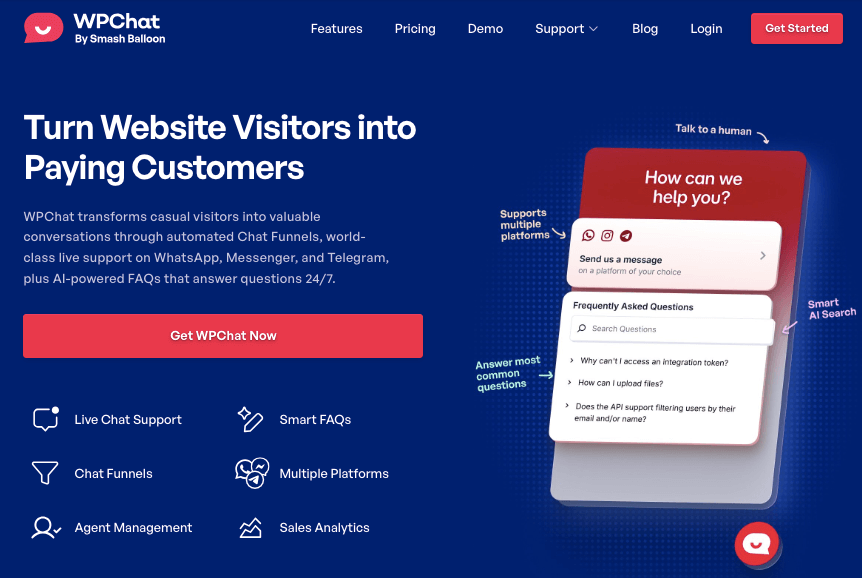
WPChat is an AI-powered WordPress chat plugin that automatically handles common customer support questions by connecting your website to WhatsApp, Messenger, Instagram, and Telegram.
It uses Smart FAQs powered by AI to provide instant answers 24/7, automated Chat Funnels to guide visitors proactively, and smart agent routing to ensure questions reach available team members.
This helps WordPress site owners dramatically reduce time spent on repetitive customer service tasks.
WPChat saves you time by:
• Automating responses to common questions with AI-powered Smart FAQs that understand user intent, not just exact keywords
• Providing 24/7 support even when you’re offline, eliminating the need to answer routine questions repeatedly
• Guiding visitors proactively with automated Chat Funnels that answer pre-sale questions before customers even ask
• Routing conversations intelligently to available team members with smart support routing
WPChat is developed by the team behind Smash Balloon, which powers over 1.75 million websites worldwide with reliable, user-friendly WordPress solutions.
The Real Cost of Manual Customer Support (Why This Matters)
How Much Time WordPress Site Owners Actually Spend on Support
Providing instant customer support is one of the biggest challenges for WordPress site owners and small businesses.
Your visitors no longer want to fill out contact forms or wait hours for a reply.
They expect quick answers, often within seconds, and if they don’t get them, they move on to someone else.
When I talk to WordPress site owners running e-commerce stores or membership sites, I consistently hear the same frustration. They’re answering identical questions day after day:
- “What’s your return policy?”
- “Do you ship internationally?”
- “How do I reset my password?”
- “When will my order arrive?”
- “What payment methods do you accept?”
Sound familiar?
I remember managing a membership site where I’d spend my Monday mornings answering email after email with nearly identical questions about billing and access issues.
By the time I finished, half my day was gone, and I hadn’t even touched the content creation and marketing work that actually grows a business.
The Hidden Costs Beyond Time
But the real damage goes deeper than just the hours you’re losing.
- Lost sales from slow response times: Every visitor who lands on your website with a question is an opportunity. If they can’t get an answer fast, they leave. And that potential sale probably goes straight to your competitor.
- Burnout from repetitive work: Answering the same question for the 47th time isn’t just boring…it’s soul-crushing. This kind of monotonous work drains your energy and enthusiasm, making it harder to provide genuinely great service when complex issues do arise.
- Inability to scale: As your business grows, so does your support volume. If you’re handling everything manually, you’re forced to choose between hiring expensive support staff or letting service quality decline. Neither option is ideal for a growing business.
- Missed opportunities for growth: Every hour spent copy-pasting return policy information is an hour you’re not spending on content creation, partnership development, or improving your products. Manual support keeps you stuck working in your business instead of on it.
Here’s a quick comparison of what this looks like in practice:
| Dimension | Manual Support | AI-Assisted Support with WPChat |
|---|---|---|
| Response Time | Hours or days | Instant (24/7) |
| Availability | Business hours only | Always available |
| Consistency | Varies by mood/fatigue | Identical every time |
| Scalability | Requires hiring more staff | Handles unlimited conversations |
| Pricing Model | Often per-agent or per-conversation | Flat annual pricing |
The bottom line?
Manual support is holding your business back in ways you might not even realize.
What Is AI-Powered Customer Support? (And How WPChat Works)
Let me break down what AI-powered customer support actually means, because there’s a lot of confusion around this term.
Traditional live chat solutions still rely on outdated on-site chat boxes that vanish the moment a visitor leaves your website.
You can respond instantly, but here’s the problem: most of these tools charge per seat or per conversation.
For small businesses, that quickly becomes unaffordable, especially as your team grows or you experience seasonal spikes in traffic.
WPChat takes a completely different approach.
Instead of trapping conversations in a browser window, WPChat connects your website directly to the messaging platforms your customers already use every day: WhatsApp, Messenger, Instagram, and Telegram.
When someone starts a chat, it opens in their preferred messaging app.
This means you can continue the conversation even after they close your website, just like chatting with a friend.
How WPChat’s AI Actually Learns Your Business
I’ve personally set up WPChat on multiple sites, and I’m always impressed by how straightforward the process is.
The setup takes under 5 minutes using WPChat’s simple 3-step wizard:
Step 1: Connect Your Number
From the WPChat setup wizard, you add your WhatsApp number (or connect Messenger, Instagram, or Telegram). No technical knowledge required.
Step 2: Choose a Theme
Pick a style that fits your brand. You can choose from Basic, Pastel, or Night themes.
Step 3: Set Its Visibility
Show your chat assistant across your entire site, or target it to appear only on specific pages, categories, tags, or custom post types.
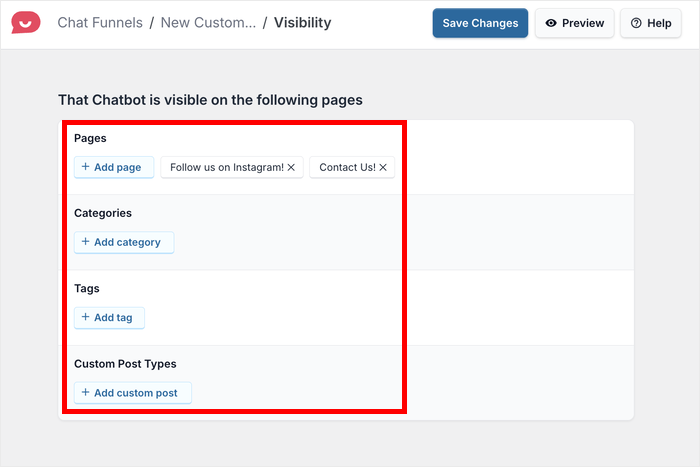
That’s all it takes. Your chat assistant is now live, ready to provide instant help to your customers.
Once it’s set up, here’s where the AI comes in:
- You add your FAQs
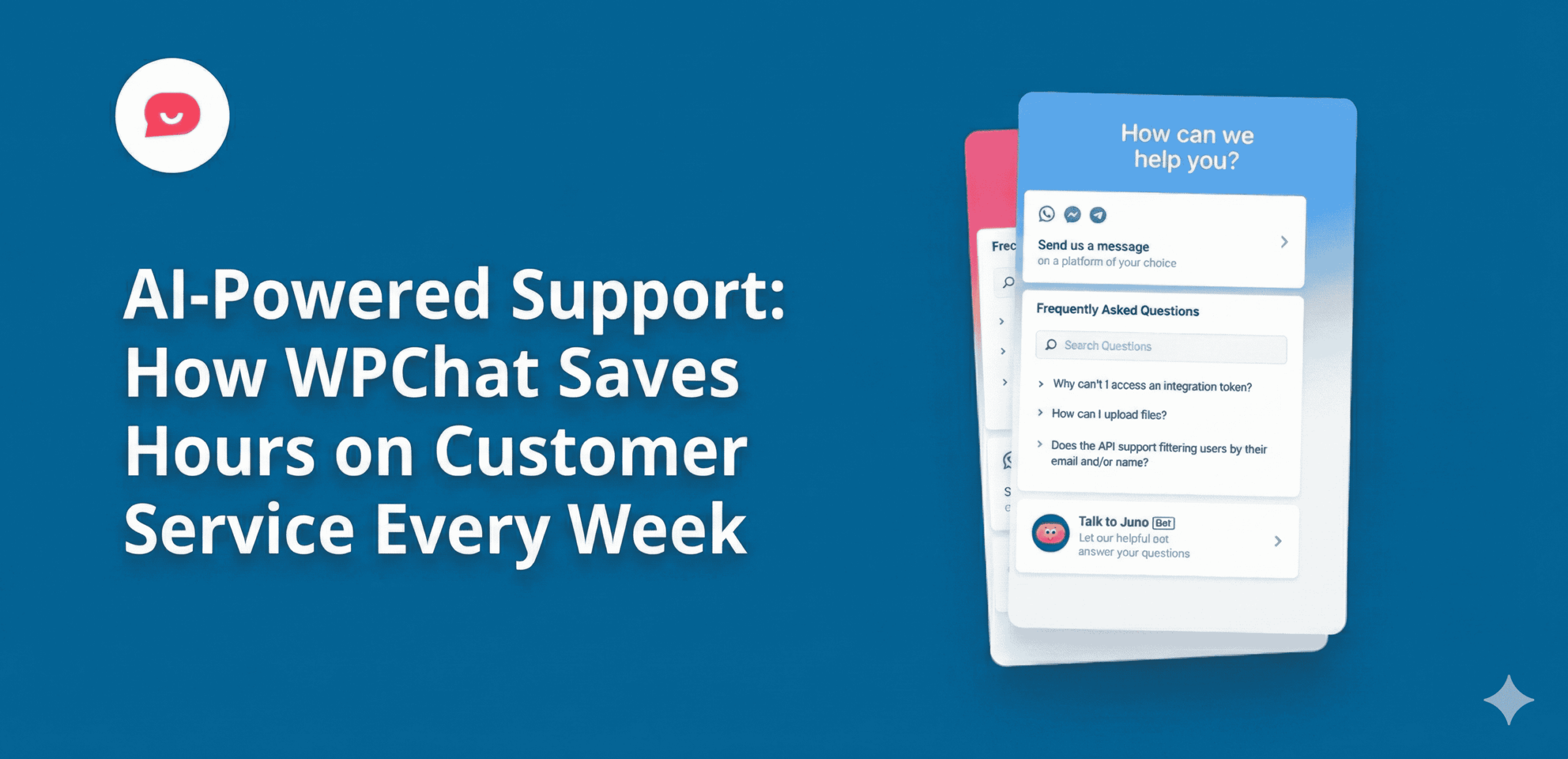
You simply type in your most common questions and answers. WPChat’s Smart FAQ system then uses AI behind the scenes to understand variations of those questions.
- The AI matches questions intelligently
When a customer types a question, the AI analyzes what they’re really asking and matches it to the most relevant FAQ, even if the phrasing is completely different from your exact FAQ title.
For example, if your FAQ says “What are your delivery timeframes?” but a customer types “How long until I get my stuff?”, WPChat’s AI is smart enough to recognize they’re asking about the same thing and shows them the right answer instantly.
- You refine based on analytics
WPChat’s built-in analytics show you which questions customers are asking most frequently, so you can add new FAQs to cover any gaps.
Why WPChat’s Messaging Platform Approach Is Different
Here’s what makes WPChat fundamentally different from traditional live chat:
- WhatsApp: The most popular messaging app in the world, with over 2 billion active users. In regions like Asia, Europe, Africa, and South America, it’s the primary way businesses communicate with customers.
- Instagram: One of the fastest-growing platforms for business messaging, with over 200 million users visiting at least one business profile every day. Customers already use Instagram to discover products, ask questions, and make purchase decisions.
- Messenger: With over 1 billion monthly active users, Facebook Messenger remains a key communication channel for businesses of all sizes. Many customers prefer using Messenger to chat with brands they already follow on Facebook.
- Telegram: Known for its speed, privacy, and simplicity, Telegram has over 1 billion active users worldwide. It’s especially popular among tech-savvy audiences and communities that value secure, instant communication.
This simple shift dramatically increases your response rate and helps you build real relationships with customers through the messaging platforms they already trust.
Here’s the comparison:
| Feature | Traditional Live Chat | WPChat |
|---|---|---|
| Conversation persistence | Lost when tab closes | Lives in their messaging app |
| Customer convenience | Must stay on website | Can reply anytime from phone |
| 24/7 availability | Only with live agents | Built-in with Smart FAQs |
| Pricing model | Per-agent or per-conversation | Flat annual pricing |
| Setup complexity | Often requires technical setup | Under 5 minutes, no coding |
| Platform | Proprietary chat window | WhatsApp, Messenger, Instagram, Telegram |
5 Ways WPChat Saves You Hours Every Week
Now let’s get into the specific mechanisms that help WPChat reclaim your time while still delivering excellent customer support.
1. Instant Answers to Repetitive Questions (No More Copy-Pasting)
Here’s a frustrating pattern I see all the time:
A WordPress site owner spends their morning answering emails.
Question 1: “What’s your return policy?”
Question 5: “What’s your return policy?”
Question 12: “What’s your return policy?”
By lunchtime, they’ve essentially copy-pasted the same answer a dozen times.
I’ve been there myself.
When I was managing an online course site, questions like “How do I access my course after purchase?”, “Do you offer refunds?”, and “What payment methods do you accept?” made up the majority of my support emails.
WPChat’s Smart FAQ system eliminates this time drain completely.
Here’s how it works:
Customers expect instant answers even outside business hours. WPChat’s Smart FAQ system automatically replies to common questions 24/7.
You can easily add FAQs for any topics your customers frequently ask.
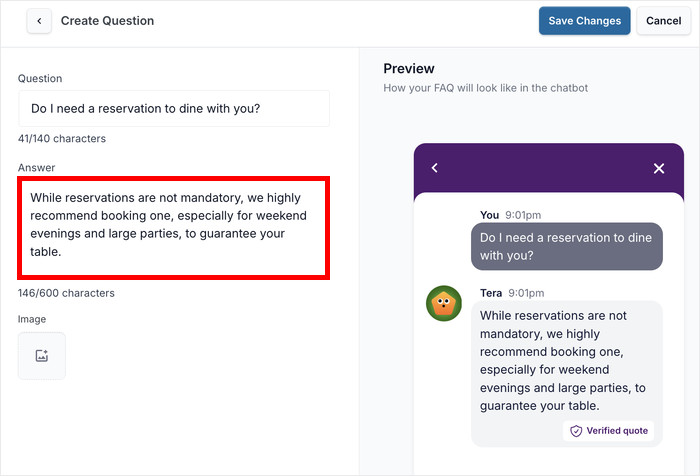
This means fewer repetitive questions for your team, which in turn means they get more time to focus on sales and complex inquiries.
For a detailed tutorial on setting this up, check out this article on how to add FAQ bot to your website.
2. 24/7 Support While You Sleep
One of the biggest challenges I faced running a membership site was dealing with international customers.
When I’d wake up in my place at 7 AM, I’d have a dozen overnight emails from customers in Australia, Singapore, and India asking questions that were 8-12 hours old.
By the time I responded, those customers had often already moved on to a competitor who could answer them immediately.
With WPChat’s Smart FAQ system working around the clock, your support never sleeps.
The AI-powered FAQs provide instant answers to common questions regardless of what time zone your customers are in, even at 3 AM when you’re sound asleep.
Think about what this means for your business:
- No more waking up to a full inbox of overnight questions
- No more guilt about customers waiting hours for simple answers
- No more lost sales because someone needed help outside your working hours
Instead of spending your first hour every morning clearing an inbox full of repetitive questions, you can start your day focusing on revenue-generating activities.
The best part?
Your FAQ library continues to work automatically while you focus on high-value tasks during your actual business hours.
3. Proactive Guidance with Chat Funnels (Answer Questions Before They’re Asked)
The most time-consuming support interactions are often the ones where you’re going back and forth trying to understand what the customer really needs.
WPChat’s Chat Funnels solve this by proactively guiding visitors through common scenarios with pre-built conversation flows.
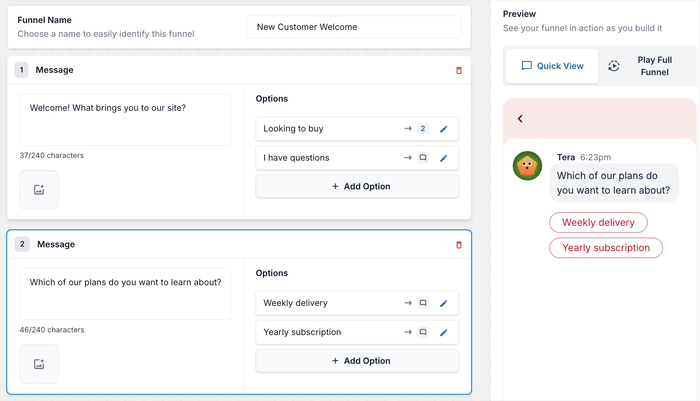
WPChat isn’t just for support. It’s built to drive conversions.
With Chat Funnels, you can design automated message flows that guide visitors through key moments of your sales process.
Think of Chat Funnels as your 24/7 sales assistant, always ready to start the right conversation at the right time. You can create funnels that:
- Greet new visitors and ask if they’d like help choosing a product
- Offer instant answers to pre-sales questions
- Suggest products, demos, or free trials
- Encourage visitors to complete checkout or book a call
Here’s a step-by-step tutorial on how to build your first chat funnel in WPChat.
4. Smart Agent Routing
Whether you’re a solo entrepreneur or managing a growing support team, WPChat keeps everything organized.
When I first started using team members for support, we’d constantly run into problems.
Two people would respond to the same customer.
Or worse, no one would respond because each person assumed someone else was handling it.
With WPChat Pro, you can add and manage multiple agents, assign availability hours, and let WPChat automatically route new chat requests to available team members.
Here’s how it works:
You can add your entire team with unlimited agent profiles.
Each team member gets their own profile with a name, photo, and contact details on WhatsApp, Telegram, Facebook Messenger, and Instagram, so customers know they’re talking to a real person, not a faceless company.
You can also easily set online and offline hours for each agent. This ensures that incoming chats are always routed to someone who is actively working and ready to help.
To keep things running smoothly, WPChat’s smart routing automatically distributes conversations among your available team members.
This ensures customers always reach the right person. No missed messages, no confusion.
See this post on how to add online chat to your website for more details.
5. Data-Driven Optimization
One of the biggest time wasters in customer support is not knowing what’s actually working.
You create FAQs, but you don’t know which ones customers actually find helpful.
You schedule team coverage, but you’re guessing at your busiest hours.
You create Chat Funnels, but you’re not sure which messages are converting.
WPChat Pro’s Analytics Dashboard eliminates this guesswork by showing you exactly what’s happening with your customer conversations. All inside your WordPress dashboard.
WPChat gives you clear insights into how your chats are performing.
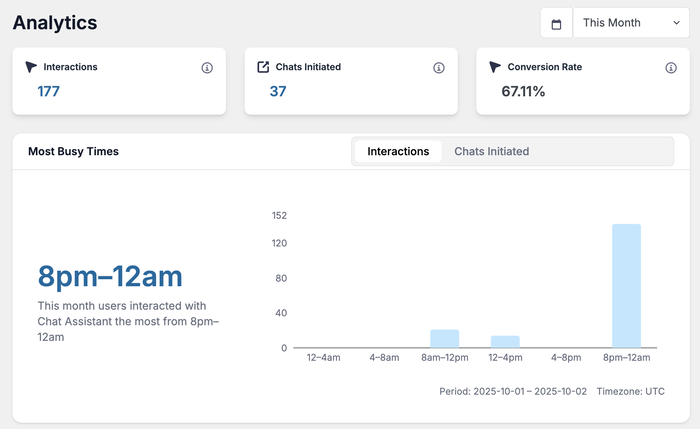
You can track:
- Total chat interactions and conversions – Know your support volume trends and how chat impacts sales
- Peak chat times and busiest days – Schedule agents when you actually need them
- Top FAQs that customers use most – Identify your most valuable content
- Chat Funnel performance – See where visitors drop off or convert with detailed metrics for each funnel
With this data, you can make smarter decisions:
- Improve FAQs based on what customers actually search for
- Refine chat funnels by identifying drop-off points
- Schedule agents more effectively to handle high-traffic hours
Instead of spending hours manually analyzing support patterns or making scheduling decisions based on gut feeling, you get instant insights that help you optimize everything.
For example, if the analytics show that 40% of your chats happen between 7-9 PM on weekdays, you can adjust your team schedule to ensure coverage during those peak hours, without paying for unnecessary coverage during slow periods.
In a nutshell, WPChat offers everything you need to measure and optimize your customer conversations for maximum impact.
What Types of Questions Can WPChat Handle?
Let me be transparent about what WPChat’s AI-powered features can and can’t do, because setting realistic expectations is important.
Questions WPChat Handles Exceptionally Well
WPChat’s Smart FAQs and Chat Funnels excel at:
• Informational questions about your products or services – “What features does the Pro plan include?”
• Policy questions – “What’s your return policy?” or “Do you ship internationally?”
• How-to questions covered in your content – “How do I reset my password?”
• Pricing and plan comparisons – “What’s the difference between Basic and Pro?”
• General troubleshooting – “My download link isn’t working”
• Pre-sales guidance – “Which product is right for my needs?”
The beauty of WPChat is that it filters out the routine noise, so when you do engage with a customer, it’s for meaningful, high-value interactions.
When You’ll Still Need Human Support
WPChat is intelligent, but it’s not magic. You’ll still need to handle:
• Account-specific issues – “Why was I charged twice?” requires looking up individual records
• Complex technical problems – Issues that require debugging or custom solutions
• Sensitive complaints or disputes – Situations requiring empathy and judgment calls
• Custom requests – “Can you create a special package for our enterprise needs?”
• Anything not covered in your FAQs – Questions about brand-new features or unique situations
What happens when a customer asks something not covered in your FAQ library?
WPChat can route the conversation to you or your available team members via WhatsApp, Messenger, Instagram, or Telegram.
This ensures no question goes unanswered: the AI handles what it can, and humans step in for everything else.
Frequently Asked Questions About AI-Powered Support with WPChat
Q: How much does WPChat cost?
WPChat offers simple, affordable annual plans starting at just $49/year for the Basic plan.
Unlike most chat tools that charge per agent or per conversation, WPChat’s flat-rate pricing means you can scale your support without worrying about escalating costs.
Q: Will WPChat work with my WordPress theme?
Yes. WPChat is built by the team behind Smash Balloon and designed to work seamlessly with all WordPress themes.
The chat assistant is fully customizable, so you can match it to your brand’s colors and style regardless of which theme you’re using.
Q: Can I customize how WPChat communicates with customers?
Absolutely. WPChat makes it easy to create a custom chat assistant that matches your brand perfectly. You can customize themes and color schemes, header text and greetings, chat icons and welcome messages, and visibility rules to control where your assistant appears.
Your FAQs and Chat Funnels are written entirely by you, so the communication style is 100% yours.
Q: What happens if WPChat doesn’t know the answer to a question?
If a customer asks something not covered in your FAQ library, WPChat can route the conversation to you or your available team members via WhatsApp, Messenger, Instagram, or Telegram.
Q: How long does it take to set up WPChat?
The initial setup takes under 5 minutes using the step-by-step wizard. You’ll connect your WhatsApp number, choose a theme, and set visibility preferences.
Adding your first batch of FAQs might take an additional 30-60 minutes depending on how many you create, but you’ll start saving time immediately.
Q: Does WPChat slow down my website?
No. WPChat is built by the same expert team that created Smash Balloon, known for creating lightweight, performance-optimized plugins. It’s designed to provide a fast experience without impacting your site’s speed or search engine rankings.
Getting Started: Your Next Steps with WPChat
If you’re spending hours each week answering the same customer questions, WPChat can help you reclaim that time starting today.
Here’s exactly what I recommend you do next:
Step 1: Get WPChat
Start with WPChat Pro if you want the full power of Chat Funnels, unlimited FAQs, team management, and analytics.
Step 2: Complete the 5-minute setup
Use the simple 3-step wizard to connect your WhatsApp number (or Messenger, Instagram, or Telegram) and customize your chat assistant’s appearance.
You’ll be live in under 5 minutes.
Step 3: Create your first 5 FAQs
Start with your absolute most common questions. Check your email inbox from the last two weeks and identify the top 5 questions you answered repeatedly.
Add those to WPChat’s FAQ system.
Step 4: Target your most important page
Use WPChat’s visibility rules to show your chat assistant on your highest-intent page, usually your pricing page, product pages, or checkout page.
Step 5: Check your analytics after one week
Review which FAQs are being viewed most often and what questions you’re still getting manually. Add new FAQs to close any gaps.
Ready to stop wasting hours on repetitive support and start focusing on growing your business?
Get started with WPChat Pro today and find out!
What’s the #1 repetitive question you’re tired of answering in your business?
Let me know in the comments below. I’d love to hear how WPChat could help automate your specific support challenges.