You’re standing in someone’s kitchen, walking a couple through a three-bedroom, and your phone buzzes in your pocket. Someone just filled out the inquiry form on a listing you posted last week.
You’ll get to it tonight. Probably around nine, after the last viewing.
By then they’ve messaged four other real estate agents.
I write about customer messaging for a living, and real estate is the clearest case I’ve come across of a category where the tool has to match how people actually work.
Agents aren’t at desks. They’re in cars, at showings, standing in driveways waiting for a client who’s running late. A contact form assumes someone is sitting in front of an inbox. Most days, nobody is.
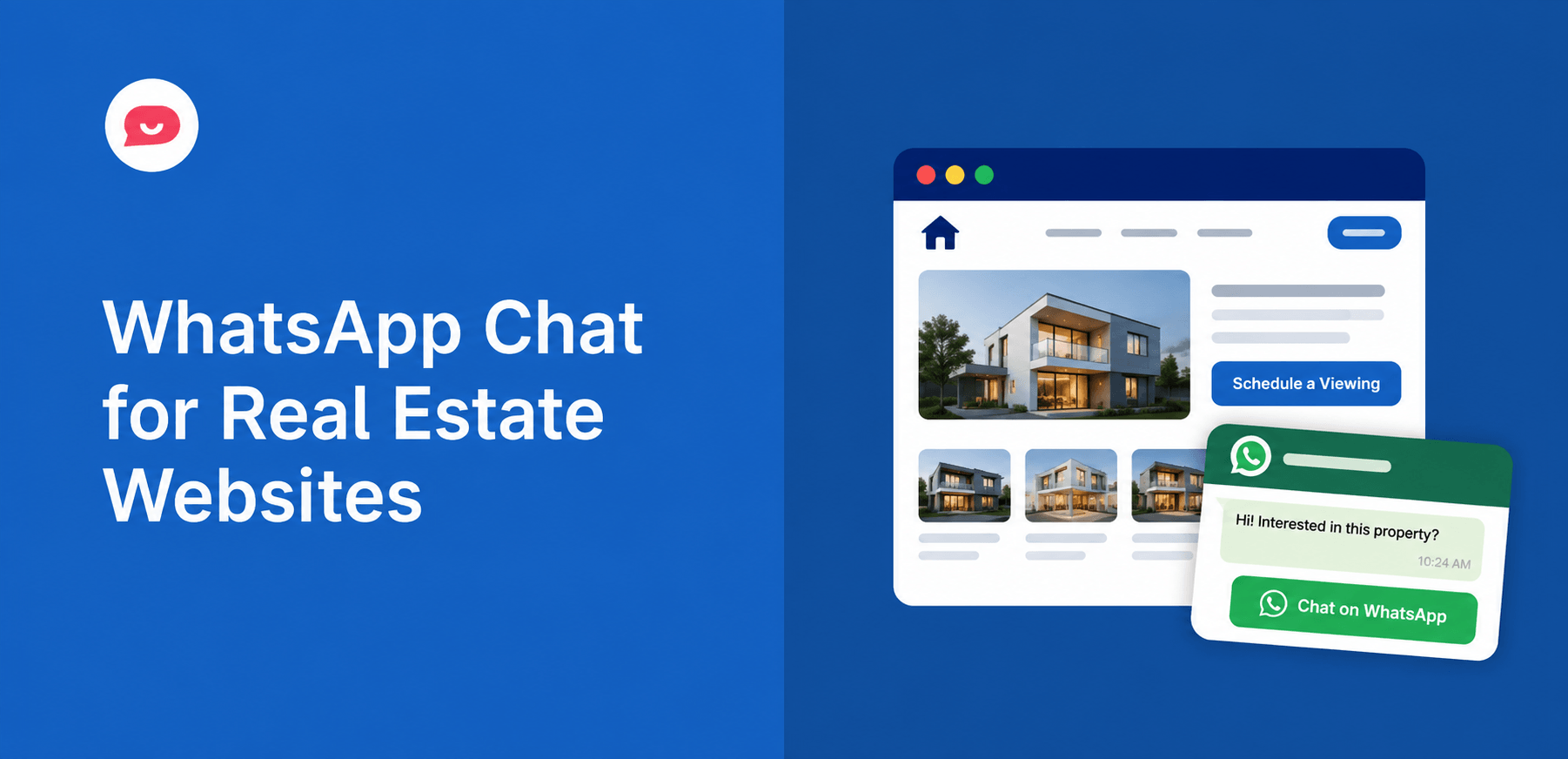
WPChat puts a click-to-WhatsApp button, plus Messenger, Telegram, and Instagram, directly on your listing pages. The inquiry lands on your phone as a WhatsApp message, in the same app you already check between appointments.
How Do I Add WhatsApp Chat to My Real Estate Website?
Install WPChat, connect your WhatsApp Business number through the setup wizard, and you have a click-to-chat button live on your site in about 5 minutes.
No developer, and no WhatsApp Business API application to file.
It works alongside Messenger, Telegram, and Instagram from the same widget, so a buyer relocating from another country reaches you on whichever app they already have open.
Here’s exactly how I’d set it up for a real estate site.
In This Article
- The Questions Buyers Ask Before They Book a Viewing
- Where to Place the Chat Widget on a Real Estate Site
- Setting Up WPChat for a Real Estate Site
- A Viewing Request Funnel You Can Copy
- Why WhatsApp Beats a Contact Form for Property Inquiries
- Routing Inquiries to the Right Agent
- WPChat Isn't an In-Dashboard Live Chat Tool
- FAQs on Using WhatsApp Chat for Real Estate
- Start Answering Property Inquiries Now
The Questions Buyers Ask Before They Book a Viewing
Property is the biggest purchase most people ever make, and almost nobody books a viewing without asking something first.
Before they’ll commit to a Saturday morning, they’re usually asking:
- Is this listing still available, or has it gone under offer?
- What are the monthly service charges or property taxes?
- Which school district is this in?
- Can I view it this weekend, or evenings only?
- Is the price negotiable?
- What’s the parking situation?
Most of these have a one-line answer you could give in ten seconds. None of them are worth a form submission and an overnight wait.
That gap is where the leads go.
The figure that gets quoted in every agent training is from the National Association of Realtors: 78% of buyers end up working with the first agent who responds.
The five-minute window is the one that decides it, and most agents miss it. Not because they don’t care, but because they’re mid-viewing with their hands full.
Where to Place the Chat Widget on a Real Estate Site
Placement matters as much as whether the widget exists at all. I’d put it in four spots, each catching a different kind of question:
- Individual listing pages. This is where the decision happens and where the widget should work hardest. Someone looking at one specific property has one specific question.
- Search and results pages. Buyers here are comparing, not committed. A quick “can you send me anything similar under 400k?” is a lead you’d otherwise never see.
- Agent profile pages. People choose agents, not just properties. A direct WhatsApp button on your bio page catches the seller who’s deciding who to list with.
- Homepage. For visitors arriving from a portal, a referral, or a sign in a window, with no particular property in mind.
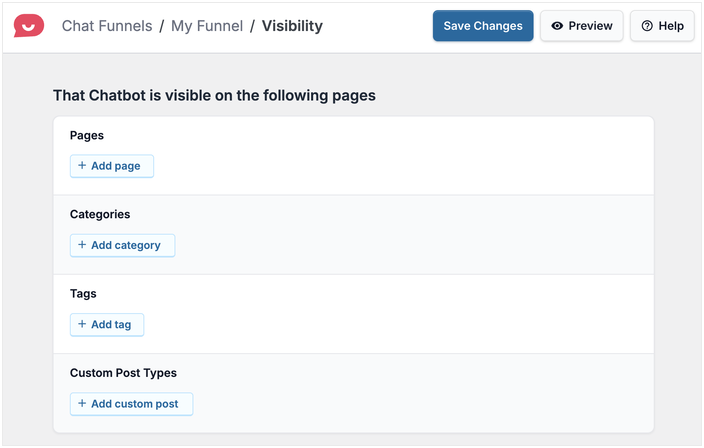
WPChat’s chat funnels have their own visibility settings, so you can run a different funnel on each of these page types. You choose the pages, categories, tags, or custom post types where a funnel appears, which means a listing page can open a flow about that kind of property while a results page opens one that helps narrow the search.
I’ve written a fuller breakdown of where to place a WhatsApp widget if you want to go deeper than real estate specifically.
Add WhatsApp Chat to Your Listing Pages
Answer listing questions on WhatsApp, Messenger, Telegram, or Instagram, all from one WordPress plugin. Try it risk-free with the 14-day money-back guarantee.
Add WPChat to My SiteSetting Up WPChat for a Real Estate Site
Here’s what I’d actually do, in order.
1. Install WPChat and connect your WhatsApp Business number.
Use a business number rather than your personal one. Agents tend to hesitate here, and it’s a fair hesitation, since a phone number on a public listing page never really goes away. You can get a WhatsApp Business number without using your personal phone, which solves it before it becomes a problem.
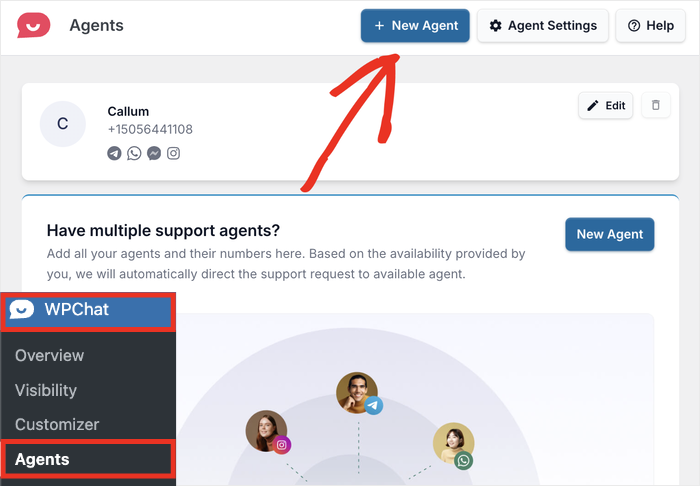
2. Add your agents.
WPChat supports multiple agents on every plan, with 5 on Basic and 10 on Plus. Each one gets their own name, photo, and contact details, so a visitor picks a person from the widget instead of landing in a general queue.
Under Agent Settings you’ll also find Timings, which control when each agent handles requests, along with Off-Hours Rules and per-platform toggles for WhatsApp, Telegram, Messenger, and Instagram.
3. Build a funnel for each page type, not for each listing.
Worried this means a custom flow for every property? It doesn’t.
Build one funnel for listing pages and one for your valuations or sellers page, then set each funnel’s visibility to the pages, categories, or post types it belongs on. Two funnels cover most brokerages.
Your widget’s header text is set once in the Customizer and applies site-wide, so treat that as your standing message for visitors and let the funnels carry anything page-specific.
4. Set your availability hours honestly.
This is the one people skip, and it’s the one I’d argue matters most in real estate.
If you’re showing properties until seven, set availability hours so the widget shows an honest offline status with a message capture instead of implying an instant reply that isn’t coming.
A buyer who knows they’ll hear back at eight tomorrow morning waits. A buyer who expects a reply in two minutes and gets nothing messages someone else.
Pair it with a WhatsApp auto-reply so the buyer gets an instant acknowledgment even at eleven at night.
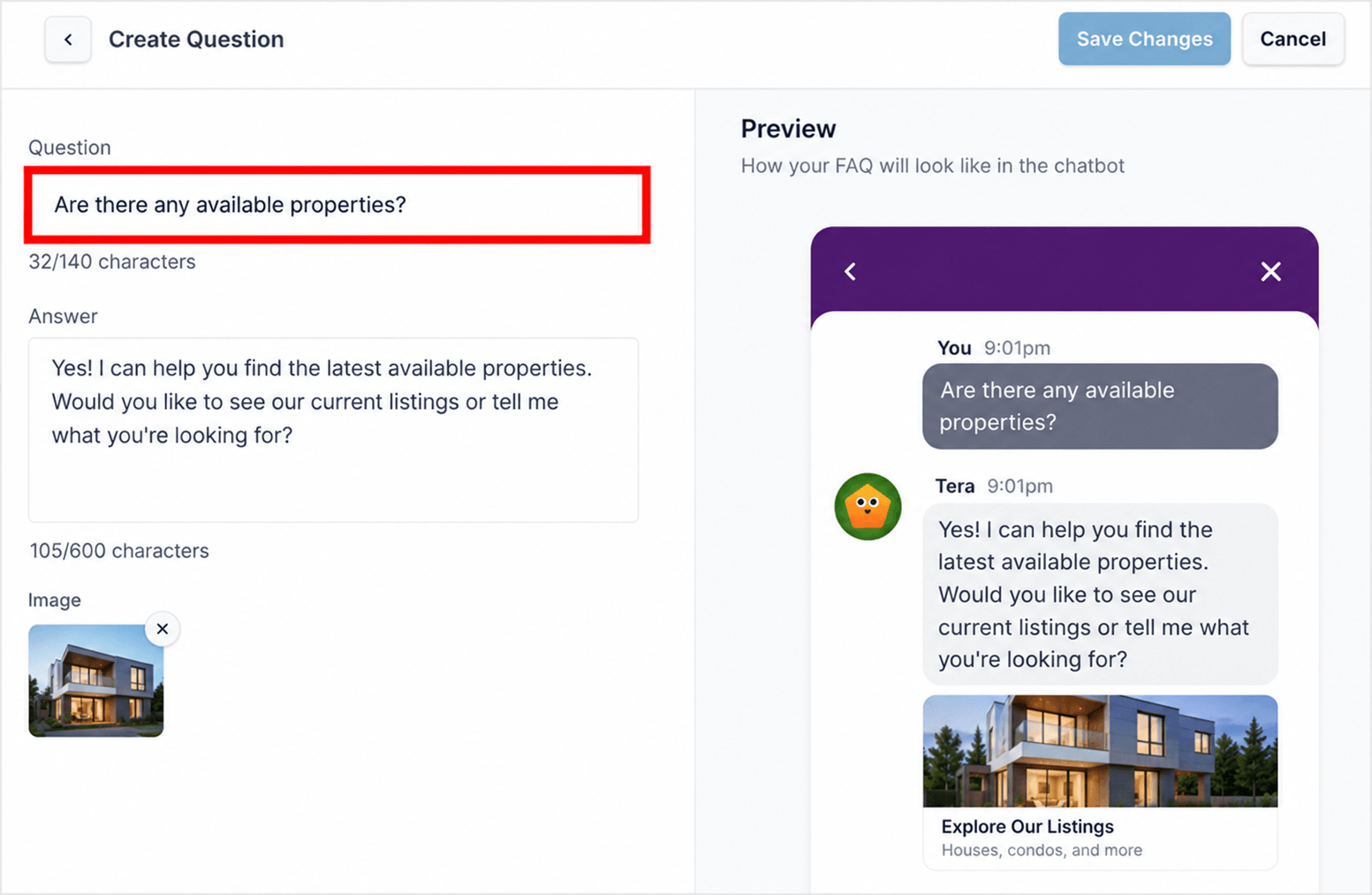
5. Build FAQ answers for your repeat questions.
Service charges, viewing availability, financing basics, the ten questions you answer every single week. An FAQ bot answers those on the page, instantly, without anyone typing them for the fortieth time.
A Viewing Request Funnel You Can Copy
Here’s a funnel structure I’d copy directly onto a listing page:
Bot: “Hi! Interested in this property? I can help.”
Visitor picks one: Book a viewing / Is it still available? / Price and fees / Speak to an agent
Each option returns a specific answer instead of “someone will be in touch.”
The viewing option collects a name, a preferred day, and a phone number, then hands the visitor off into a real WhatsApp conversation with whichever agent is on shift.
What I’ve noticed about funnels like this: the automation isn’t really the point.
The point is that the same six questions get the same accurate answer at eleven at night on a Sunday, when you’re asleep and a buyer is scrolling listings in bed. That’s when a lot of property browsing actually happens.
The full walkthrough is in my guide to building a chat funnel in WPChat.
Why WhatsApp Beats a Contact Form for Property Inquiries
Contact Form vs. Live Chat Dashboard vs. Click-to-Chat
Here’s how the three options actually compare for a real estate site, on the four things that decide whether an inquiry turns into a viewing.
| Contact form | In-dashboard live chat | Click-to-chat with WPChat ⭐ Recommended | |
|---|---|---|---|
| How fast does a buyer get an answer? | ❌ Hours, often overnight. The reply lands in an inbox they’ve already moved on from. | ⚠️ Fast, but only while someone is logged in and watching the queue. | ✅ Arrives as a WhatsApp message on the phone that’s already in your pocket. |
| Does someone have to be at a desk? | ⚠️ Effectively yes. Somebody has to work the inbox. | ❌ Yes. The dashboard has to be open and staffed to be worth anything. | ✅ No. Agents answer from their own phones between viewings. |
| What happens after the visitor leaves your site? | ❌ The thread dies with the tab. Any follow-up starts cold. | ❌ The chat window closes and the session ends with it. | ✅ The WhatsApp thread stays in their phone, so following up is a reply, not a cold call. |
| What does it cost as your team grows? | ✅ Usually free, already built into your theme or form plugin. | ⚠️ Typically billed per agent per month, so the cost climbs every time you hire. | ✅ Flat annual license from $49/yr, with agents included. |
| Best for | Low-volume sites where nobody expects a fast reply. | Teams with someone staffing a queue during set hours. | Agents who work from their phone and need the inquiry to reach them wherever they are. |
For a long time the assumption was that a contact form and a portal inbox covered it. For a purchase this size, they don’t.
If you have someone sitting at a desk all day whose job is to watch a queue, a live chat dashboard genuinely works, and I’d tell you to use one.
Most brokerages don’t have that person.
If your agents are out showing properties for most of the week, the tool has to reach them on the phone they’re already carrying, which is the whole reason click-to-chat fits real estate better than it fits a lot of other industries.
WhatsApp has more than 2 billion users worldwide, and it’s the default messaging app across Latin America, most of Europe, the Middle East, and large parts of Asia and Africa.
Those are the same markets where cross-border property buying is most common. A buyer in Dubai looking at a flat in Lisbon already has WhatsApp open.
Messages there get read within minutes, because it’s the same app people use to text their family. A form submission sitting in an inbox for fifteen hours is a lead that already picked somebody else.
The thread also survives the visit. A contact form dies the moment the tab closes. A WhatsApp conversation is still sitting in someone’s phone the next morning, which is a large part of why click-to-chat tends to capture leads that a form quietly loses.
There’s a follow-up advantage too.
When a property comes back on the market or a similar listing appears, you already have an open thread with someone who asked about it. No cold call. No “just following up on your inquiry from March” email that goes straight to promotions.
Routing Inquiries to the Right Agent
Real estate is where multi-agent setup stops being a nice extra and starts being the thing that makes this work.
Listings are usually split by agent, by neighborhood, or by whether it’s a sale or a rental. If every inquiry lands with one person who then forwards it on, you’ve reintroduced the delay you were trying to remove.
WPChat handles this by schedule rather than by listing. Each agent gets their own name, photo, and contact details, and Agent Settings let you set Timings for when that agent handles requests, plus Off-Hours Rules for everything outside them. Whoever is on shift picks up the conversation, on their own WhatsApp, on their own phone.
The per-listing part happens one level up, in your funnels. Because funnel visibility is set by page, category, tag, or post type, a rental listing can run a different qualifying flow than a page aimed at sellers. By the time someone taps through to a real conversation, the funnel has already worked out what they want.
For a small brokerage, that combination is the difference between a chat widget the team actually uses and one that quietly goes unanswered because it was somebody else’s job to check it.
WPChat Isn’t an In-Dashboard Live Chat Tool
The plain version: WPChat takes a visitor from your real estate site into a real conversation in one click, on WhatsApp, Messenger, Telegram, or Instagram. No dashboard to manage.
If you’ve shopped for chat tools before, you’ve seen the live chat platforms. A window opens on your site, and your team answers from a dashboard behind another login.
WPChat isn’t that. The conversation happens where your customer already is, on the messaging app they already use, not in a hosted console somebody has to remember to check between showings. If you spend four days a week away from a desk, that difference decides whether a chat tool gets used at all or quietly becomes another tab nobody opens.
It also means no per-agent monthly fee, which matters when your team grows by two people every spring.
Already running a chat tool or a portal widget? Switching isn’t the rebuild it sounds like. WPChat is a WordPress plugin, not a hosted platform, so it installs alongside whatever else is already on the site.
WPChat is built by the team behind Smash Balloon, trusted across more than 1.75 million WordPress sites. That’s not a real estate specific number, but it’s the support infrastructure behind the plugin you’re putting on your listing pages.
If you want the deeper comparison, I’ve laid out WhatsApp versus live chat in full.
FAQs on Using WhatsApp Chat for Real Estate
Can I use WPChat if my listings come from an IDX or MLS feed?
Yes. WPChat sits on top of your WordPress pages and isn’t tied to where your listing data comes from. Whether properties are pulled in through an IDX plugin, an MLS feed, or entered manually, the chat widget works the same way, and funnel visibility can still be set by page, category, or post type.
Do I need a separate phone number for each agent?
Each agent needs their own WhatsApp number, since WhatsApp ties an account to a number. Basic supports up to 5 agents and Plus supports up to 10, each with their own name, photo, and contact details, so buyers can pick the right person before the conversation starts.
What happens to inquiries that come in overnight?
Set availability hours and the widget shows an honest offline status outside your working hours, with a message capture so the inquiry still reaches you. Off-Hours Rules handle what happens when no agent is on shift, and the conversation stays in the WhatsApp thread, so you pick it up the next morning without anything getting lost.
Will a chat widget slow down my listing pages?
WPChat loads asynchronously, which means the widget loads after your page content rather than blocking it. That matters on property pages carrying twenty high-resolution photos, where every extra blocking script costs you.
Is this GDPR compliant if I have buyers in the EU?
Yes, GDPR compliance is included on every plan. Because the conversation moves to WhatsApp rather than a hosted chat console, you’re not accumulating visitor chat transcripts on a third party’s servers.
Start Answering Property Inquiries Now
The agents winning listings right now aren’t necessarily the ones with the best photography or the biggest portal spend. Often they’re just the ones who answered first.
A click-to-WhatsApp button on your listing pages closes most of the gap between an inquiry arriving and you seeing it, because it arrives in the app that’s already in your pocket. Setup takes about 5 minutes, your agents answer from their own phones, and there’s no dashboard for anyone to forget to check.
- Connect WhatsApp, Messenger, Telegram, and Instagram from one widget
- Cover evenings and weekends with agent timings and off-hours rules
- Answer repeat listing questions automatically with FAQs and chat funnels
Be the Agent Who Answers First
Put a WhatsApp button on your listing pages and take inquiries from the phone that’s already in your pocket. Backed by a 14-day money-back guarantee.
Add WPChat to My Real Estate Site