Most marketing experts will tell you that building a massive email list is the only way to grow, but a tiny messaging list will actually outperform it.
When people open their phone’s messaging apps, they expect to talk to real humans instead of reading boring corporate newsletters.
Trying to force mobile visitors to fill out long, complicated lead capture forms is a quick way to lose their interest completely.
If you want to fix this drop-off rate, having WhatsApp chat funnels explained (with real funnel examples) is the absolute best place to start.
I have personally tested these direct messaging strategies to connect with users right on their phones, and the engagement rates are incredible.
In this guide, I will walk you through exactly how to set up your own automated chat sequences to naturally drive more sales.
- What Is a WhatsApp Chat Funnel? (Quick Answer)
- How Does a WhatsApp Chat Funnel Work?
- Why Use a WhatsApp Chat Funnel on Your WordPress Site?
- 4 Types of WhatsApp Chat Funnels (And When to Use Each)
- 3 Real WhatsApp Chat Funnel Examples (Step-by-Step)
- Easiest Way to Set Up a WhatsApp Chat Funnel in WordPress (Using WPChat)
- WhatsApp Chat Funnel Best Practices (Do's and Don'ts)
- Conclusion — Your Next Step to Building a WhatsApp Chat Funnel
What Is a WhatsApp Chat Funnel? (Quick Answer)
A WhatsApp chat funnel is an automated conversation that you can show to website visitors.
It uses pre-written messages and clickable replies to guide visitors towards a goal, like booking a call, buying something, or giving you their contact info.
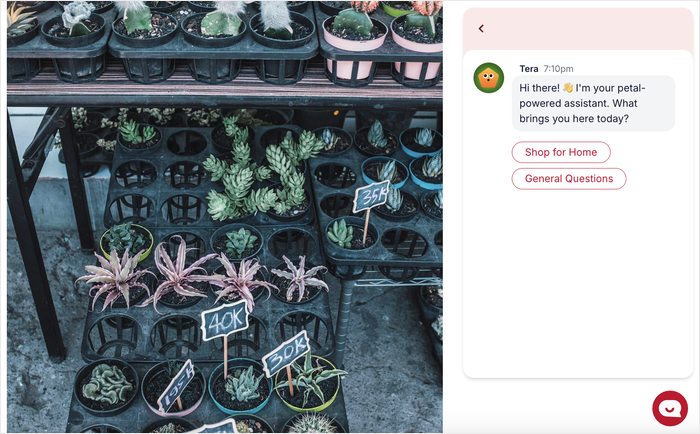
This all runs on a chatbot, software that automatically sends and receives messages without any human involvement.
What you get is a “conversational sales funnel.” Instead of making visitors scroll endlessly on a landing page and fill out a form, you guide them through a step-by-step chat that feels much more personal.
Think of a traditional landing page as a brochure dropped on a doorstep.
A WhatsApp chat funnel, though, is more like a helpful staff member answering the door, asking what you need, and personally showing you where to go.
WhatsApp Chat Funnel vs. Regular Messaging: What’s the Difference?
Both involve WhatsApp, but how they work behind the scenes is completely different. Here’s a quick side-by-side comparison:
| Feature | Regular WhatsApp Messaging | WhatsApp Chat Funnel |
|---|---|---|
| Who sends messages | A real person, manually | A chatbot, automatically |
| Response time | Depends on when you’re online | Instant, 24/7 |
| Scalability | Limited — one conversation at a time | Unlimited — handles thousands simultaneously |
| Automation | None | Fully automated |
| Lead capture capability | Manual and inconsistent | Built-in, inside the conversation |
| Consistency | Varies by person and mood | Always says the same thing, perfectly |
As you can see, regular WhatsApp messaging is great for one-on-one chats but it doesn’t scale. A WhatsApp chat funnel does all the heavy lifting for you, automatically.
How Does a WhatsApp Chat Funnel Work?
Understanding how a WhatsApp chat funnel works under the hood makes it much easier to build one.
To make this as beginner-friendly as possible, I’ll be using WPChat — a WordPress plugin that lets you add a WhatsApp chat button and interactive chat funnels to your website.
Here’s the exact sequence of events every time a visitor enters your funnel:
- A visitor lands on your website and sees a WhatsApp chat widget.
- They click it, which triggers the first message in your sequence.
- The visitor sees pre-written reply options: simple buttons they can tap to respond.
- Their choice routes them to the next message in the conversation, based on the reply they selected.
- The funnel ends when the goal is reached and the visitor has the information they need
- Your visitor can contact you on WhatsApp to finalize the booking, purchase, or confirm details.
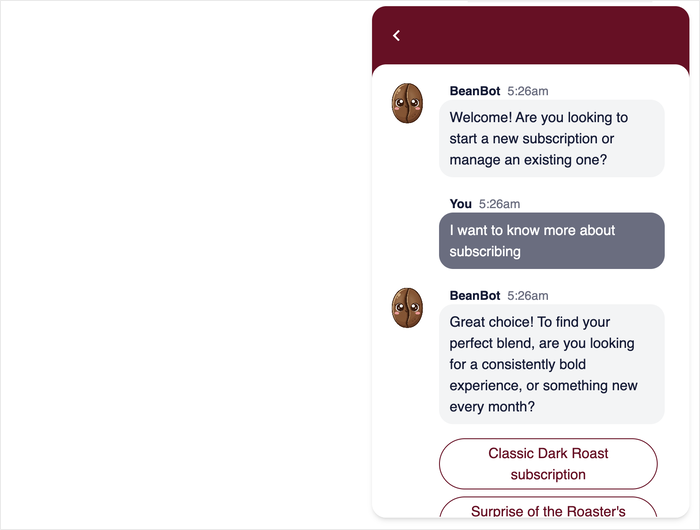
That’s the whole engine. You write the messages and reply options once, and WPChat handles the rest automatically.
The Conversation Flow — How the Chatbot Guides Visitors
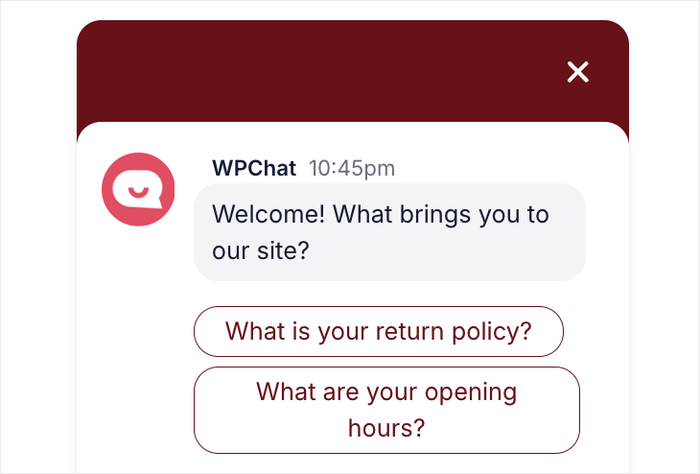
Once a visitor enters your funnel, the chatbot takes over and guides them through a branching conversation.
Think of it like following a recipe that has two versions — if you’re dairy-free, you take the left path; if you’re not, you take the right. You wrote both paths in advance.
Here’s a simple example of how a branching flow looks in practice:
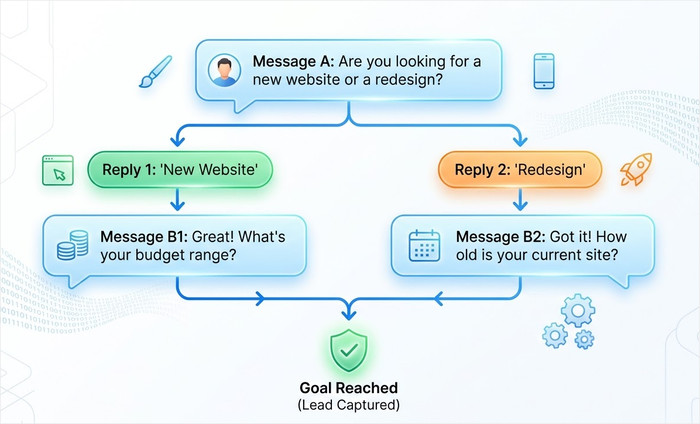
You can learn more about setting up the button that starts this whole flow in our guide on how to add a WhatsApp chat widget to your website.
The Goal: What Happens at the End of the Funnel
Every funnel needs a finish line — a specific outcome you want to reach. In WPChat, you define this goal inside the funnel builder so the conversation always moves toward it.
Here are the most common funnel goals you can set:
- Lead Capture: The visitor shares their contact info with you using WhatsApp.
- Product Page Click: The visitor has learned enough about the product to make a decision to buy.
- Call Booking: The visitor talks with you on WhatsApp to book an appointment.
- Support Resolution: The visitor gets a pre-written answer to their question, and the conversation ends.
The beauty of defining a clear goal before you build is that every message you write has a job to do: move the visitor one step closer to that finish line.
Why Use a WhatsApp Chat Funnel on Your WordPress Site?
A WhatsApp chat funnel is one of the best ways to generate leads, engage visitors, and reduce load on your support team.
Studies have shown that WhatsApp messages achieve open rates of around 98%, compared to roughly 20% for email.
This means nearly every message you send actually gets read. All these numbers are hard to ignore, especially for a small business where every lead counts.
Here’s why WhatsApp chat funnels specifically deserve a place on your WordPress site:
- With over 2 billion active WhatsApp users globally, you’re not asking visitors to sign up for a new platform or download a new app.
- Once your automated WhatsApp funnel is set up in WPChat, it runs completely on its own — no extra staff or manual replies needed.
- Instead of sending visitors to a separate form they may never complete, this sends them to WhatsApp, where you automatically get their phone number.
- A single funnel built in WPChat can handle thousands of conversations simultaneously, without any additional cost or effort on your part.
Note: If you’re interested in getting even more out of WhatsApp for your business, take a look at our complete guide to WhatsApp marketing.
4 Types of WhatsApp Chat Funnels (And When to Use Each)
Not all WhatsApp chat funnels are built the same way — and that’s actually a good thing.
Depending on what your business needs, there’s a specific funnel type designed to get you the best results.
Here’s a quick overview of the four main types before we dive into each one:
| Funnel Type | Primary Goal | Best For | Key Feature Needed |
|---|---|---|---|
| Lead Generation | Capture contact details | Service businesses, bloggers | Question branching + contact capture |
| Question branching + contact capture | Answer common questions | eCommerce stores, service providers | FAQ options + human handoff |
| Sales & Product Discovery | Recommend products and drive purchases | WooCommerce store owners | Product links + branching replies |
| Event Registration & Booking | Collect bookings or registrations | Coaches, consultants, local businesses | Booking link delivery |
Now let’s look at each one in more detail.
Lead Generation Funnel
A lead generation funnel is designed to do one thing: turn an anonymous visitor into a known contact. The conversation flow typically looks like this:
- Greet the visitor and introduce yourself
- Ask a qualifying question (“What are you looking for today?”)
- Follow up with a second qualifier to understand their needs
- Collect their name and contact details
- Deliver a lead magnet (like a free guide or discount) or confirm that someone will follow up
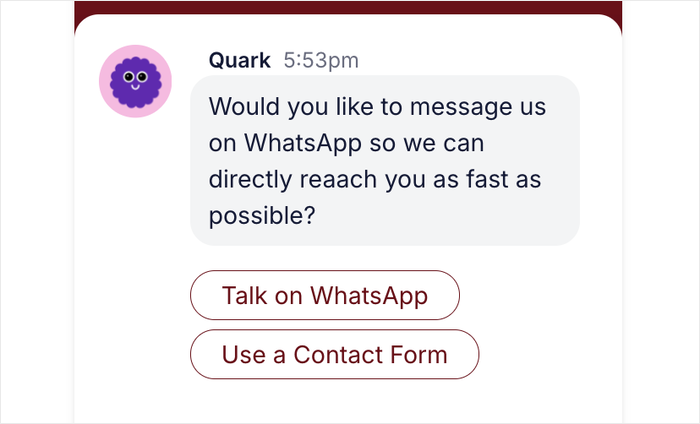
This type of funnel works especially well for service businesses like freelancers, consultants, and agencies, as well as bloggers.
Customer Support Funnel
A customer support funnel helps visitors find answers to their most common questions — without you having to be online to respond. The flow works like this:
- The visitor arrives with a question
- The chatbot presents a list of common topics (“Shipping / Returns / My Order / Something Else”)
- The visitor selects their issue from the reply options
- They receive a pre-written answer instantly
- If the answer doesn’t help, they’re offered the option to connect with a human agent.
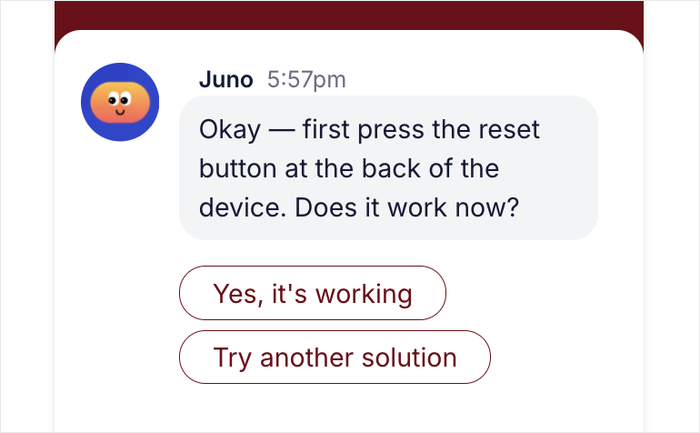
This is one of WPChat’s core use cases, and it’s easy to see why. For small business owners, handling the same support questions repeatedly is one of the biggest time drains there is.
A customer support funnel handles those repetitive tickets automatically, freeing you up to focus on work that actually needs your attention.
Sales & Product Discovery Funnel
Instead of leaving visitors to browse on their own and hope they find the right product, the chatbot asks the right questions and guides them directly to what they need.
The flow typically looks like this:
- Visitor lands on a product page
- Chatbot asks “What are you trying to solve today?”
- Based on their reply, the chatbot asks a follow-up question to narrow down the options
- The visitor receives a specific product recommendation with a direct purchase link
- They’re offered the chance to ask more questions or go straight to checkout
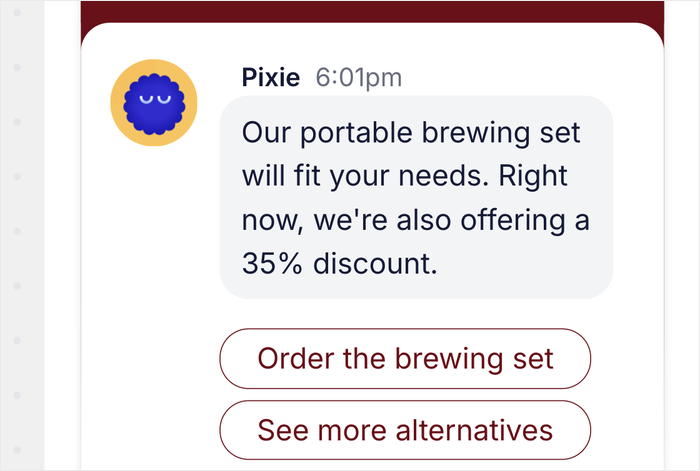
This type of funnel is a natural fit for WooCommerce store owners who want to give every visitor a guided shopping experience.
Event Registration & Booking Funnel
An event registration and booking funnel makes it easy for interested visitors to sign up for a webinar, register for a local event, or book a one-on-one appointment.
The flow is typically short and focused:
- Visitor expresses interest in an event or service
- Chatbot asks for their preference (date, time, or event type)
- Visitor receives a direct booking link or a confirmation message with next steps
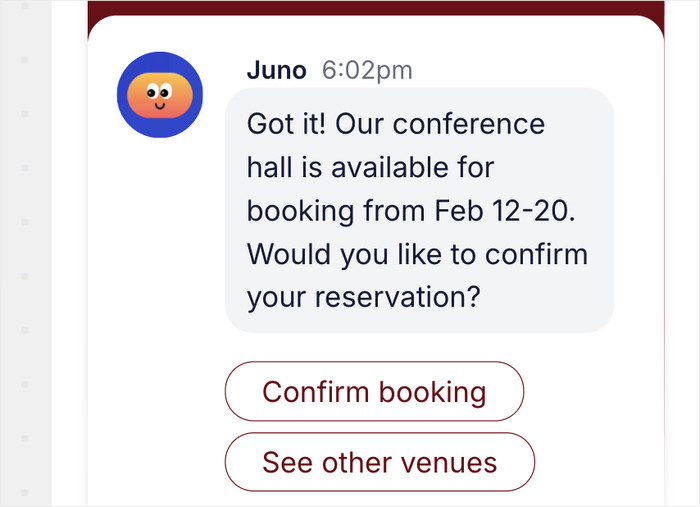
This funnel type works brilliantly for coaches, consultants, therapists, and anyone whose business runs on appointments.
Because the flow is short and the goal is crystal clear, visitors move from interest to booked in just a few taps.
3 Real WhatsApp Chat Funnel Examples (Step-by-Step)
To show you exactly how these funnels work, I’ve mapped out three real-world scenarios you can replicate on your own site.
I’ve written out each funnel as a full conversation transcript, exactly as a visitor would experience it.
Example 1 — The ‘Free Consultation’ Lead Gen Funnel (For Service Businesses)
Scenario: A visitor lands on a freelance web designer’s homepage. The WPChat button appears in the bottom corner. They click it, and the funnel begins.
🤖 Bot: Hey there! 👋 Thanks for stopping by. I help businesses get online with beautiful, custom websites. Are you looking for…
- 💬 A brand new website
- 💬 A redesign of an existing site
👤 Visitor: Taps “A brand new website”
🤖 Bot: Exciting! A new website is a big step. 🎉 To point you in the right direction, what’s your approximate budget for this project?
- 💬 Under 1,000 USD
- 💬 Over 1,000 USD
👤 Visitor: Taps “Under 1,000 USD”
🤖 Bot: That’s a great budget to work with! Do you want to see examples of website templates, or would you like to chat with a developer and confirm your details?
- 💬 See website templates
- 💬 Chat with a developer
👤 Visitor: Taps “chat with a developer”
Here’s what’s happening behind the scenes in WPChat…
Each reply button (“A brand new website” / “A redesign”) is connected to a separate next message, creating two distinct branches.
The budget question makes sure the visitor already knows their budget and project type before they even say hello.
When they finally chat with a developer, they know what they want, what it can cost, and you get their phone number to reach them in the future.
Example 2 — The ‘Product Recommender’ Sales Funnel (For WooCommerce Stores)
Scenario: A visitor is browsing an online supplement store. They’ve been on the product page for 30 seconds, and the WPChat pop-up appears.
🤖 Bot: Hi! 👋 Not sure which supplement is right for you? I can help you find the perfect match in just 2 questions. Ready?
- 💬 Let’s go!
- 💬 Talk to support
👤 Visitor: Taps “Let’s go!”
🤖 Bot: Great! First up — what’s your main health goal right now?
- 💬 Build muscle
- 💬 Lose weight
👤 Visitor: Taps “Build muscle”
🤖 Bot: Nice goal! 💪 Are you just getting started with supplements, or would you call yourself experienced?
- 💬 Just starting out
- 💬 I know my stuff
👤 Visitor: Taps “Just starting out”
🤖 Bot: Perfect — for beginners focused on building muscle, our Starter Whey Protein Bundle is the most popular choice. It’s simple, effective, and easy on the stomach.
- 💬 Tell me more
- 💬 I want to see alternatives
👤 Visitor: Taps “Tell me more”
🤖 Bot: Great choice to do your research! 🙌 The Starter Whey Bundle includes a 30-day supply, mixes easily with water or milk, and has over 400 five-star reviews. Still have questions?
- 💬 I’m ready to buy!
- 💬 Talk to a human
👤 Visitor: Taps “I’m ready to buy!”
🤖 Bot: Awesome! Here’s your direct link to grab the bundle 👉 [link URL here]. Thanks for chatting — enjoy your first order! 🎉
A quick note on cart abandonment…
Research consistently shows that approximately 70.22% of online shopping carts are abandoned before purchase.
A funnel like this one directly addresses that problem by engaging hesitant buyers before they leave the page.
Example 3 — The ‘Instant FAQ’ Customer Support Funnel (For Any Business)
Scenario: It’s 11pm. A visitor lands on a small business website with a question about their order. No one is online — but the WPChat funnel is.
🤖 Bot: Hi! 👋 I’m here to help — even outside business hours. What do you need help with today?
- 💬 Returns & refunds
- 💬 Something else
👤 Visitor: Taps “Returns & refunds”
🤖 Bot: No problem! Here’s our return policy: We accept returns within 30 days of purchase. Items must be unused and in original packaging. To start a return, email [email protected] with your order number.
Did that answer your question?
- 💬 Yes, thanks!
- 💬 I need more help
👤 Visitor: Taps “I need more help”
🤖 Bot: Got it — no worries! You can drop us a message on WhatsApp, and a real human will get back to you first thing in the morning. 😊
- 💬 Talk to us on WhatsApp
👤 Visitor: Taps “Talk to us on WhatsApp”
With that, WPChat will redirect the visitor to WhatsApp, where they can explain their issue. Once it’s office hours, you or your support staff can respond with the solution.
For a small business owner who can’t afford to staff a support desk around the clock, that kind of coverage is invaluable.
Every visitor gets an instant, helpful response no matter what time they show up.
Easiest Way to Set Up a WhatsApp Chat Funnel in WordPress (Using WPChat)
The easiest way to set up a WhatsApp chat funnel in WordPress is by using WPChat — a plugin built specifically with businesses in mind.
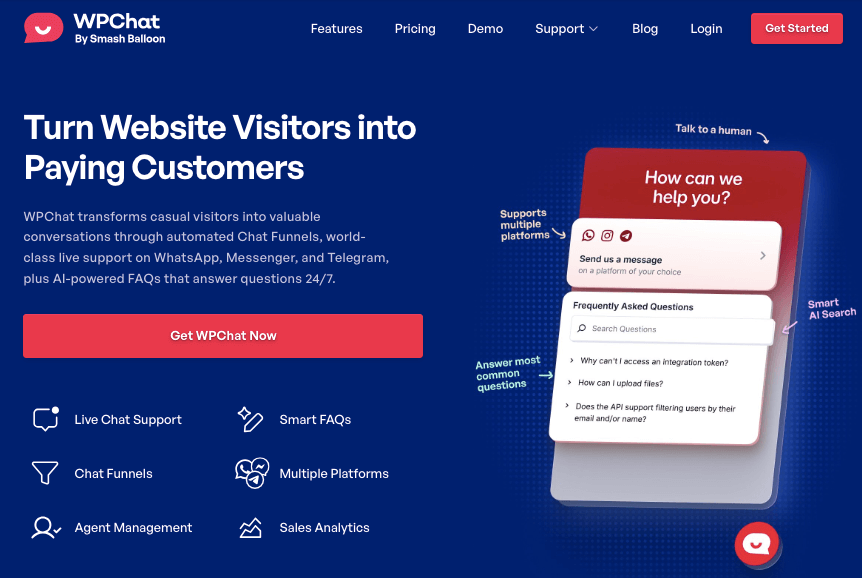
WPChat lets you add a WhatsApp chat button to your WordPress site and build fully automated chat funnels — all from your WordPress dashboard.
Here’s what WPChat includes out of the box:
- Visual funnel builder: Create branching conversation flows with a simple point-and-click interface — no code, no flowchart software needed.
- Pre-built reply buttons: Add tappable response options to every message so visitors never have to type a thing.
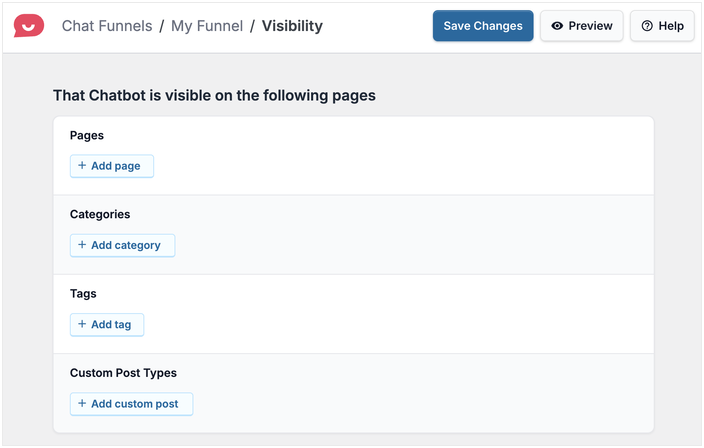
- Smart visibility controls: Choose exactly where your chat button appears — on specific pages, tags, categories, and even custom post types.
- 24/7 automated responses: Once your funnel is live, it runs completely on its own with no manual replies needed.
- Mobile-friendly design: Looks and works great on any device, right out of the box.
- Multiple funnel support: Build separate funnels for lead generation, sales, support, and bookings — and show each one in the right place on your site.
On top of creating chat funnels, WPChat also connects your website to popular messaging apps like WhatsApp, Telegram, Facebook Messenger, and Instagram.
Creating a WhatsApp Chat Funnel Using WPChat
- Install and activate WPChat from your WordPress dashboard via Plugins » Add New
- Navigate to WPChat » Funnels and click ‘Add New Funnel’
- Name your funnel and write your opening greeting message
- Add reply button options and connect each one to the next message in the sequence
- Configure your visibility — choose which pages the button appears on and how it’s displayed
- Test every branch using the built-in preview tool, then click ‘Publish’ to go live
For the full step-by-step walkthrough of each of these steps with screenshots, see how to create a chat funnel using WPChat.
Ready to give it a try? Get started with WPChat today and build your first funnel in under 10 minutes.
WhatsApp Chat Funnel Best Practices (Do’s and Don’ts)
Building a WhatsApp chat funnel is the first step; building a good one is what actually gets results.
After testing these funnels firsthand, I’ve found that the difference between a funnel that converts and one that gets abandoned usually comes down to a handful of simple principles.
Here’s a quick reference table to keep in mind as you build:
| ✅ Do’s | ❌ Don’ts |
|---|---|
| Focus on one clear goal per funnel | Try to achieve multiple things in one funnel |
| Write in a friendly, conversational tone | Use formal or corporate-sounding language |
| Keep the flow to 5–7 message exchanges | Make visitors answer more than 7 questions |
| Use short, tappable reply button options | Enter extremely long answers and reply options |
| Test every branch before publishing | Go live without testing all reply paths |
| Greet visitors warmly and personally | Jump straight into questions with no welcome |
| Offer a human handoff option | Leave visitors stuck with no way to escalate |
Frequently Asked Questions About WhatsApp Chat Funnels
What is the difference between a WhatsApp chatbot and a WhatsApp chat funnel?
A WhatsApp chatbot is the underlying technology — the automated system that sends and receives messages on your behalf.
A WhatsApp chat funnel is a strategy built on top of that chatbot, with a specific goal in mind (such as lead capture, a sale, or a support resolution) and a planned sequence of messages.
Do I need a WhatsApp Business account to use WPChat?
No, a WhatsApp Business account is not required to use WPChat.
However, setting up a business account is still useful if you’re using WhatsApp to promote your business and reach customers.
How many messages should a WhatsApp chat funnel have?
Most effective WhatsApp chat funnels use between 3 and 7 message exchanges from start to finish.
Fewer than 3 exchanges may not give you enough information to personalize the experience or qualify the visitor properly. More than 7 risks losing the visitor’s attention before they reach your goal.
Can I use WhatsApp chat funnels for an eCommerce store?
WhatsApp chat funnels work extremely well for eCommerce stores, and WPChat integrates seamlessly with both WordPress and WooCommerce.
As shown in Example 2 earlier in this article, you can use a chat funnel to ask visitors what they’re looking for, recommend the right product, and send them directly to the product page.
Conclusion — Your Next Step to Building a WhatsApp Chat Funnel
A WhatsApp chat funnel is an automated conversation sequence that guides your visitors toward a specific goal like capturing leads, answering support questions, or recommending products.
As you can see, WPChat makes it possible for any WordPress site owner to build one without writing a single line of code.
Your next step is simple: install WPChat, follow the setup steps in this guide, and publish your first funnel.
Start with one clear goal, keep it short, write like a human, and watch what happens when your website starts having real conversations with your visitors.
Ready to generate leads and engage visitors? Get started with WPChat today!