
You have WhatsApp Business set up. You reply to chats when they come in, send a broadcast when there’s a sale, and wonder why results stay flat.
That’s not a WhatsApp problem. It’s a strategy problem.
WhatsApp is the highest-engagement direct marketing channel available to small businesses, with 98% average open rate, 45 to 60% click-through rate, and the average message read within 3 minutes of delivery.
Email gets 20% open rates and 2 to 4% CTR. The channel isn’t the problem. Not having a system is.
Here’s the thing small businesses often miss: WhatsApp is actually one of the few marketing channels where being small is an advantage. Your customers already expect a personal, one-to-one conversation.
They’re not looking for a polished brand experience. They want a real answer from a real person, fast.
That’s exactly what a small business can deliver. The problem is most small businesses never build the system that turns that natural advantage into consistent revenue.
I’ve talked to a lot of small business owners who use WhatsApp daily and still aren’t seeing the results they expected.
The ones that are? They’re running a system: segmented contacts, a content calendar, multiple agents with coverage, and metrics they actually check. The gap between those two groups isn’t effort. It’s structure.
Before You Read This Guide
This article assumes you’ve already set up WhatsApp Business and connected it to your WordPress site with WPChat, a WordPress plugin that lets you manage WhatsApp conversations, multiple agents, and analytics directly from your dashboard.
If you’re starting from zero, the WhatsApp Business Marketing: The Complete Beginner’s Guide covers everything you need first. Come back here when you’re ready to build the system on top of it.
In This Article
- WhatsApp vs Email vs SMS: Why Small Businesses Are Switching
- Why Most Small Businesses Plateau on WhatsApp
- Step 1. Segment Your Audience Before You Send Anything
- Step 2. Build a WhatsApp Content Calendar
- Step 3. Set Up Multiple Agents
- Step 4. Measure What's Working
- Step 5. Stay Compliant
- Frequently Asked Questions on Setting Up WhatsApp Marketing
- Your WhatsApp Marketing Strategy on One Page
WhatsApp vs Email vs SMS: Why Small Businesses Are Switching
Small businesses that switch from email-first to WhatsApp-first marketing report dramatically higher engagement at the same send frequency.
WhatsApp messages reach contacts where they already spend most of their time, and the platform’s conversational format means people respond rather than scroll past.
Here’s how the three main direct marketing channels compare:
| SMS | |||
|---|---|---|---|
| Average open rate | 98% | 20% | 98% |
| Average click-through rate | 45 to 60% | 2 to 4% | 10 to 20% |
| Average time to read | Under 3 minutes | 90+ minutes | Under 5 minutes |
| Two-way conversation | Yes | No | Limited |
| Rich media (images, docs) | Yes | Yes | No |
| Cost per message | Low (API) / Free (app) | Very low | Low to medium |
| Best for | Relationship-led selling | Newsletters | Transactional alerts |
WhatsApp combines SMS’s speed and open rate with email’s rich media capability and adds something neither has: native two-way conversation.
For small businesses where the relationship is the product, that combination is difficult to match.
The caveat: WhatsApp’s engagement numbers depend on not abusing them. High open rates are a trust signal. Meaning, contacts open because they expect relevance.
The moment that breaks, block rates rise and the platform penalizes your account. The system in this guide is designed to protect that trust while using it to grow revenue.
Want more info? See our post on WordPress Live Chat vs Email to see their differences in detail.
Why Most Small Businesses Plateau on WhatsApp
Most small businesses run WhatsApp the same way: reply when a message comes in, broadcast when there’s a sale, treat every contact the same.
It’s not that they’re doing something wrong. They just don’t have a plan. And without a plan, results stay flat no matter how often you check the app.
Here’s what that looks like next to a business that actually has a system:
| Reactive Approach | Strategic System |
|---|---|
| Responds to chats as they arrive | Proactively drives conversations through targeted entry points |
| Sends broadcasts when there’s a sale | Runs a planned content calendar with segmented audiences |
| Treats all contacts the same | Segments by behavior, purchase stage, and value |
| Measures nothing | Tracks open rates, response rates, and conversions |
| One person handles everything | Distributes conversations across a team with configured availability |
Everything in this guide is about getting from the left column to the right one.
Step 1. Segment Your Audience Before You Send Anything
Sending the same message to everyone in your contact list is the fastest way to trigger opt-outs.
It also puts your account at risk: WhatsApp’s spam detection flags accounts with high block rates, and mass messages sent to unsorted lists are the most common cause.
Before you send anything, divide your list.
The 5 Core Segments Every Small Business Needs
| Segment | Who They Are | Best Message Type |
|---|---|---|
| New Leads | First contact, haven’t purchased | Welcome sequence, product education |
| Active Prospects | Engaged, showing purchase signals | Social proof, offers, FAQ resolution |
| First-Time Buyers | Completed one purchase | Post-purchase support, cross-sell, review request |
| Repeat Customers | Two or more purchases | VIP offers, loyalty rewards, referral ask |
| Lapsed Contacts | No engagement in 60+ days | Re-engagement with high-value free content |
Each segment gets a different message because each one has a different relationship with your business.
A new lead needs to feel welcomed and informed, not sold to immediately.
A repeat customer already trusts you, so a loyalty offer lands completely differently than it would on someone who’s never bought.
A lapsed contact who hasn’t heard from you in two months needs a reason to re-engage, not a promo code they’ll ignore.
Starting with the right message for the right person is the single most important thing you can do to keep your opt-out rate low and your response rate high.
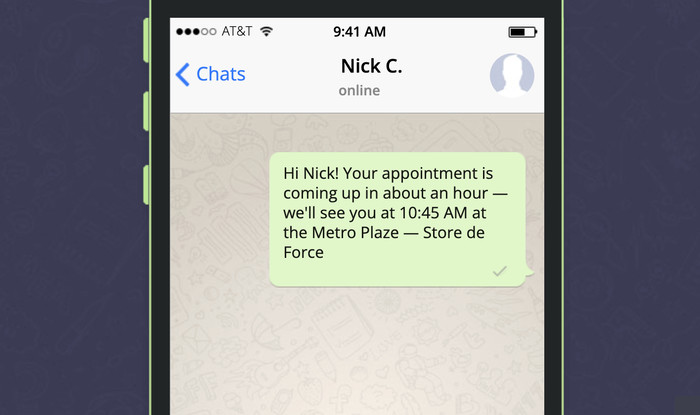
For more on capturing and organizing leads from your site before they even reach WhatsApp, see How to Capture Leads from Website Visitors.
On the standard WhatsApp Business App, you can sort contacts manually using Labels (free, but you’re doing the sorting yourself). WPChat Pro’s Analytics gives you visibility into how conversations are performing across your team, which makes it easier to spot which segments are engaging and which need attention.
For the full setup, see How to Add WhatsApp Chat to Your WordPress Website.
Step 2. Build a WhatsApp Content Calendar
The rule: no more than 1 to 2 promotional broadcasts per week. Not a guideline.
Daily promotional messaging is the fastest way to get blocked at scale, and a high block rate is how accounts get suspended. Keep the volume down and the relevance high.
The 4-Week Starter Calendar
| Week | Message Type | Goal | Timing |
|---|---|---|---|
| Week 1 | Welcome + value content (tip, guide, or resource) | Build trust with new contacts | Monday morning |
| Week 2 | Product highlight or case study | Educate and warm up prospects | Wednesday midday |
| Week 3 | Promotional offer (Active Prospects segment only) | Drive conversions | Tuesday morning |
| Week 4 | Re-engagement or customer check-in | Reduce churn, collect feedback | Thursday afternoon |
Copy-Paste Message Templates
Three templates for the message types that actually work:
Welcome Message:
“Hi [First Name]! Thanks for reaching out to [Business Name]. I’m [Name], happy to help. What can I do for you today?”
Promotional Broadcast (Active Prospects only):
“Hi [First Name], we’re running a special this week: [offer]. I thought of you because you’d asked about [product/topic]. Want details? Just reply YES and I’ll send everything over.”
Abandoned Cart Recovery — 15-Minute Message:
“Hi [First Name], I noticed you left [Product Name] in your cart. Any questions I can help with before you decide?”
A quick note on the Week 2 case study: social proof is consistently one of the highest-converting content types in WhatsApp broadcasts, especially when it’s specific: a named customer, a real number, a concrete outcome.
Vague testimonials don’t move people. Specific ones do. For a deeper look at what types of social proof actually convert, this guide on social proof covers the full breakdown.
Abandoned Cart Timing Sequence for E-Commerce
If you sell products online, this three-message sequence is worth setting up:
- 15 minutes: a friendly reminder with the product image and a direct checkout link
- 1 hour: a follow-up with social proof or a low-stock nudge
- 24 hours: a final message with a small incentive (free shipping or 5% off)
For building more complex automated conversation flows, WPChat’s chat funnels let you set up multi-step sequences based on how contacts respond.
Step 3. Set Up Multiple Agents
One person handling all your WhatsApp conversations works fine at low volume.
It breaks down as you grow. When the same inbox is fielding sales questions, support issues, and general inquiries at the same time, response quality drops and things fall through.
This is one area where small businesses actually have an edge over larger companies: you don’t need a call center.
Two or three agents with clear ownership and realistic working hours is enough to handle significant volume, as long as the setup is right.
How Multi-Agent Setup Works in WPChat Pro
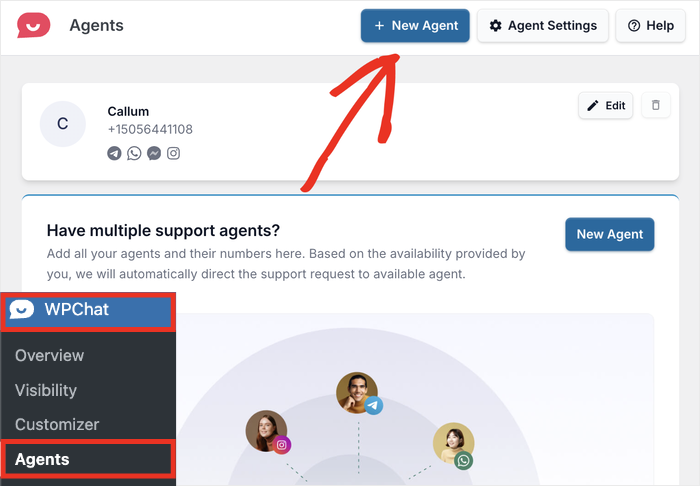
WPChat Pro lets you add multiple agents to your WhatsApp channel, each with their own configured working hours.
In practice:
- Different team members can cover different shifts or conversation types
- Each agent has configurable availability, so customers aren’t waiting on someone who’s offline
- As your team grows, you can add more agents without restructuring anything (the Elite plan supports unlimited agents)
The configurable agent timings matter more than most people realize.
If your agent is marked as available 24/7 but only actually responds during business hours, customers who message at 10pm get silence when they expect a response.
Setting accurate availability upfront manages expectations and reduces frustration, which directly affects your response rate metric in Step 4.
For step-by-step setup, see Setting Up Your Support Agents in WPChat. For advanced agent configuration options, see the Advanced Agent Settings guide.
Step 4. Measure What’s Working
| Metric | What It Measures | 2025 Benchmark |
|---|---|---|
| Message Open Rate | % of broadcasts opened | Aim for 90%+ (WhatsApp average: 98%) |
| Response Rate | % of recipients who reply | Well-segmented broadcasts typically see 30 to 60% |
| Click-Through Rate | % who click a link in your message | WhatsApp average: 45 to 60% vs. email’s 2 to 4% |
| Opt-Out Rate | % who block or unsubscribe after a broadcast | Keep below 2%. Above this, review your frequency and relevance |
| Conversion Rate | % of conversations that result in a sale or booking | Varies by industry. Track trends over time, not absolutes |
Tracking these is only useful if you act on them. Here’s what each number is actually telling you when it goes wrong:
- Open rate drops below 80%: contacts may have muted your messages without blocking. Check if you’ve been sending too frequently
- Response rate is below 20%: your message landed with the wrong segment, or the ask isn’t clear enough
- CTR is under 15%: the link placement or the message copy isn’t connecting. Test putting the link earlier in the message
- Opt-out rate above 2%: almost always a segmentation problem; you’re sending to people who don’t want that specific message
Step 5. Stay Compliant
WhatsApp’s anti-spam enforcement is aggressive and it runs in the background.
By the time you notice a problem, your account may already be flagged. These are the rules that keep you out of trouble.
Compliance Checklist
| Requirement | What to Do |
|---|---|
| Explicit Opt-In | Contacts must actively agree to receive messages. A checkbox or “Reply YES” confirmation both work. |
| Easy Opt-Out | Every broadcast must include a clear unsubscribe option (e.g., “Reply STOP to unsubscribe”) |
| Data Minimization | Collect only name and phone number unless you have a specific, stated reason for more |
| Privacy Policy | Update your site’s privacy policy to list WhatsApp as a data processor |
| No Purchased Lists | Using bought contact lists violates WhatsApp’s Terms of Service and will get your account banned |
Two things most small businesses skip that matter:
Keep a consent log. It doesn’t need to be elaborate. A spreadsheet with the contact’s name, the date they opted in, and how they opted in (checkbox, reply, form) is enough. If WhatsApp ever reviews your account, that log is what you point to.
Process opt-outs immediately. When someone replies STOP, they need to be removed from your broadcast list before the next send. Sending to someone who’s opted out is one of the fastest ways to generate a spam flag. Build the removal step into your workflow, not as an afterthought.
For small businesses specifically, staying on the right side of these rules protects more than just your account. It protects the personal, trust-based relationships that make WhatsApp marketing work in the first place.
Frequently Asked Questions on Setting Up WhatsApp Marketing
Is WhatsApp marketing worth it for small businesses?
Yes, and small businesses are often better positioned for it than large ones. WhatsApp is built for one-to-one conversation, which is exactly how small businesses already operate. A message from a named person at a business a customer knows converts at a much higher rate than a branded broadcast. WhatsApp open rates average 98% and click-through rates average 45 to 60%, compared to email’s 20% open rate and 2 to 4% CTR.
What’s the best time to send WhatsApp broadcast messages?
Tuesday through Thursday, between 10am and noon or 6pm and 8pm local time, tends to get the highest open and response rates. That said, run your own tests after the first month. Your audience’s behavior is always going to be more accurate than a general benchmark.
How many contacts do I need before WhatsApp marketing is worth doing?
No minimum. Fifty well-segmented contacts can generate real results if the messages are relevant and the follow-up is consistent. The system in this guide works the same way whether you have 50 contacts or 50,000.
Can I use WhatsApp for marketing in every country?
WhatsApp is available in most countries, but the rules around marketing messages vary. GDPR covers the EU and India’s DPDP Act covers Indian users. Check what applies to your market and make sure your opt-in process is documented.
How many agents can I add in WPChat Pro?
It depends on the plan. Basic supports up to 5 agents, Plus supports up to 10, and Elite supports unlimited agents. Each agent gets their own configurable working hours, so you can set up coverage across time zones or different team functions without routing everything through one person.
Your WhatsApp Marketing Strategy on One Page
Six steps, in order:
- Segment your audience: divide contacts into 5 groups before sending anything
- Build a content calendar: max 1 to 2 promotional broadcasts per week, mixed with value content
- Use the abandoned cart timing sequence: send at 15 minutes, 1 hour, and 24 hours
- Set up multiple agents: cover more conversations without everything going through one inbox
- Track 5 metrics: open rate, response rate, CTR, opt-out rate, conversion rate
- Stay compliant: explicit opt-in, easy opt-out, no purchased lists, keep a consent log
WhatsApp marketing for small business works because it’s personal by design. The system in this guide keeps it personal at scale.
Ready to build it? WPChat has everything you need, from multi-agent team management to a full analytics dashboard, all inside your WordPress dashboard.
Not set up yet? The WhatsApp Business Marketing: The Complete Beginner’s Guide is where to start.
For broader small business marketing strategy across channels, this guide covers social media marketing for small business from the same team.