If you’re weighing WhatsApp marketing against SMS marketing, you’re asking the right question.
Both land directly in someone’s notification bar. Both get opened. But the way they perform, and who they actually work for, is pretty different.
I’ve tested both channels with small business owners, and the honest answer is: it depends. Where your customers are, what you’re sending, and how much back-and-forth you want all factor in.
Here’s the short version: WhatsApp wins on engagement and features, especially if your customers are outside the US. SMS wins on reach and simplicity in North America.
For most small businesses, the smart move is to start with one and add the other once you have a rhythm.
In This Article
- Is WhatsApp or SMS Better for Small Business Marketing?
- WhatsApp vs SMS Marketing: Quick Comparison
- Reach and Accessibility: Who Can You Actually Message?
- Open Rates and Engagement: Where WhatsApp Pulls Ahead
- Cost: Which Is Cheaper for a Small Business?
- Features: What Each Channel Can and Can't Do
- When to Use SMS vs When to Use WhatsApp
- Why Most Small Businesses Should Use Both
- How to Add WhatsApp to Your WordPress Site
- Frequently Asked Questions on SMS vs WhatsApp
- Top WhatsApp Marketing Comparison Posts
- Start Turning Visitors into Real Conversations
Is WhatsApp or SMS Better for Small Business Marketing?
Both channels hit around 98% open rates, but WhatsApp messages get clicked 15-50% of the time compared to SMS’s 10-11%. If every click counts for your business, that gap matters. That said, SMS works on any phone without an app, which gives it a wider ceiling in the US where 97% of adults have a mobile number but not everyone is on WhatsApp.
Here’s how they break down across the factors that actually matter.
WhatsApp vs SMS Marketing: Quick Comparison
| Factor | SMS | WhatsApp ⭐ Recommended for WordPress Sites |
|---|---|---|
| Does it work without an app? | ✅ Yes, works on any mobile number | ❌ No, requires WhatsApp installed |
| What’s the open rate? | ✅ ~98%, most read within 3 minutes | ✅ ~98%, comparable speed |
| How often do people click? | ⚠️ 10-11% click-through rate | ✅ 15-50% click-through rate |
| Can you send images and video? | ❌ Plain text only (MMS costs more) | ✅ Photos, video, PDFs, voice notes, product catalogs |
| What does it cost per message? | ⚠️ Fractions of a cent, adds up at scale | ✅ Free app; API runs $0.005-$0.05 per 24-hr conversation |
| Can customers reply naturally? | ⚠️ Technically yes, but feels like a notification | ✅ Yes, back-and-forth feels like texting a friend |
| How hard is setup? | ⚠️ Registered number + TCPA-compliant opt-ins required | ⚠️ Free app is easy; API needs Meta verification |
| Best for | US-focused, simple alerts, maximum reach | Global audiences, product sales, real conversations |
If your customers are primarily in the US and you want the simplest possible channel, start with SMS.
If you want higher click rates and real two-way conversations, WhatsApp is worth the slightly steeper setup.
Reach and Accessibility: Who Can You Actually Message?
SMS doesn’t require anything beyond a phone number.
Your customers don’t need an app, a smartphone, or a WhatsApp account. In the US, 97% of adults have a mobile phone, so your SMS list can theoretically reach almost everyone.
WhatsApp requires the app. It sounds limiting. But your customers are already on it.
3 billion people use WhatsApp globally, and in many markets including the UK, Brazil, India, Germany, Mexico, and most of Latin America, it’s the primary way people message businesses.
If any portion of your customer base is outside North America, WhatsApp reach is likely stronger than SMS.
Where SMS clearly wins: you’re a US-only business, your customers skew older, or you want to message people who’ve given you a phone number but never connected with you on WhatsApp.
Open Rates and Engagement: Where WhatsApp Pulls Ahead
The stat both sides love to quote is the 98% open rate. It’s real, but it’s not the number that matters most.
Click-through rate is where the gap shows up. SMS messages get clicked about 10-11% of the time. WhatsApp messages land at 15-50% CTR depending on campaign type and personalization.
On a list of 1,000 people, that’s the difference between 100 clicks and up to 500.
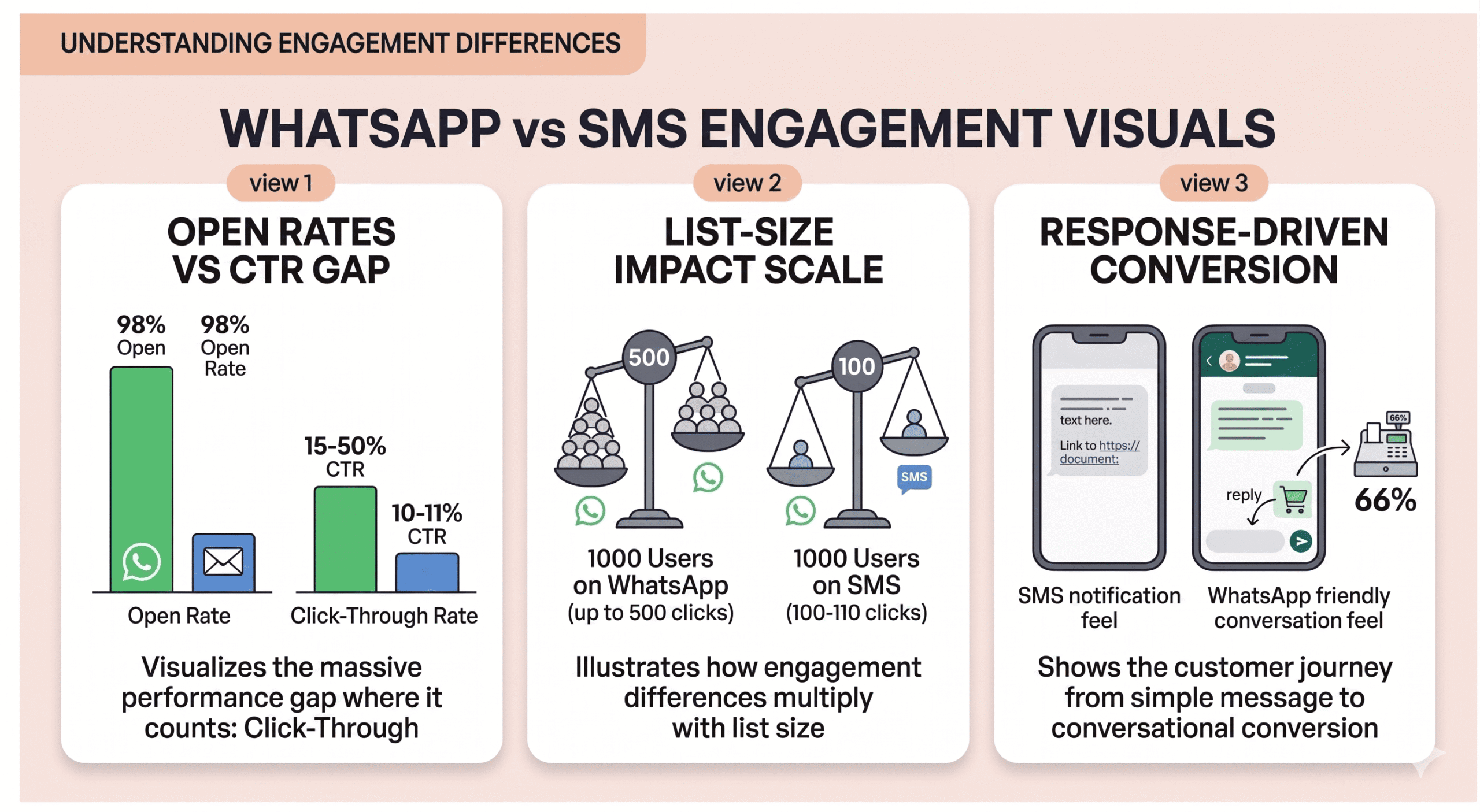
Response rates favor WhatsApp too. Research from WhatsApp shows 66% of consumers complete a purchase after messaging a business on the platform.
A big part of that is just format.
A WhatsApp message sits in the same thread as a conversation with a friend. An SMS from a business feels more like a notification. That difference shows up in whether people actually buy.
Cost: Which Is Cheaper for a Small Business?
Honestly, it depends more on volume than anything else.
SMS costs fractions of a cent to a few cents per message depending on your provider. At $0.01 per message, 10,000 sends costs around $100. Manageable, but if you’re sending weekly campaigns to a growing list, it adds up.
WhatsApp Business (the free app) costs nothing for conversations you start with people who’ve saved your number. For most small businesses getting started, that’s a real advantage.
If you need automation, CRM integrations, or large list sends, you’ll move to the WhatsApp Business API, which runs roughly $0.005-$0.05 per 24-hour conversation window, not per message.
The better question is cost per conversion, not cost per send. WhatsApp’s higher click rates often mean a better return even if the per-message cost is similar.
Features: What Each Channel Can and Can’t Do
SMS is deliberately simple. You get 160 characters of plain text, a link if you have one, and a required opt-out instruction. That simplicity is a feature in some contexts: the message always renders, there’s nothing to break, and you can’t accidentally send a broken template.
WhatsApp gives you a lot more to work with.
Photos, videos, PDFs, voice notes, location pins, product catalogs. Messages can run up to 1,024 characters. You can add quick-reply buttons so customers tap instead of typing.
If you sell physical products, being able to send a product photo with a “Buy Now” button in a single message is genuinely useful.
WhatsApp also makes real back-and-forth natural. A customer asks a question, you send a photo, they reply with a follow-up, you answer. All in one thread. That kind of conversation doesn’t work in SMS.
I’ve covered how small businesses are already doing this well in WhatsApp marketing examples worth looking at before you build your first campaign.
When to Use SMS vs When to Use WhatsApp
Use SMS when:
- Your audience is primarily US-based and not all of them are on WhatsApp
- You’re sending time-sensitive alerts where a simple text is enough: appointment reminders, order confirmations, flash sale notifications, shipping updates
- You want to reach customers who don’t use smartphones or rarely open apps
- You want maximum simplicity with no setup curve
Use WhatsApp when:
- Your customers are already on WhatsApp (if they’re outside the US, they almost certainly are)
- You’re selling products and want to send images, videos, or product catalogs
- You want real conversations, not just notifications
- You’re running an abandoned cart recovery campaign (WhatsApp recovery rates hit up to 70%)
- You want to build a channel that grows with your business over time
Why Most Small Businesses Should Use Both
The real answer isn’t which one wins. They serve different purposes, and using both covers more ground than either alone.
A setup that works well: use your website to capture contacts via a chat widget or opt-in form.
Use WhatsApp for real conversations such as product questions, warm follow-ups, abandoned cart recovery.
Use SMS for transactional messages: order confirmations, appointment reminders, time-sensitive alerts.
How to Add WhatsApp to Your WordPress Site
Choosing WhatsApp as your marketing channel is one thing. Actually getting visitors to your website to reach you on WhatsApp is another. That’s the gap WPChat closes.
WPChat is a WordPress plugin that adds a customizable chat button to your site and routes visitors directly to WhatsApp (or Messenger, Telegram, or Instagram, if you’re running those too). No coding required.
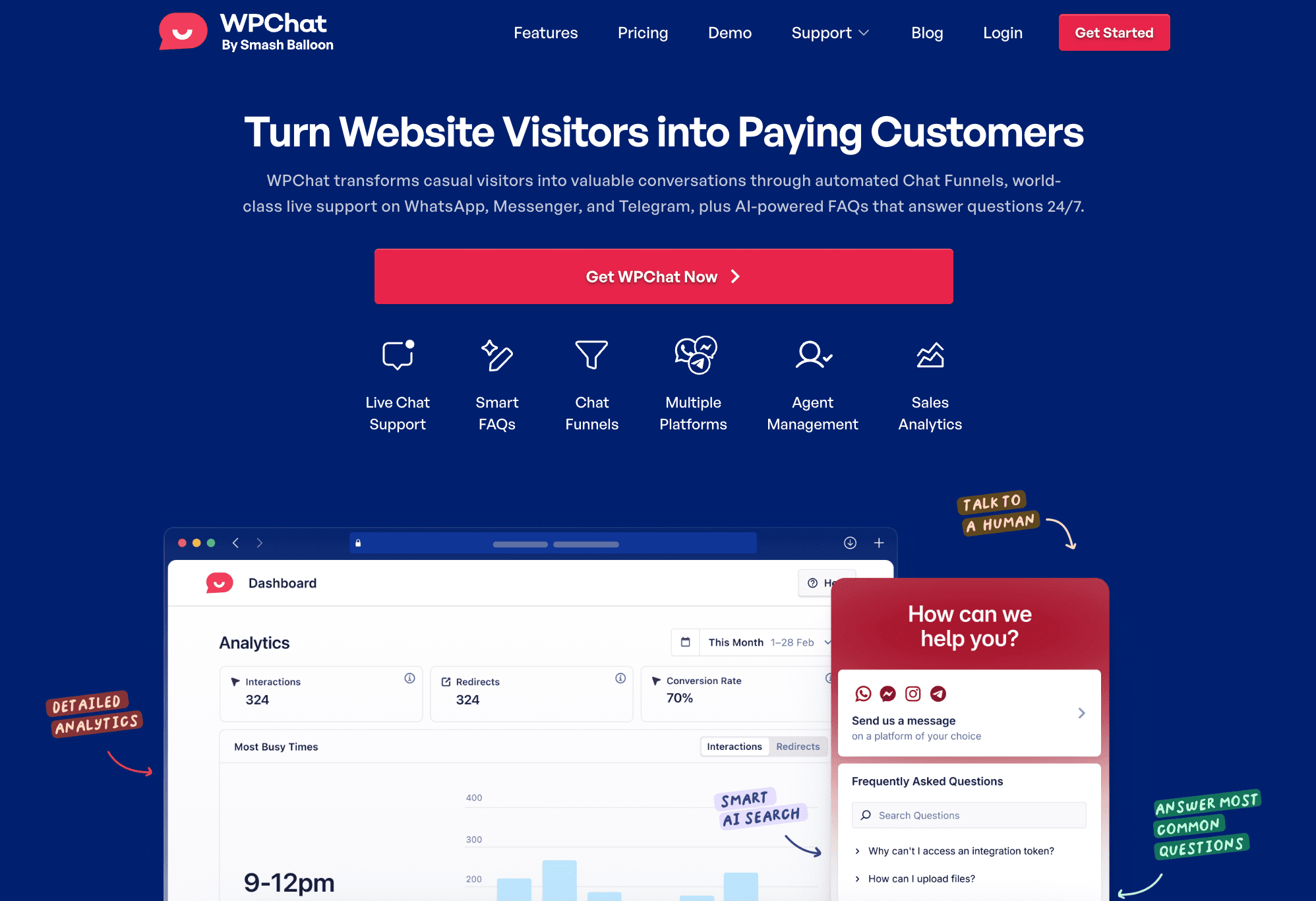
The setup wizard walks you through connecting your WhatsApp Business number and going live in minutes.
But it’s not just a chat button. A few features matter specifically for WhatsApp marketing:
Chat Funnels let you start the conversation proactively. Instead of waiting for a visitor to type something, a funnel opens with a pre-written message and tappable reply options.
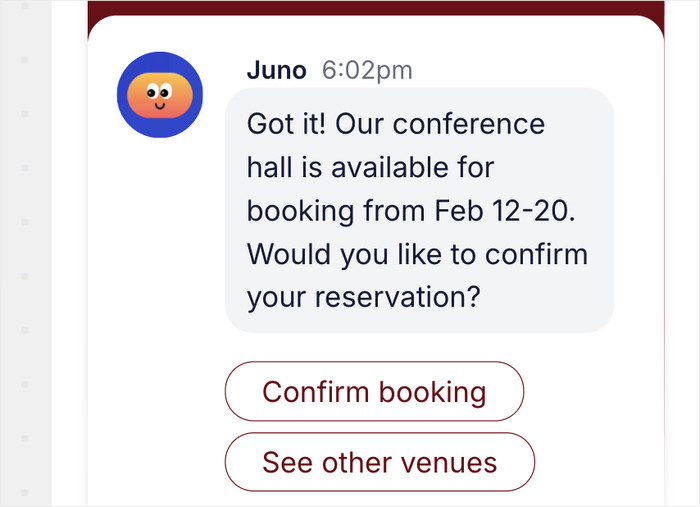
The visitor self-selects, and you know exactly what they need before you reply. For abandoned cart recovery and pre-purchase questions, this alone changes the conversion math.
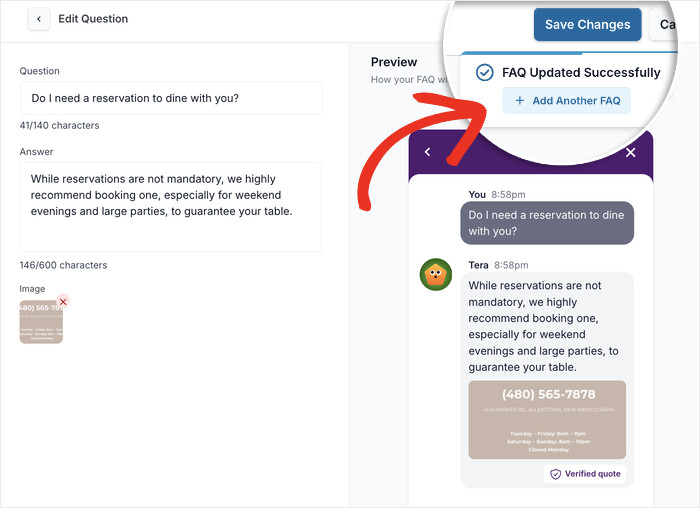
Smart FAQs answer your most common questions automatically, 24/7. If someone asks about shipping, returns, or pricing at 11pm, they get an instant answer instead of silence. The questions that actually need you still get through.
Visibility Controls let you show the right chat experience on the right page.
If your customers are already on WhatsApp (and for most businesses, they are), WPChat turns your WordPress site into the starting point for every conversation.
Frequently Asked Questions on SMS vs WhatsApp
Which has a higher open rate, WhatsApp or SMS?
Both channels hit around 98% open rates, so open rate alone isn’t a useful differentiator. Where WhatsApp wins is click-through rate: 15-50% compared to SMS’s 10-11%. If you’re measuring which channel drives more action rather than just opens, WhatsApp has the edge.
Is WhatsApp Business free for small businesses?
Yes. The WhatsApp Business app is free to download and use with no volume caps for basic messaging. If you need automation, CRM integrations, or the ability to run large campaigns, you’d move to the WhatsApp Business API, which costs $0.005-$0.05 per 24-hour conversation window. Most small businesses starting out can do a lot with the free app before needing the API.
Do I need consent to send WhatsApp marketing messages?
Yes, and the rules are similar to SMS. You can only message people who have opted in. For businesses using the WhatsApp API, Meta requires pre-approved message templates for outbound marketing campaigns. Collecting consent through your website via a chat widget or contact form is the cleanest way to build a compliant list for either channel.
Can WhatsApp replace SMS for small business marketing?
For most US-based businesses, not entirely. SMS reaches anyone with a mobile number, including people who don’t have WhatsApp. WhatsApp drives more engagement and supports real back-and-forth conversations, but it requires the app. The most practical approach is to use WhatsApp for warm follow-ups and product conversations, and SMS for broad reach and transactional alerts. They work better together than either does alone.
Which is better for recovering abandoned carts?
WhatsApp, by a significant margin. WhatsApp abandoned cart recovery campaigns hit recovery rates up to 70% in some studies, largely because the follow-up message arrives in the same thread where the customer might have already asked a question. SMS cart recovery works too, but response rates are lower and the conversation can’t go anywhere useful beyond a link.
Top WhatsApp Marketing Comparison Posts
- WhatsApp vs Instagram DMs for Business
- WhatsApp vs Facebook Messenger
- WhatsApp vs Live Chat: Which is Best for Your WordPress Business?
- WhatsApp vs Email Marketing: Which Converts Better?
Start Turning Visitors into Real Conversations
You don’t have to choose one channel and commit forever.
Most small businesses start with whichever one their customers actually use and add the second once they have a rhythm.
But if your customers are already on WhatsApp, the fastest starting point is making it easy for them to reach you directly from your website.
Right now, there are visitors landing on your site with questions, and leaving without ever asking them. WPChat fixes that.
Once a visitor can reach you on WhatsApp in one click, you have a real conversation, a real contact, and a real shot at turning that visit into a sale.
Use WPChat to Add WhatsApp to Your Site →