Configurar o WhatsApp no seu website é a parte fácil. As empresas que realmente crescem com ele são aquelas que vão além de responder a mensagens recebidas e constroem uma estratégia real em torno dele.
Este guia é especificamente para proprietários de pequenas empresas que já têm o WhatsApp Business a funcionar. Se ainda está na fase de “como adiciono o WhatsApp ao meu site”, comece primeiro com o nosso guia para iniciantes em marketing de WhatsApp Business, depois volte aqui.
Vou guiá-lo através do framework de cinco passos que usamos na WPChat: segmentar os seus contactos, construir um calendário de conteúdos, configurar múltiplos agentes, medir o que está a funcionar e manter a conformidade à medida que escala.
Como Construir uma Estratégia de Marketing de WhatsApp para uma Pequena Empresa?
Uma estratégia de marketing de WhatsApp para pequenas empresas tem cinco partes: segmente os seus contactos em grupos com base em onde eles estão na jornada de compra, construa um calendário de conteúdos simples com não mais do que 1 a 2 transmissões por semana, configure múltiplos agentes para que uma pessoa não seja um gargalo, acompanhe cinco KPIs principais (taxa de abertura, taxa de resposta, taxa de cliques, taxa de exclusão, taxa de conversão) e mantenha um registo de consentimento para que permaneça em conformidade à medida que a sua lista cresce. Todo o sistema pode estar a funcionar em cerca de quatro semanas.
Antes de Ler Este Guia
Este artigo assume que já configurou o WhatsApp Business e o conectou ao seu site WordPress com WPChat, um plugin WordPress que permite gerir conversas do WhatsApp, múltiplos agentes e análises diretamente do seu painel.
Se está a começar do zero, o WhatsApp Business Marketing: O Guia Completo para Iniciantes cobre tudo o que precisa primeiro. Volte aqui quando estiver pronto para construir o sistema por cima.
Neste Artigo
- WhatsApp vs Email vs SMS: Porque as Pequenas Empresas Estão a Mudar
- Porque a Maioria das Pequenas Empresas Estagna no WhatsApp
- Passo 1. Segmente o seu público antes de enviar qualquer coisa
- Passo 2. Crie um Calendário de Conteúdo para WhatsApp
- Passo 3. Configurar Múltiplos Agentes
- Passo 4. Meça o Que Está a Funcionar
- Etapa 5. Mantenha a Conformidade
- Perguntas Frequentes sobre a Configuração do Marketing do WhatsApp
- Comece a Construir a Sua Estratégia de WhatsApp Esta Semana
WhatsApp vs Email vs SMS: Porque as Pequenas Empresas Estão a Mudar
Pequenas empresas que mudam de marketing focado em email para marketing focado em WhatsApp relatam um engagement dramaticamente mais alto com a mesma frequência de envio.
As mensagens do WhatsApp chegam aos contactos onde eles já passam a maior parte do tempo, e o formato de conversação da plataforma significa que as pessoas respondem em vez de ignorar.
Veja como os três principais canais de marketing direto se comparam:
| SMS | |||
|---|---|---|---|
| Taxa de abertura média | 98% | 20% | 98% |
| Taxa de cliques média | 45 a 60% | 2 a 4% | 10 a 20% |
| Tempo médio de leitura | Menos de 3 minutos | 90+ minutos | Menos de 5 minutos |
| Conversa bidirecional | Sim | Não | Limitado |
| Multimédia (imagens, documentos) | Sim | Sim | Não |
| Custo por mensagem | Baixo (API) / Grátis (app) | Muito baixo | Baixo a médio |
| Ideal para | Vendas baseadas em relacionamento | Newsletters | Alertas transacionais |
O WhatsApp combina a velocidade e a taxa de abertura do SMS com a capacidade de multimédia do email e adiciona algo que nenhum deles tem: conversa bidirecional nativa.
Para pequenas empresas onde o relacionamento é o produto, essa combinação é difícil de igualar.
A ressalva: os números de engagement do WhatsApp dependem de não os sobrecarregar. Taxas de abertura elevadas são um sinal de confiança. Ou seja, os contactos abrem porque esperam relevância.
No momento em que isso se quebra, as taxas de bloqueio aumentam e a plataforma penaliza a sua conta. O sistema neste guia foi concebido para proteger essa confiança enquanto a utiliza para aumentar a receita.
Quer mais informações? Veja o nosso artigo sobre WordPress Live Chat vs Email para ver as suas diferenças em detalhe.
Porque a Maioria das Pequenas Empresas Estagna no WhatsApp
A maioria das pequenas empresas gere o WhatsApp da mesma forma: responde quando uma mensagem chega, transmite quando há uma promoção, trata todos os contactos da mesma forma.
Não é que estejam a fazer algo de errado. Simplesmente não têm um plano. E sem um plano, os resultados permanecem estáveis, não importa quantas vezes verifique a aplicação.
Eis como isso se compara a uma empresa que realmente tem um sistema:
| Abordagem Reativa | Sistema Estratégico |
|---|---|
| Responde a chats à medida que chegam | Impulsiona proativamente conversas através de pontos de entrada direcionados |
| Envia transmissões quando há uma promoção | Executa um calendário de conteúdo planeado com públicos segmentados |
| Trata todos os contactos da mesma forma | Segmenta por comportamento, fase de compra e valor |
| Não mede nada | Monitoriza taxas de abertura, taxas de resposta e conversões |
| Uma pessoa trata de tudo | Distribui conversas por uma equipa com disponibilidade configurada |
Tudo neste guia serve para ir da coluna da esquerda para a da direita.
Passo 1. Segmente o seu público antes de enviar qualquer coisa
Enviar a mesma mensagem a todos na sua lista de contactos é a forma mais rápida de desencadear exclusões.
Também coloca a sua conta em risco: a deteção de spam do WhatsApp sinaliza contas com altas taxas de bloqueio, e mensagens em massa enviadas para listas não ordenadas são a causa mais comum.
Antes de enviar qualquer coisa, divida a sua lista.
Os 5 Segmentos Principais que Toda Pequena Empresa Precisa
| Segmento | Quem São | Melhor Tipo de Mensagem |
|---|---|---|
| Novos Leads | Primeiro contacto, ainda não comprou | Sequência de boas-vindas, educação sobre o produto |
| Prospectos Ativos | Engajado, mostrando sinais de compra | Prova social, ofertas, resolução de FAQ |
| Compradores de Primeira Vez | Completou uma compra | Suporte pós-compra, venda cruzada, pedido de avaliação |
| Clientes Recorrentes | Duas ou mais compras | Ofertas VIP, recompensas de fidelidade, pedido de referência |
| Contactos Inativos | Sem interação nos últimos 60+ dias | Reativação com conteúdo gratuito de alto valor |
Cada segmento recebe uma mensagem diferente porque cada um tem uma relação diferente com o seu negócio.
Um novo lead precisa sentir-se bem-vindo e informado, não pressionado a comprar imediatamente.
Um cliente recorrente já confia em si, pelo que uma oferta de fidelização tem um impacto completamente diferente do que teria numa pessoa que nunca comprou.
Um contacto inativo que não tem notícias suas há dois meses precisa de um motivo para reativar, não de um código promocional que irá ignorar.
Começar com a mensagem certa para a pessoa certa é a coisa mais importante que pode fazer para manter a sua taxa de recusa baixa e a sua taxa de resposta alta.
Para mais informações sobre como capturar e organizar leads do seu site antes mesmo de chegarem ao WhatsApp, consulte Como Capturar Leads de Visitantes do Website.
Na Aplicação Padrão WhatsApp Business, pode organizar contactos manualmente utilizando Etiquetas (gratuito, mas é você quem faz a organização). O Analytics do WPChat Pro dá-lhe visibilidade sobre o desempenho das conversas em toda a sua equipa, o que facilita a identificação de quais segmentos estão a interagir e quais precisam de atenção.
Para a configuração completa, consulte Como Adicionar Chat do WhatsApp ao Seu Website WordPress.
Quer lidar com mais conversas sem aumentar o número de funcionários?
O WPChat Pro permite adicionar múltiplos agentes, construir funis de chat que qualificam visitantes automaticamente e acompanhar quais as conversas que estão realmente a converter. Apoiado por uma garantia de devolução do dinheiro de 14 dias.
Ver Preços do WPChat ProPasso 2. Crie um Calendário de Conteúdo para WhatsApp
A regra: não mais do que 1 a 2 transmissões promocionais por semana. Não é uma diretriz.
Mensagens promocionais diárias são a forma mais rápida de ser bloqueado em escala, e uma alta taxa de bloqueio é o que leva à suspensão de contas. Mantenha o volume baixo e a relevância alta.
O Calendário Inicial de 4 Semanas
| Semana | Tipo de Mensagem | Objetivo | Horário |
|---|---|---|---|
| Semana 1 | Boas-vindas + conteúdo de valor (dica, guia ou recurso) | Construir confiança com novos contactos | Segunda-feira de manhã |
| Semana 2 | Destaque de produto ou estudo de caso | Educar e aquecer potenciais clientes | Quarta-feira ao meio-dia |
| Semana 3 | Oferta promocional (apenas segmento de Potenciais Clientes Ativos) | Gerar conversões | Terça-feira de manhã |
| Semana 4 | Reativação ou contacto com o cliente | Reduzir o abandono, recolher feedback | Quinta-feira à tarde |
Modelos de Mensagens Copiar-Colar
Três modelos para os tipos de mensagens que realmente funcionam:
Mensagem de Boas-Vindas:
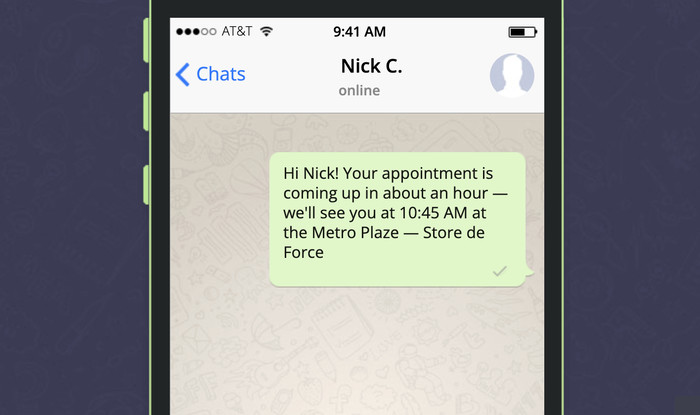
“Olá [Primeiro Nome]! Obrigado por contactar a [Nome da Empresa]. Sou [Nome], terei todo o gosto em ajudar. Em que posso ser útil hoje?”
Transmissão Promocional (Apenas para Prospectos Ativos):
“Olá [Primeiro Nome], estamos com uma promoção especial esta semana: [oferta]. Pensei em si porque perguntou sobre [produto/tópico]. Quer detalhes? Basta responder SIM e enviarei tudo.”
Recuperação de Carrinho Abandonado — Mensagem de 15 Minutos:
“Olá [Primeiro Nome], notei que deixou [Nome do Produto] no seu carrinho. Tem alguma dúvida em que possa ajudar antes de decidir?”
Uma nota rápida sobre o estudo de caso da Semana 2: a prova social é consistentemente um dos tipos de conteúdo com maior conversão em transmissões do WhatsApp, especialmente quando é específica: um cliente nomeado, um número real, um resultado concreto.
Testemunhos vagos não motivam as pessoas. Os específicos sim. Para uma análise mais aprofundada sobre que tipos de prova social realmente convertem, este guia sobre prova social cobre a análise completa.
Sequência de Temporização de Carrinho Abandonado para E-commerce
Se vende produtos online, esta sequência de três mensagens vale a pena configurar:
- 15 minutos: um lembrete amigável com a imagem do produto e um link direto para checkout
- 1 hora: um seguimento com prova social ou um aviso de stock baixo
- 24 horas: uma mensagem final com um pequeno incentivo (envio grátis ou 5% de desconto)
Para construir fluxos de conversação automatizados mais complexos, os funis de chat da WPChat permitem configurar sequências de vários passos com base em como os contactos respondem.
Passo 3. Configurar Múltiplos Agentes
Uma pessoa a gerir todas as suas conversações de WhatsApp funciona bem com baixo volume.
Isto falha à medida que cresce. Quando a mesma caixa de entrada está a responder a perguntas de vendas, problemas de suporte e inquéritos gerais ao mesmo tempo, a qualidade da resposta diminui e as coisas perdem-se.
Esta é uma área onde as pequenas empresas têm realmente uma vantagem sobre as empresas maiores: não precisa de um call center.
Dois ou três agentes com responsabilidade clara e horários de trabalho realistas são suficientes para lidar com um volume significativo, desde que a configuração esteja correta.
Como Funciona a Configuração Multi-Agente no WPChat Pro
WPChat Pro permite adicionar múltiplos agentes ao seu canal de WhatsApp, cada um com o seu próprio horário de funcionamento configurado.
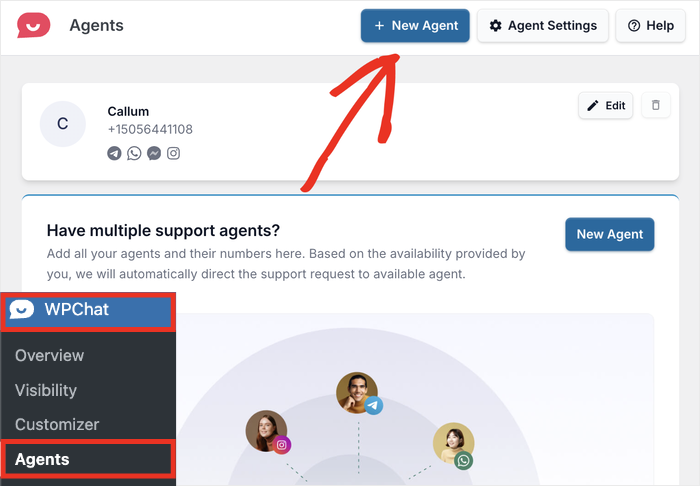
Na prática:
- Diferentes membros da equipa podem cobrir diferentes turnos ou tipos de conversação
- Cada agente tem disponibilidade configurável, para que os clientes não esperem por alguém que está offline
- À medida que a sua equipa cresce, pode adicionar mais agentes sem reestruturar nada (o plano Elite suporta agentes ilimitados)
Os tempos configuráveis do agente são mais importantes do que a maioria das pessoas imagina.
Se o seu agente estiver marcado como disponível 24/7, mas apenas responder durante o horário comercial, os clientes que enviarem mensagens às 22h receberão silêncio quando esperam uma resposta.
Definir a disponibilidade com precisão antecipadamente gere expectativas e reduz a frustração, o que afeta diretamente a sua métrica de taxa de resposta na Etapa 4.
Para configuração passo a passo, consulte Configurar os Seus Agentes de Suporte no WPChat. Para opções avançadas de configuração de agentes, consulte o guia Definições Avançadas de Agente.
Etapa 4. Meça o Que Funciona
| Métrica | O Que Mede | Referência 2025 |
|---|---|---|
| Taxa de Abertura de Mensagens | % de transmissões abertas | Procure ter 90%+ (média do WhatsApp: 98%) |
| Taxa de Resposta | % de destinatários que respondem | Transmissões bem segmentadas geralmente veem de 30 a 60% |
| Taxa de Cliques | % que clica num link na sua mensagem | Média do WhatsApp: 45 a 60% vs. 2 a 4% do email |
| Taxa de Exclusão | % que bloqueia ou cancela a subscrição após uma transmissão | Mantenha abaixo de 2%. Acima disso, reveja a sua frequência e relevância |
| Taxa de Conversão | % de conversas que resultam numa venda ou reserva | Varia por setor. Acompanhe as tendências ao longo do tempo, não os valores absolutos |
Acompanhar estes números só é útil se agir com base neles. Eis o que cada número lhe está realmente a dizer quando corre mal:
- Taxa de abertura abaixo de 80%: os contactos podem ter silenciado as suas mensagens sem bloquear. Verifique se tem enviado com muita frequência
- Taxa de resposta abaixo de 20%: a sua mensagem chegou ao segmento errado, ou o pedido não é claro o suficiente
- CTR abaixo de 15%: a colocação do link ou o texto da mensagem não estão a conectar. Tente colocar o link mais cedo na mensagem
- Taxa de exclusão acima de 2%: quase sempre um problema de segmentação; está a enviar para pessoas que não querem essa mensagem específica
Etapa 5. Mantenha a Conformidade
A aplicação anti-spam do WhatsApp é agressiva e funciona em segundo plano.
Quando der por si de um problema, a sua conta pode já estar sinalizada. Estas são as regras que o livram de problemas.
Checklist de Conformidade
| Requisito | O que fazer |
|---|---|
| Opt-in Explícito | Os contactos devem concordar ativamente em receber mensagens. Uma caixa de seleção ou uma confirmação de “Responder SIM” funcionam. |
| Opt-out Fácil | Cada transmissão deve incluir uma opção clara de cancelamento (por exemplo, “Responder PARAR para cancelar”) |
| Minimização de Dados | Recolha apenas nome e número de telefone, a menos que tenha uma razão específica e declarada para mais |
| Política de Privacidade | Atualize a política de privacidade do seu site para listar o WhatsApp como processador de dados |
| Sem Listas Compradas | Usar listas de contactos compradas viola os Termos de Serviço do WhatsApp e resultará no banimento da sua conta |
Duas coisas que a maioria das pequenas empresas ignora e que são importantes:
Mantenha um registo de consentimento. Não precisa de ser elaborado. Uma folha de cálculo com o nome do contacto, a data em que deu opt-in e como deu opt-in (caixa de seleção, resposta, formulário) é suficiente. Se o WhatsApp alguma vez rever a sua conta, esse registo é o que apresentará.
Processe os opt-outs imediatamente. Quando alguém responde PARAR, precisa de ser removido da sua lista de transmissão antes do próximo envio. Enviar para alguém que fez opt-out é uma das formas mais rápidas de gerar um sinal de spam. Integre o passo de remoção no seu fluxo de trabalho, não como uma reflexão tardia.
Para pequenas empresas especificamente, manter-se do lado certo destas regras protege mais do que apenas a sua conta. Protege as relações pessoais e de confiança que fazem o marketing no WhatsApp funcionar em primeiro lugar.
Perguntas Frequentes sobre a Configuração do Marketing do WhatsApp
Vale a pena o marketing no WhatsApp para pequenas empresas?
Sim, e as pequenas empresas estão muitas vezes melhor posicionadas para isso do que as grandes. O WhatsApp é construído para conversação um-para-um, que é exatamente como as pequenas empresas operam. Uma mensagem de uma pessoa nomeada de uma empresa que um cliente conhece converte a uma taxa muito mais alta do que uma transmissão de marca. As taxas de abertura do WhatsApp têm uma média de 98% e as taxas de cliques de 45 a 60%, em comparação com a taxa de abertura de 20% e CTR de 2 a 4% do e-mail.
Qual é a melhor hora para enviar mensagens de transmissão no WhatsApp?
Terça a quinta-feira, entre as 10h e as 12h ou as 18h e as 20h, hora local, tende a obter as maiores taxas de abertura e resposta. Dito isto, faça os seus próprios testes após o primeiro mês. O comportamento do seu público será sempre mais preciso do que um ponto de referência geral.
Quantos contactos preciso de ter antes de o marketing no WhatsApp valer a pena?
Sem mínimo. Cinquenta contactos bem segmentados podem gerar resultados reais se as mensagens forem relevantes e o acompanhamento for consistente. O sistema neste guia funciona da mesma forma, quer tenha 50 contactos ou 50.000.
Posso usar o WhatsApp para marketing em todos os países?
O WhatsApp está disponível na maioria dos países, mas as regras sobre mensagens de marketing variam. O RGPD abrange a UE e o Ato de Proteção de Dados Pessoais da Índia abrange os utilizadores indianos. Verifique o que se aplica ao seu mercado e certifique-se de que o seu processo de opt-in está documentado.
Quantos agentes posso adicionar no WPChat Pro?
Depende do plano. O Básico suporta até 5 agentes, o Plus suporta até 10 e o Elite suporta agentes ilimitados. Cada agente tem o seu próprio horário de trabalho configurável, para que possa configurar a cobertura em diferentes fusos horários ou funções de equipa sem encaminhar tudo para uma só pessoa.
Comece a Construir a Sua Estratégia de WhatsApp Esta Semana
A maioria das pequenas empresas que usam o WhatsApp está a deixar a maior parte do seu potencial de lado. Respondem a mensagens quando chegam, enviam uma transmissão ocasional e chamam-lhe estratégia. O framework de cinco passos neste guia é o que separa essa abordagem de uma que realmente se compõe ao longo do tempo.
É precisamente aí que o WPChat se destaca. A segmentação, a configuração multi-agente, os funis de chat, a análise – tudo está integrado num único plugin que se encontra no seu site WordPress.
Obtenha a sua cópia do WPChat aqui e siga o framework passo a passo.
- Esta semana: segmente os seus contactos existentes nos 5 grupos e anote quais necessitam de acompanhamento
- Semana 2: construa o seu calendário de conteúdos de 4 semanas e agende a sua primeira transmissão de valor
- Semana 3: adicione um segundo agente e configure a disponibilidade para que nenhuma conversa fique sem resposta
- Semana 4: reveja os seus KPIs e encontre a métrica que mais precisa de trabalho
Já está a executar uma estratégia de WhatsApp no seu site WordPress? Diga-me o que está a funcionar nos comentários. Leio todos eles.