Watching hard-earned traffic vanish from your site without a trace can be incredibly frustrating.
You pour hours into getting people to your WordPress site, only for most to just close the tab and disappear.
I’ve been there. Building and running multiple WordPress sites showed me early on that getting traffic is only half the battle.
So I tested out a ton of solutions to see which ones actually work and which ones don’t. Some were a complete waste of time. But a handful of strategies made a real difference in capturing leads before they walked out the door.
You don’t have to just sit back and accept those lost opportunities. It’s really about knowing which targeted offers grab a reader’s attention at the final second.
In this guide, I’ll show you the five proven strategies I always implement to recover abandoning traffic and steadily build an audience on WordPress.
- The Quick Answer: 5 Ways to Capture Leads Before Visitors Leave
- The 98% Problem: Why Most Website Visitors Disappear Without a Trace
- The Psychology of Abandonment: Why Visitors Leave Without Converting
- Why Conversations Convert Better Than Forms (The Case for Conversational Lead Capture)
- Strategy 1: Meet Visitors With Multi-Platform Live Chat
- Strategy 2: Use Exit-Intent Popups Before Visitors Leave
- Strategy 3: Use Chat Funnels to Warm Up Visitors
- Strategy 4: Offer Something in Exchange for Contact Information
- Strategy 5: Measure What's Working and Optimize
- Putting It All Together: Your Lead Capture System on One Page
- Conclusion: Stop Losing Visitors. Start Capturing Leads.
The Quick Answer: 5 Ways to Capture Leads Before Visitors Leave
Here are the five proven strategies to capture leads before visitors leave your website:
- Multi-Platform Live Chat: Add a floating chat widget to your site that lets visitors reach you instantly on the messaging app they already use: WhatsApp, Telegram, Facebook Messenger, or Instagram.
- Exit-Intent Popups: Use OptinMonster to detect when a visitor is about to close the tab and display a targeted offer at the exact moment they’re leaving.
- Chat Funnels: Have visitors go through a quick, automated chat first, before they even get to talk to you. That way, every live conversation starts warm.

- Lead Magnets: Instead of just asking for their email, offer something genuinely helpful: a checklist, a handy template, or even a free guide.
- Measure and Optimize: Keep a close eye on your chat engagement rate, how many leads you’re capturing, and even the performance of pages. Then, actually use that data to continuously improve your results.
Each of these strategies addresses a particular reason why visitors decide to leave. And don’t worry, we’ll walk you through setting every single one up on your WordPress site, showing you exactly what to do.
The 98% Problem: Why Most Website Visitors Disappear Without a Trace
Here’s a number that should stop you in your tracks: research shows that approximately 98% of website visitors leave without taking any action. No purchase, no signup, no contact.
That means for every 100 people who find your site, roughly 98 of them close the tab and move on with their day. Most websites have this issue since they’re built to be read, not to engage.
The problem is not the medium itself, it’s how most websites have been designed. Many are little more than boring brochures. There’s little on them that compels the reader to actually pick up the phone and call the company, or get out their credit card and purchase.
— Siimon Reynolds, Entrepreneur
Having a website without a lead capture strategy is like opening a shop with no staff at the front door. People browse, look around, and leave without you ever knowing they were there.
The Psychology of Abandonment: Why Visitors Leave Without Converting
You’ve probably done this too. Landed on a site, had a quick question, and then just gone the moment no answer showed up.
It happens to all of us, every day. It’s completely normal behavior for anyone browsing online.
So, why do people leave without converting? Turns out, there are four big reasons, and none of them point to your product or service being remotely bad.
- They couldn’t get a question answered. If visitors can’t quickly find what they need, they won’t stick around.
- If there’s no compelling reason to act today, that thought of “I’ll come back later” almost always means “I’ll never come back.”
- A big one is asking for too much, too soon. A contact form that wants a name, email, and phone number before any trust has even begun to build? That’s a huge turn-off.
- They just got distracted. A notification popped up, a colleague walked over, or they just clicked away to another tab that was already open.
The good news is that all of it is fixable with the right solutions in place.
Why Unanswered Questions Are Your Biggest Conversion Killer
Here’s the important insight: a visitor who has a question is actually a warm lead. They’re interested enough to wonder something specific about your product, service, or content.
If they can’t quickly find the answer to the question that brought them there, they’re gone.
Losing that visitor at the exact moment they were most engaged is the costliest conversion failure a website can have.
Why Traditional Contact Forms Fail to Capture Most Leads
Alright, here’s a thought most website gurus seem to ignore: a contact form isn’t really a lead capture strategy. If anything, it’s a desperate last resort.
According to data from Formstack, form abandonment rates regularly exceed 80%.
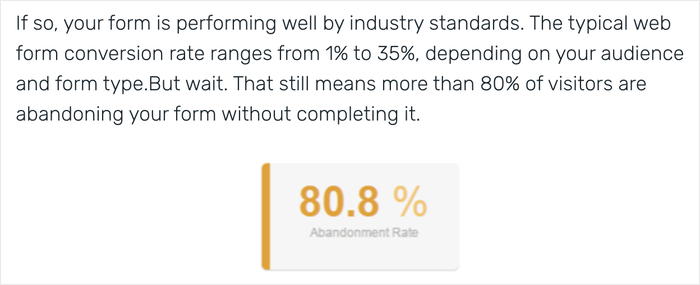
That means even when a visitor finds your form and begins filling it out, four out of five of them never hit submit.
Here’s why this happens so often:
- Forms just slam the brakes on anyone’s browsing flow. You’re basically asking them to stop scrolling, switch gears, and tackle a whole new task.
- They demand commitment before trust is established. Asking for a name, email address, and phone number from a first-time visitor is asking a lot from someone who just met you.
- On top of that, forms also offer a delayed response. “We’ll get back to you within 24–48 hours” is not what someone wants to hear when they have a question right now.
Forms still have a role to play and are great for detailed inquiries, project requests, or formal submissions.
But the stats show that forms don’t work well as the main lead capture strategy.
Why Conversations Convert Better Than Forms (The Case for Conversational Lead Capture)
Before we walk through the five strategies, it’s important to understand why these work so well.
Conversational lead capture means you’re engaging website visitors through real-time or automated chat to collect their contact information and generate leads.
The core difference is friction. A form says: “Stop what you’re doing, fill this out, and wait.” A conversation says: “Hey! Can I help you with something?”
One feels like a barrier. The other feels like a service.
So, why does conversational lead capture just work?
- First off, it actually meets people right when they’re scrolling through your site, reading an article, or trying to decide. It doesn’t yank them away to do a separate chore.
- Second, it reduces the friction. Unlike forms, it asks for information piece by piece, gradually, within a flow that already feels totally normal.
- And most importantly, it comes across like a real, genuine chat, not just some cold exercise in collecting data.
Research from Drift found that conversational tools like live chat generate 3–5x higher conversion rates compared to traditional lead forms.
People are a lot more willing to share information in a conversation, compared to when they’re being told to list some details.
Strategy 1: Meet Visitors With Multi-Platform Live Chat
Live chat for your website sounds awesome, right? But monitoring yet another dashboard, on top of your email, social media, and that WordPress admin panel, can be overwhelming.
But here’s the thing: WPChat doesn’t add a new platform to your already-full plate. It connects your website’s chat widget to the messaging apps your visitors already use and trust.
What Is WPChat and How Does Its Multi-Platform Chat Work?
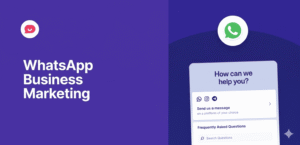
WPChat is a WordPress plugin that adds a floating chat widget to your website.
When a visitor clicks that widget, they’ll instantly see a menu of messaging apps like WhatsApp, Telegram, Instagram, and Facebook Messenger.
They simply pick the platform they’re already comfortable with, and WPChat sends them straight to your chat on that app. After that, you can reply just like you would to any other message.
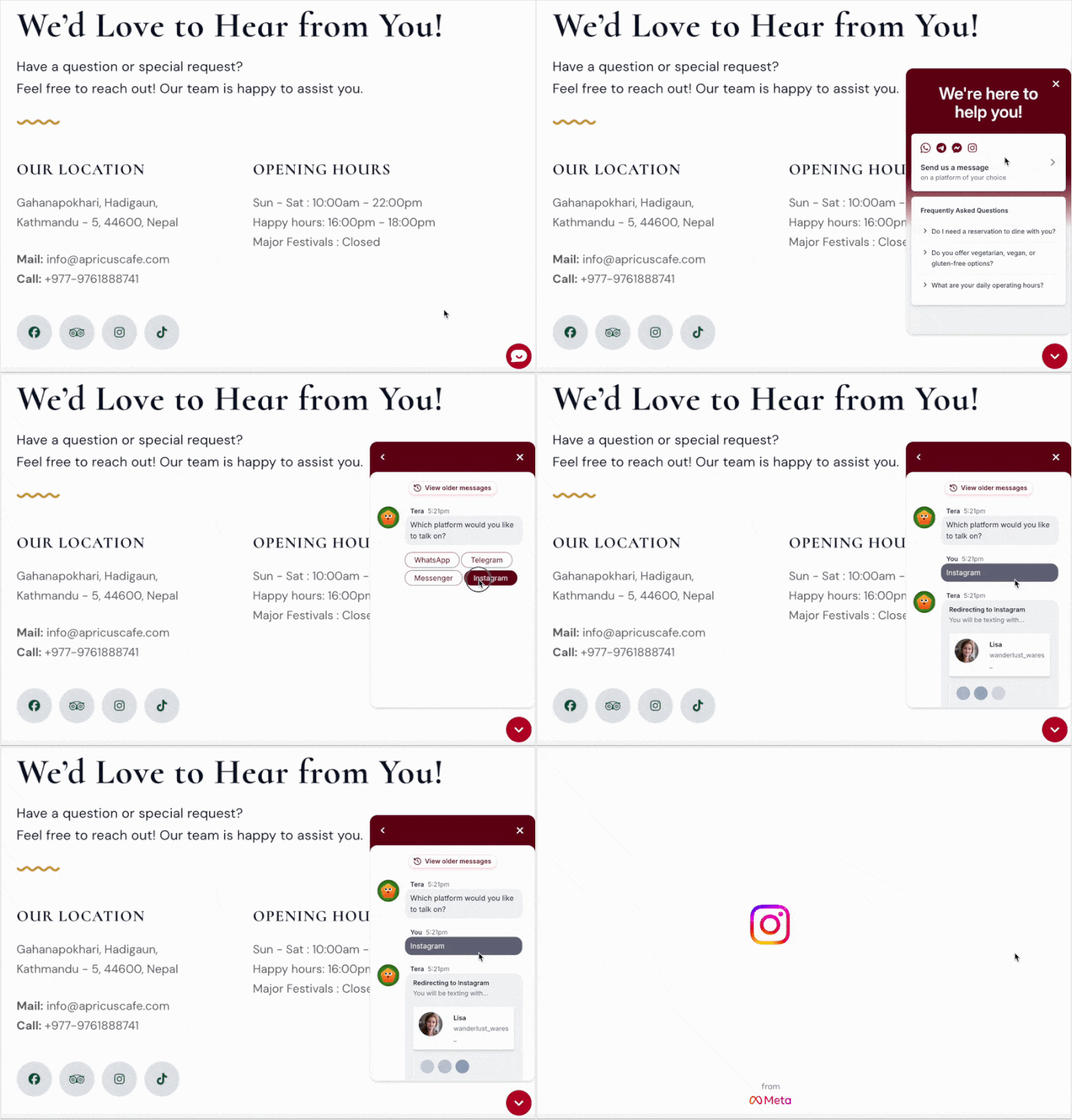
Think of it like a reception desk with a sign that says, “How would you like to reach us?” The visitor picks up the phone, using a method they’re already comfortable with.
Why This Approach Works Better for Beginners
Usually, beginners default to one of two things: a dead-end contact form or an email address plastered everywhere.
The key here? Someone starting a chat gets to choose an app they already know and trust. That’s a huge deal.
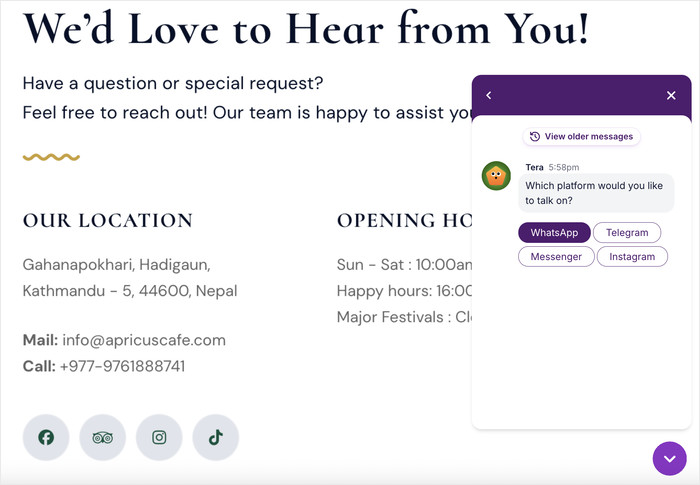
Removing that barrier can be the difference between a visitor who reaches out and one who quietly leaves.
How to Set Up the WPChat Widget on Your WordPress Site (Step-by-Step)
Don’t worry if you’ve never set up a chat tool before. This takes less than 5 minutes and requires zero coding:
- Install and activate WPChat on your website
- Enter your contact info for the messaging apps you use
- Set up display rules for your new chat widget
- Use the live editor to customize how it looks on your website
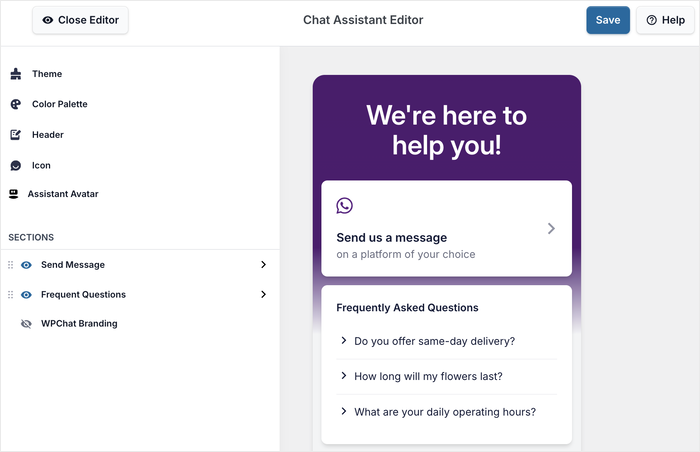
For more details, check out this step-by-step guide on how to add online chat to your website.
Tips for Converting Conversations Into Leads
Once your widget is live, the very next question every beginner asks is: “Okay, what do I actually say when someone messages me?”
Don’t worry, you’ve totally got this. Here’s a super simple framework that consistently works.
1. Respond within the first hour.
Research from Harvard Business Review found that businesses that respond to leads within an hour are nearly 7x more likely to generate leads.
The quicker you answer, the better the chance that visitor is still focused on buying or asking questions.
Setting a notification on your phone for WhatsApp or Telegram messages means you’ll rarely miss that window.
2. Answer their question first before anything else.
It’s tempting to launch straight into your pitch, but resist that urge. Start by directly answering whatever brought them to your chat.
When a visitor feels heard and helped, they’re naturally more open to hearing what you offer next.
3. End every conversation with a clear next step.
This is the moment a helpful conversation becomes a captured lead. Try something like: “Can I send you a link to our pricing page?” or “Would you like me to email you more details?”
A single, low-commitment next step is all it takes to move the conversation forward.
4. Save their contact details immediately.
As soon as a conversation wraps up, make sure you save that visitor’s name and contact info. That means their WhatsApp number, Telegram handle, or whatever email they give you.
Don’t rely on your memory or scrolling through chat history to stay organized. A simple spreadsheet or a free CRM tool works perfectly when you’re just getting started.
Strategy 2: Use Exit-Intent Popups Before Visitors Leave
Most people just assume that once a visitor decides to bail, they’re gone for good. But that’s absolutely not true.
Exit-intent tech actually lets you snag that “I’m out of here” moment and transform it into one last chance to grab a lead, literally seconds before they close the tab.
What Is Exit-Intent Technology and How Does It Work?
Exit-intent technology by OptinMonster tracks your visitor’s mouse movement on the page.
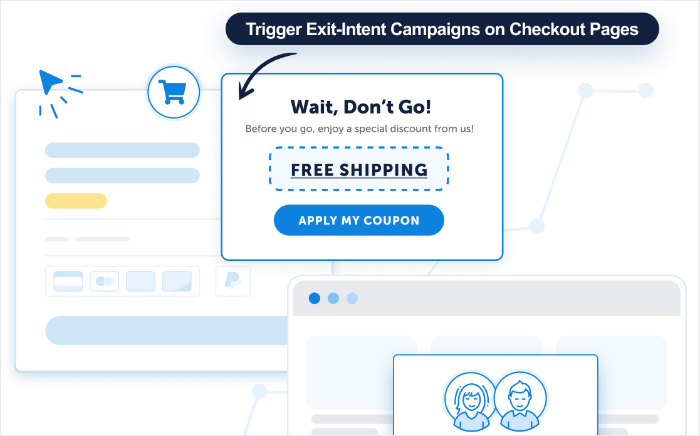
The instant someone’s cursor drifts towards the close button or the address bar to leave, a targeted popup appears.
It’s like a shop assistant spotting you heading for the door and quietly asking, “Hey, before you take off, can I grab you something?” It feels like a smart, natural whisper, not some loud, annoying interruption.
Introducing OptinMonster: The Industry-Leading Lead Generation Tool
OptinMonster is a lead generation and conversion optimization plugin for WordPress, used by over 1.2 million websites.
Using this tool, you can design targeted popups, floating bars, and slide-in forms that activate based on specific visitor behaviors. This includes when someone’s trying to leave.
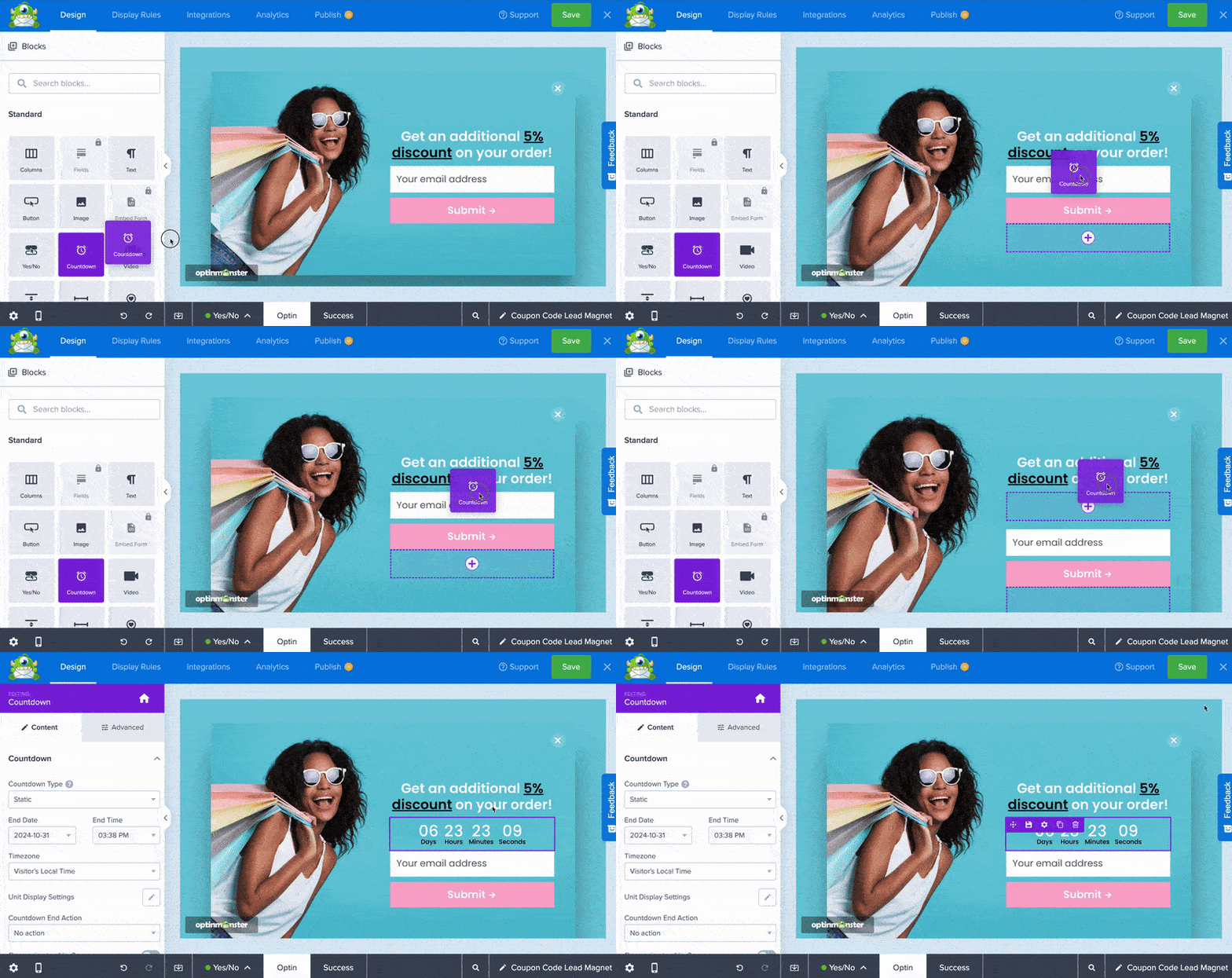
According to OptinMonster’s own published case studies, exit-intent popups can recover between 2% and 4% of abandoning visitors when the offer is well-targeted.
That might sound small, but on a site receiving 10,000 monthly visitors, that’s up to 400 leads you would have lost without the tool.
Here’s what every effective exit-intent offer must include:
- Relevance: The offer you make has to match the page the visitor is leaving. A discount or free trial? Perfect for a pricing page. But for a blog post, something like a downloadable guide will fit.
- Low Commitment: Just ask for an email address and skip the name, phone, and company. Every extra field you add simply lowers your conversion rate.
- Immediate Value: The visitor needs to understand what they’re getting right now. Things like a downloadable checklist, a discount code, or a free guide all work because the reward is instant.
- One Clear Action: Finally, keep it to one button, one choice. No extra navigation links, absolutely no distractions. The only decisions a visitor should face are “yes, I want this” or “no thanks.”
I’ve found that the most common mistake people make with exit-intent popups is using the same generic offer on every page of their site.
Honestly, just taking an extra twenty minutes to really tailor your offer for specific pages can make a massive difference in how many leads you actually snag.
To learn more, check out this beginner’s guide on creating lead-generation popups using OptinMonster.
Strategy 3: Use Chat Funnels to Warm Up Visitors
Ever called a business and had to explain your whole story from scratch? Your budget, what went wrong, everything you’d tried already?
It’s exhausting for you, and it just makes the conversation take forever.
That’s exactly what it feels like when someone completely cold drops into your live chat without any context.
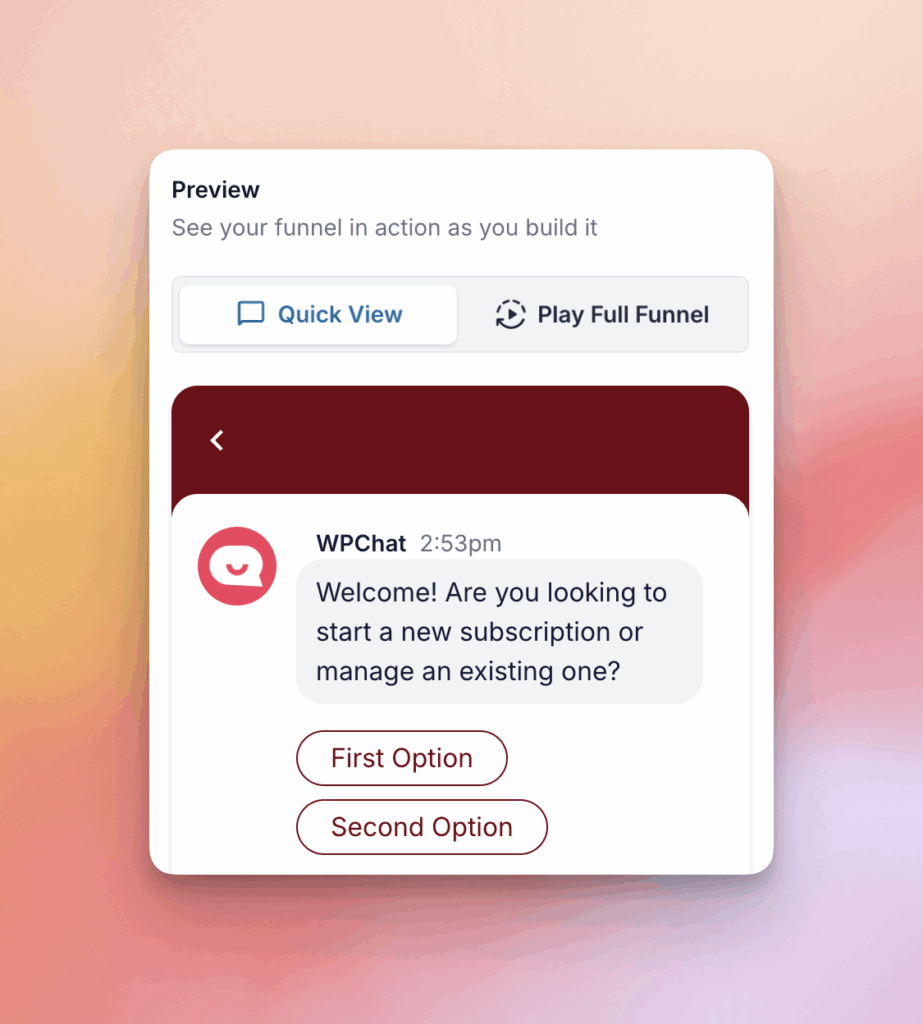
Chat Funnels solve this by making sure every visitor who reaches your team is already informed, already interested, and already clear on what they want.
What Is a Chat Funnel, and What Does It Actually Do?
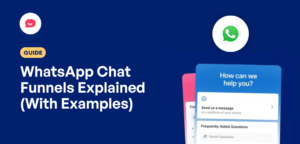
A chat funnel is a sequence of questions created with WPChat that automatically guides a visitor through a conversation, qualifies their interest, and collects their contact information.
Okay, picture a chat funnel like the receptionist at your doctor’s office.
You know, the person who asks a couple of questions, gets the gist of your visit, and makes sure the doctor already knows what’s going on before you even walk into the room.
What a Chat Funnel Conversation Looks Like
Here’s exactly what a visitor experiences when they interact with a chat funnel on your site:
- A visitor arrives on a target page (e.g., your pricing page or a popular blog post)
- If a visitor has a question, they click on a floating icon and start a chat.
- A message appears automatically asking, “Are you looking for help with [Topic A] or [Topic B]?”
- Your visitor can choose from the options (“I want to learn about shipping fees”).
- The chat funnel answers the question and asks follow-up question.
- Finally, WPChat redirects them to a support agent, and their contact information is saved.
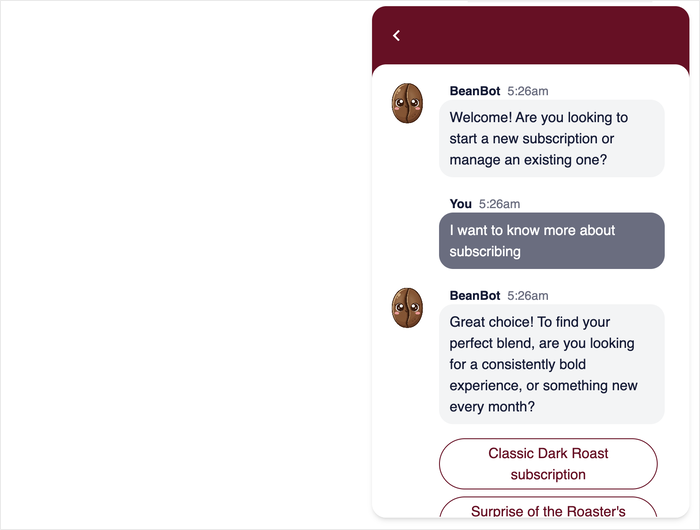
Notice what just happened? The visitor arrived at your live chat already knowing your pricing, already interested, and already having chosen to reach out.
That is a much warmer lead than someone who clicks a chat bubble and types “hi.”
Why Warmer Visitors Convert Into Leads More Easily
I’ve consistently seen this: visitors who jump into a live chat after already checking out some key info are far more likely to share their contact details and take that next step.
One informed, self-qualified visitor is worth a whole lot more than ten cold contacts you have to educate from scratch.
That’s why building a solid chat funnel is hands down one of the best ways to get higher quality leads without even needing to pump more traffic to your site.
To learn more, check out this tutorial on setting up an interactive chat widget on your website.
Strategy 4: Offer Something in Exchange for Contact Information
Asking a stranger for their email address is a big request, unless you’re offering something genuinely worth having in return.
That’s the core principle behind lead magnets, and it’s one of the most reliable lead capture strategies available.
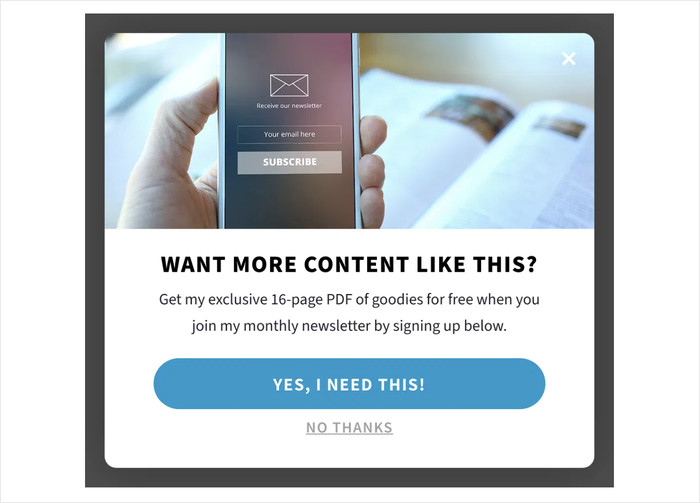
When someone downloads your checklist or resource guide, they’ve already told you something huge: they’re genuinely interested in your topic, interested enough to trade their email for more of it.
The 5 Types of Lead Magnets That Work Best for WordPress Sites
For most WordPress site owners, the best lead magnets are super quick to create. They’re immediately useful, and they tie directly into the content a visitor’s already reading.
So, here are the five formats that consistently get results:
1. A checklist version of a popular how-to post.
Take your best-performing tutorial and strip it down to a simple, printable checklist. Visitors who are halfway through reading your post are already interested in the topic.
With a checklist, you can give them something to take away and use immediately. This is one of the fastest lead magnets to create because the content already exists.
2. A resource list.
Another great solution is a curated list of tools, plugins, or links, like “The 10 plugins we use on every new WordPress site.”
It’s quick to put together and delivers immediate, practical value to visitors who are in research mode.
3. A short email course.
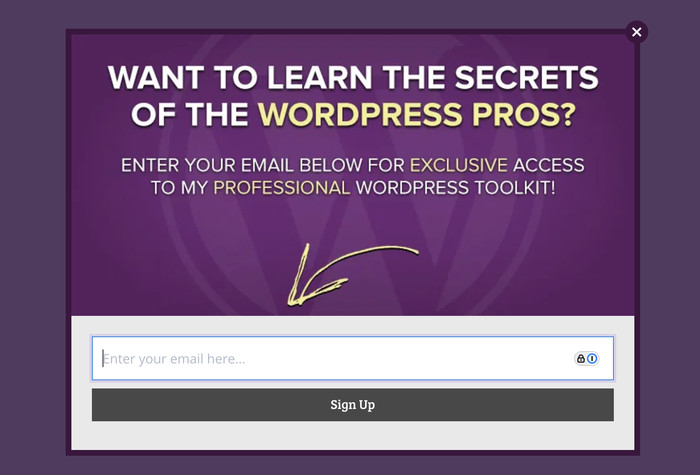
Even a series of 3–5 short emails that teach something specific like “5 days to a faster WordPress site” can do wonders for building a connection with visitors.
Each email delivers a small win, which builds trust steadily over time.
4. A free audit or assessment.
You can also offer to review something specific, like a visitor’s website speed, their SEO setup, or their email signup form.
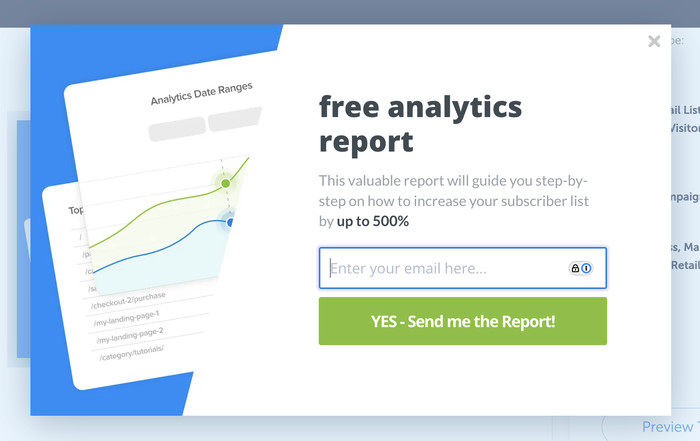
This lets you position yourself as an expert and creates an immediate, personal reason to share contact details.
5. A template.
Think of a ready-to-use template: maybe it’s an editorial calendar, a content brief, or even a social media planner. This is how you actually save your visitors real time and effort.
Templates just feel more tangible than plain written guides, which is probably why people so consistently jump at the chance to grab them.
How to Deliver Your Lead Magnet Using OptinMonster
The smartest way to get a lead magnet onto a WordPress site is through a targeted campaign that kicks in based on visitor behavior. Luckily, OptinMonster makes this really simple to get going.
The trick is to make sure your lead magnet offer shows up on the page that’s most relevant to the resource you’re giving out.
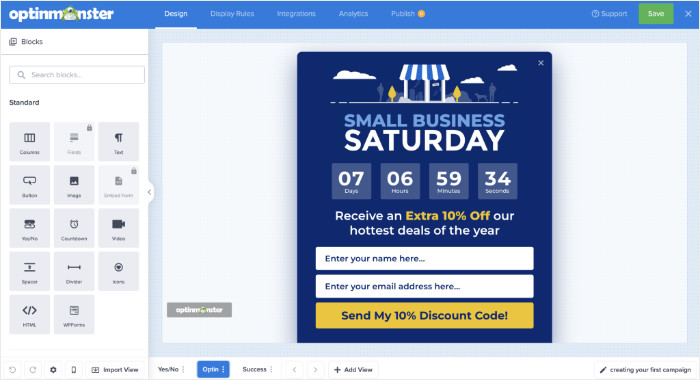
So, if you’ve created a checklist to go with a particular blog post, it makes total sense for that offer to appear right there on that post.
To get started with more ways to generate leads, take a look at this list of the best lead magnet ideas.
Strategy 5: Measure What’s Working and Optimize
Most lead capture advice stops at “set it up and let it run.” But the sites that consistently grow their email lists aren’t just running these strategies.
Instead, they’re reading their data and making small, steady improvements every month.
I’ll show you the three numbers that actually matter, and a simple monthly process for using them to get better results over time.
The 3 Metrics Every Lead Capture Strategy Should Be Measured By
These three metrics give you the lowdown on how well your lead capture tools are really doing. Best part? You don’t need any tech knowledge to figure them out.
1. Chat Conversion Rate
This is basically the percentage of visitors who genuinely engage with your WPChat widget. That means clicking it, choosing a menu option, or starting a conversation.
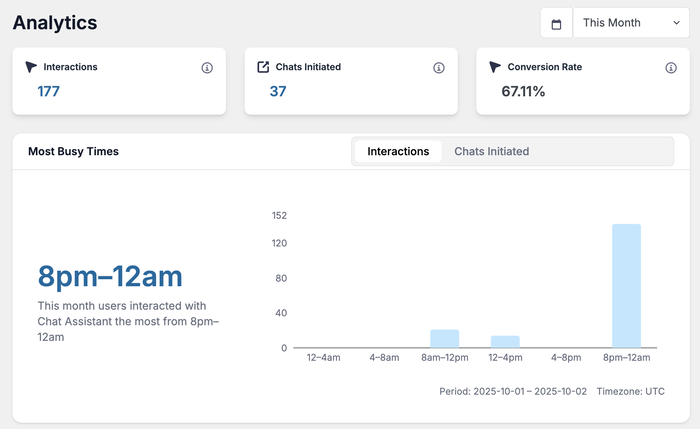
These three metrics give you the lowdown on how well your lead capture tools are really doing. And you don’t need any tech knowledge to figure them out.
2. Lead Capture Rate
This is how often your OptinMonster campaign actually grabs an email address after it appears.
If your campaign shows up frequently but isn’t converting well, the problem could be the offer itself or simply how your heading is phrasing it.
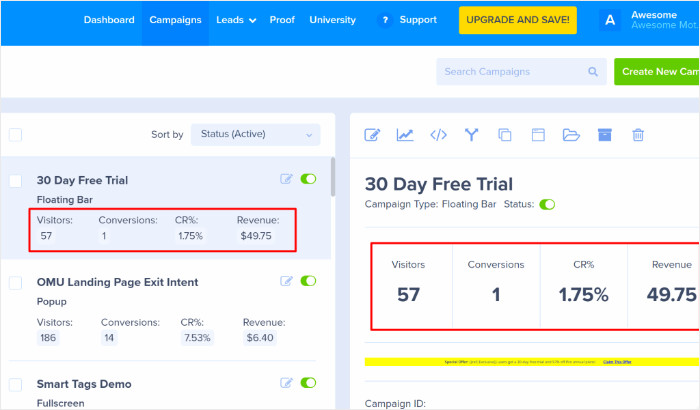
3. Page-Level Performance
This tells you which specific pages on your site are generating the most leads from your opt-in forms.
Knowing your top-performing pages helps you understand which parts of your site have been optimized to generate leads.
So, you can apply the same approach to pages that aren’t pulling their weight yet and tweak their design.
Putting It All Together: Your Lead Capture System on One Page
Alright, here’s a full breakdown of your lead capture system and how every strategy connects:
| Strategy | Tool | Best Used On | Expected Outcome |
|---|---|---|---|
| 1. Multi-Platform Live Chat | WPChat Chat Widget | All high-traffic pages | Visitors connect instantly on their preferred app |
| 2. Exit-Intent Triggers | OptinMonster Popup | High-exit pages, pricing pages | Abandoning visitors converted into leads at the last moment |
| 3. Chat Funnels | WPChat + Chat Funnels | Services, pricing, and FAQ pages | Warm, pre-qualified visitors arrive at every conversation |
| 4. Lead Magnets | Your Content + OptinMonster | High-traffic blog posts and resource pages | Email addresses collected in exchange for genuine value |
| 5. Analytics | WPChat + OptinMonster Analytics | Sitewide | Steady, compounding improvement in lead capture over time |
Each strategy in this guide works on its own. But the real power comes when they work together.
You could have WPChat warming up and qualifying visitors, OptinMonster intercepting the ones about to leave, and your lead magnets giving every visitor a solid reason to say yes.
That’s not a collection of tactics. That’s a lead capture system.
And the best news? You don’t have to build all of it right now. Just pick Strategy 1, get your WPChat widget live, and then just see what happens when people can actually connect with you on an app they already have open on their phone.
Conclusion: Stop Losing Visitors. Start Capturing Leads.
Most of your visitors are just going to leave without saying a word. That’s the harsh reality of the 98% problem, but now you’ve got a complete system to actually change that.
You know how to meet visitors on the apps they already use, warm them up before they ever talk to you, intercept them right as they’re about to leave, and offer them something truly worth sticking around for.
Ready to start generating leads and converting visitors? Sign up for WPChat today!