You’re getting a lot of pre-sale questions by email. Do you ship to Canada? Is this in stock? Can I get a quote? Each one costs you twenty minutes, and a slow reply probably costs you the sale.
So you’re picking between two things. A chat widget, where a person answers. Or a chatbot, where software does.
Every article you read frames it the same way: bots are fast and scale well, but people are better at judgment. All true, and no help at all when the person answering is you, and someone asks about shipping at 11pm.
The practical question is different. When a message arrives and nobody’s there, where does it go? And how much work does each option take before it does anything at all?
This post answers both, then shows what each takes to set up on WordPress.
In this Article:
- Live Chat vs Chatbot: The Short Answer for a WordPress Site
- All This Advice Assumes You Have Staff
- Where Does an Unanswered Message Actually Go?
- What Each One Actually Takes to Set Up on WordPress
- The Bill That Arrives After the Free Tier
- When a Chatbot Genuinely Is the Better Choice
- How WPChat Handles the Availability Problem
- Live Chat vs Chatbot: What It Comes Down To
Live Chat vs Chatbot: The Short Answer for a WordPress Site
This isn’t a choice between automation and empathy. It’s a question of who’s around to answer and where the message goes when nobody is.
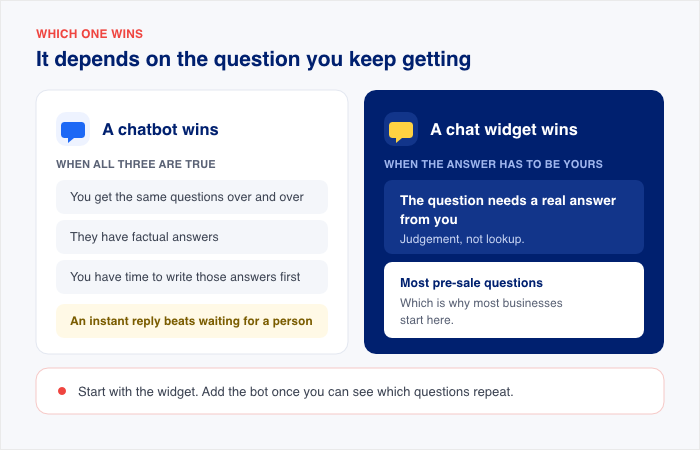
- A chatbot wins when you get the same questions over and over, they have factual answers, and you’ve got time to write those answers out first. For a quick question, an instant reply beats waiting for a person.
- A chat widget wins when the questions need a real answer from you. Which are most pre-sale questions, and that’s why most businesses start here.
Here’s the part the comparison posts skip. A chatbot can’t answer anything until you’ve written its answers. That’s not a five-minute job; it’s a writing project.
And chat widgets differ in one way that matters more than any feature list: where the conversation ends up. Some run in the browser tab, which is fine while someone’s watching.
Others send it to a messaging app the customer already has open, so it’s still sitting there in the morning whether you replied or not.
That’s the whole decision. Not which one’s friendlier, but which one still has your customer’s message in it tomorrow.
All This Advice Assumes You Have Staff
Search for “live chat vs. chatbot,” and you’ll get three different recommendations resting on the same assumption.
| How they frame it | What they tell you to do | |
|---|---|---|
| Freshworks | Live chat brings empathy, chatbots bring speed | Chatbot for high overnight volume, agents for low volume that needs a person |
| Tidio | Bots reply instantly, live chat averages 47 seconds | Use software that does both and route between them |
| Mailchimp | Bots are the efficient sidekick, live chat is the face at the storefront | Decide whether you value efficiency or relationships more |
None of it is wrong. Freshworks says pick by volume, Tidio says run both and route between them, Mailchimp says decide what you value more. All reasonable, and all of it assumes the same thing: that when the bot can’t help, there’s a person to hand the customer to.
If it’s you and maybe one other person, that assumption doesn’t hold. There’s nobody to escalate to at 11pm, so the advice runs out exactly where your problem starts.
Look at what customers actually say they want, and the argument shifts.
SurveyMonkey, February 2026:
- 89% say companies should always offer a way to reach a human
- 84% believe human agents are more accurate
- 79% strongly prefer talking to a person
Read those numbers again and notice what isn’t in them.
Not one is about warmth, or tone, or whether the bot said something tactless. They’re about access. Can I reach a person, and is this conversation going anywhere?
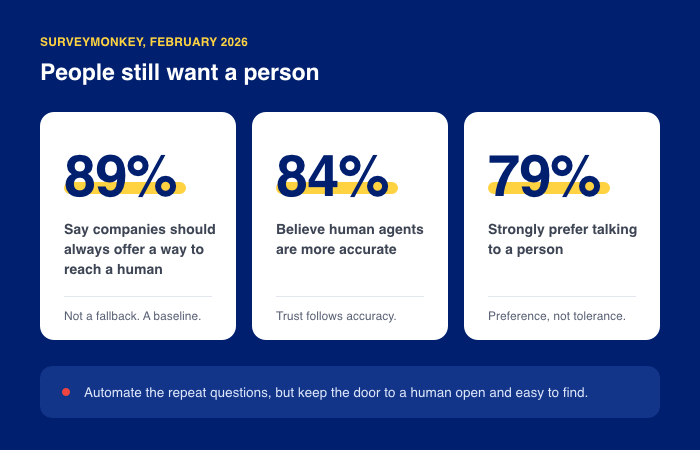
Your customers aren’t grading your chat on personality. They’re asking something simpler: if this doesn’t answer me, does anyone?
And the honest answer depends less on the software than on whether the message ends up somewhere you’ll actually see it. For most of us, it means the apps that are already open on our phones.
That’s the axis. Not automation against empathy, but whether an unanswered message is still there when you’re back at your desk.
Where Does an Unanswered Message Actually Go?
It’s 11:14 pm. Someone opens your chat and types, “Do you ship to Canada?”
You’re asleep. What happens next depends on which kind of chat you installed.
Ending one: the chatbot.
The bot answers instantly, which is the whole promise. It says you ship to most countries and links to your shipping page.
That isn’t the question. Your customer wanted to know about Canada specifically, and whether the duties are included, and they’ve read the shipping page already. So they ask for a person.
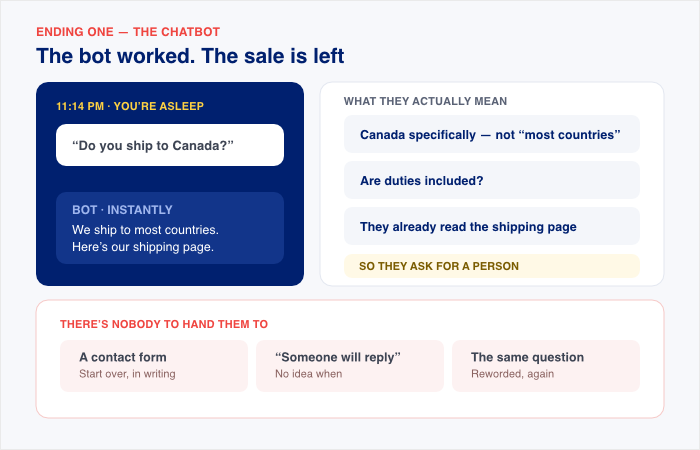
There’s nobody to hand them to. The bot offers a contact form, or says someone will get back to them, or asks the question again in different words.
Best case, they fill out the form, and you get an email in the morning. Most people don’t. They close the tab and check whether the other shop ships to Canada.
That’s where the after-hours sales go. Not to a bot that broke, but to one that worked exactly as designed and still couldn’t finish the conversation.
Ending two: the messaging thread.
Same question, same time. If you’ve set up FAQs, the widget answers straight away with what it knows. Either way, the conversation moves into WhatsApp, Messenger, Telegram, or Instagram, whichever one your customer picked.
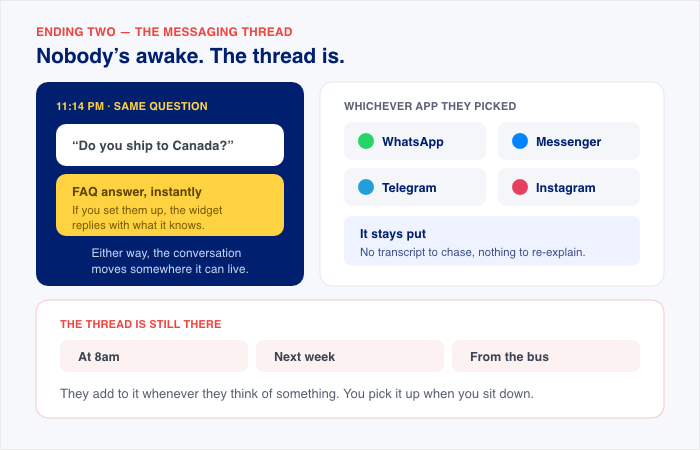
Nobody’s pretending a person is awake. But the thread is, and it stays put. It’s there at 8am.
It’s there next week. They can add to it from the bus, and you pick it up when you sit down.
| Chatbot | Messaging-app thread | |
|---|---|---|
| What your customer gets at 11:14pm | An instant answer, if you’ve written that one | An instant answer if you’ve set up FAQs, and a thread either way |
| When it can’t help | A contact form, or the same question rephrased | The message sits in the thread, waiting for you |
| How they follow up | Return to your site and start over | Reply in the thread from their phone |
| What you see the next morning | A form submission, if they bothered | The conversation, waiting for a reply |
| Where the conversation lives | A widget they have to find again | An app they already use every day |
That last row cuts both ways. Moving support into WhatsApp or Messenger means those conversations live on Meta’s platform, on Meta’s terms, and it makes your business account the thing customers message at any hour.
That’s a real trade, and worth making deliberately rather than discovering later. For most small businesses it’s an easy one, since those apps are where customers already message everyone else.
One path keeps the message but ends the conversation. The other keeps the conversation going, somewhere your customer already is, and asks you to accept that this is now where they’ll find you.
What Each One Actually Takes to Set Up on WordPress
Here’s the difference nobody in the top results points out.
A chatbot is a writing project you have to finish before it answers anything. A chat widget that runs through messaging apps works the day you install it and lets you add FAQs later if you want them.
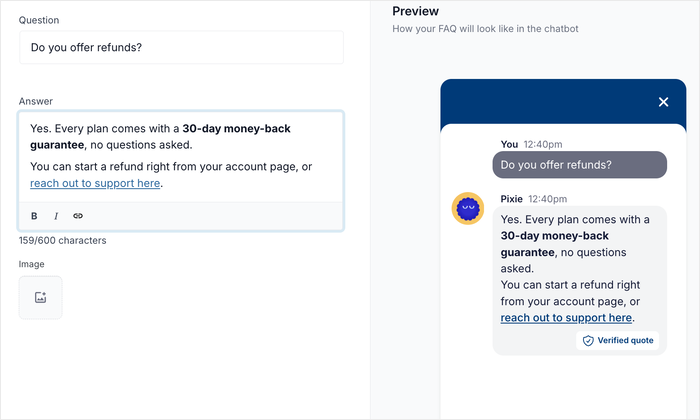
That’s not “one has answers and the other doesn’t.” WPChat has FAQs, Chat Funnels and Smart Search, and it’s worth saying so, because you’d find out later anyway.
A chatbot needs the content before it can do anything at all. With WPChat, you connect your channels, and it works, then you write FAQs when you have an afternoon.
Everything a chatbot needs before it answers one question
Before a chatbot can answer anything, you have to write the answers. Setup guides file all of it under one word, “training,” which makes it sound like something the software does. It isn’t.
Here’s what’s actually on your desk.
| Stage | What you have to do |
|---|---|
| Write the content | Answer your top 20 questions in full sentences |
| Write out pricing, returns, and shipping, including the countries you ship to | |
| Write contact details, hours, and product descriptions | |
| Check it all agrees with itself | |
| Define the behaviour | Decide what it shouldn’t try to answer |
| Decide where it sends people when it doesn’t know | |
| Set the tone, the greeting, and the suggested questions | |
| Test and maintain | Try 10 to 15 real questions from your inbox |
| Read the transcripts daily in week one, weekly after that | |
| Update the answers whenever a price or policy changes | |
| Comply | Tell people they’re talking to AI |
One more thing that’s worth checking before you commit. With some builders, the bot learns your site once, when you first create the widget.
Changing what it knows later means starting a new one and swapping the code on your site, not clicking refresh. It varies by vendor, and it’s the kind of thing you find out after your prices change, so read the documentation for whichever one you’re considering.
A live chat widget like WPChat works the other way round. You add or edit an answer in the plugin, and it’s live, with nothing to rebuild. That’s the practical answer to “can I start simple and add to it later?”
What the messaging-app path takes
- Go to Plugins » Add New Plugin, search for WPChat, then click Install Now and Activate. This puts the widget on your site without you touching a theme file.
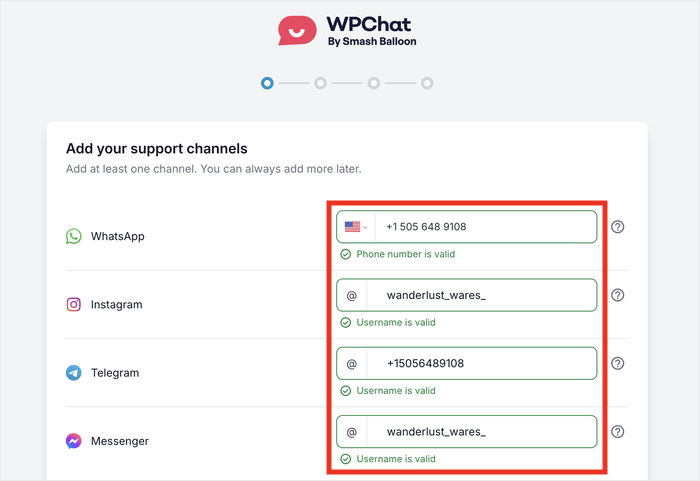
- Add your support channels. Enter your WhatsApp number, or your Messenger, Telegram or Instagram details. One is enough to start, and you can add the rest later.
- Select a theme. Three to choose from. You can change the colors afterwards.
- Configure visibility. Decide which pages the widget shows on.
- Complete the setup and your chat widget is live.
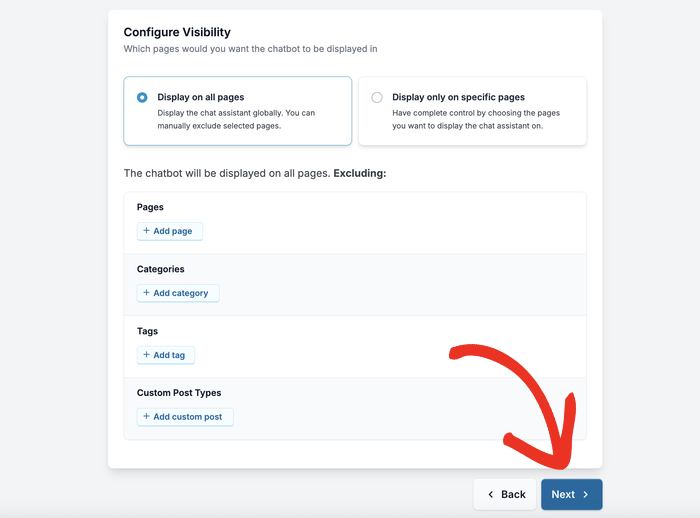
Note that FAQs and Chat Funnels aren’t in that count. They’re optional, and you can add them next month or never.
Here’s the same decision as a table.
| Chatbot | Messaging-app chat widget | |
|---|---|---|
| Content needed before launch | Questions, policies, pricing, and product details, all checked against each other | None |
| Time to first answered message | However long the writing takes, plus a five-minute embed | Install, then four setup steps |
| When your prices change | Answers go stale until you update them | FAQs go stale too, but you’re in the thread with current prices |
| If you stop maintaining it | It keeps answering, confidently and wrongly | FAQs go just as stale, but the thread still reaches you |
| Adding to it later | Some builders need a new widget built from scratch | Add or edit an answer, and it’s live |
Keep the 11pm question until you’re awake to answer it
WPChat is free on WordPress.org and sends chats straight to WhatsApp, Messenger, Telegram or Instagram. Pro adds off-hours routing and unlimited FAQs, with a 14-day money-back guarantee.
See WPChat Pro PlansThe Bill That Arrives After the Free Tier
Free chatbot plans are metered. One popular builder gives you 50 messages a month, and once you pass that, the widget switches off. Its own documentation says it stops being visible to visitors, as if it was never installed.
Your customers don’t get a warning. They get a page with no chat on it, which looks exactly like a site that never had one. You find out only if you log in and look.
Paid tiers move the ceiling rather than removing it. Whether the cap is 300 messages or 20,000, it’s a number you can hit in a month you didn’t plan for. And the pricing itself moves: flat allowances become per-seat, or per question answered, or automatic top-ups the moment you cross the line.
Two opposite failures, same moment. One tool goes quiet and tells nobody. The other keeps talking and keeps charging.
Elfsight’s free chatbot plan is a useful example:
- 50 messages a month on the free plan
- Only your customers’ messages count, not the bot’s replies
- Paid tiers move the ceiling to 300, then 1,000, then 3,000
- The clock resets on your subscription date, not the first of the month
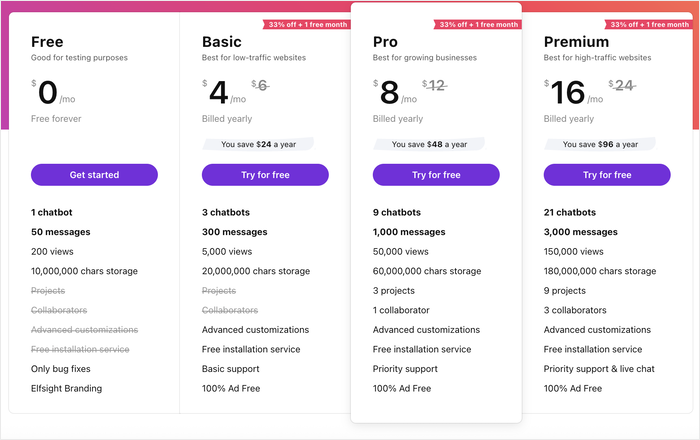
Fifty isn’t many once a post starts pulling traffic. And the ceiling is the point: whether the cap is 50 or 3,000, whether customers can reach you comes down to what you’ve budgeted that month.
Before you sign up, find out what happens when you hit it. Some tools go silent. Some bill you. Know which one you’re buying.
When a Chatbot Genuinely Is the Better Choice
Everything above argues for keeping a person in the loop. That doesn’t make chatbots the wrong tool. For some businesses they’re clearly the better call, and the conditions are specific enough to check yourself against.
- You get the same questions constantly. Not “it feels like a lot.” Count a week of your inbox. If six questions make up most of it and you’re spending hours on them, a bot pays for itself.
- The answers don’t change. Sizing charts. Shipping zones. Opening hours. One correct answer, regardless of who’s asking or how annoyed they are. That’s what a bot is good at.
- Someone will keep it updated. A specific person, every time a price moves or a policy changes. If that person is you and you’re already behind on your inbox, be honest about it.
- You’ve budgeted for a busy month, not a quiet one. And you know whether the tool goes silent or bills you when the meter runs out.
There’s also a simpler point in the bot’s favor. For a quick factual question, a good bot beats waiting for a person.
If nobody keeps it updated, though, it doesn’t stop working. It keeps answering, confidently, with last year’s return policy. And every wrong answer reads as an official statement from your business.
Whichever way you go, there has to be a way through to a person. 78% of people say it matters that they can switch from a bot to a human, and only 15% say that switch actually works.
Which brings us back to where this started. If that route leads to a chat window nobody is watching, it isn’t a route.
How WPChat Handles the Availability Problem
WPChat is a free chat plugin for WordPress from Smash Balloon. It puts a chat widget on your site and connects it to the messaging apps your customers already have open on their phones.
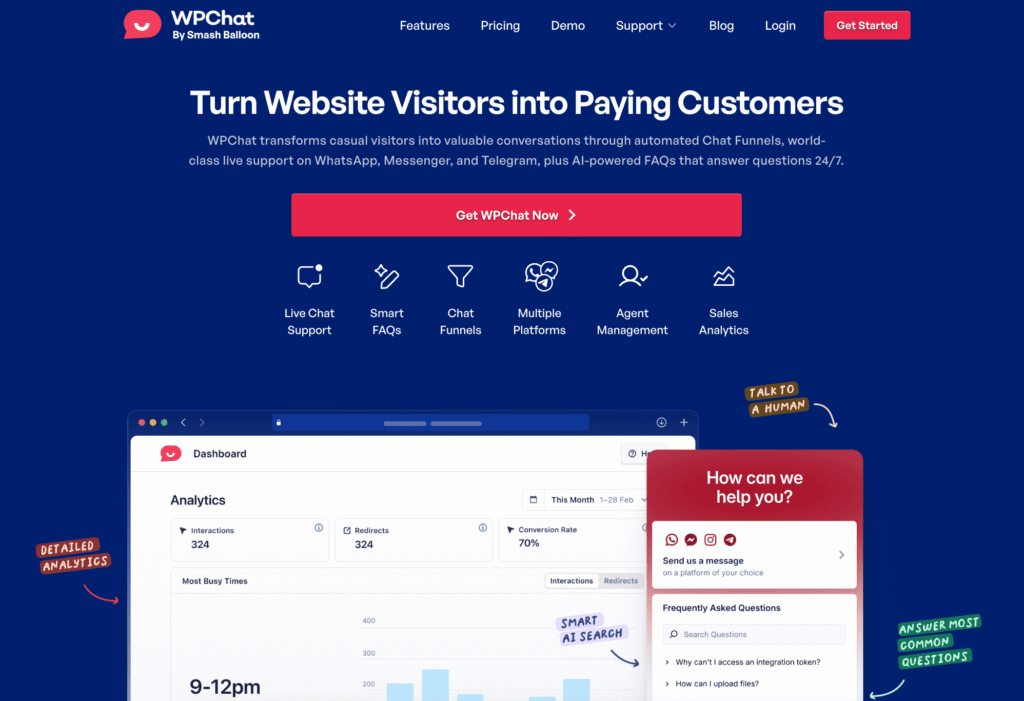
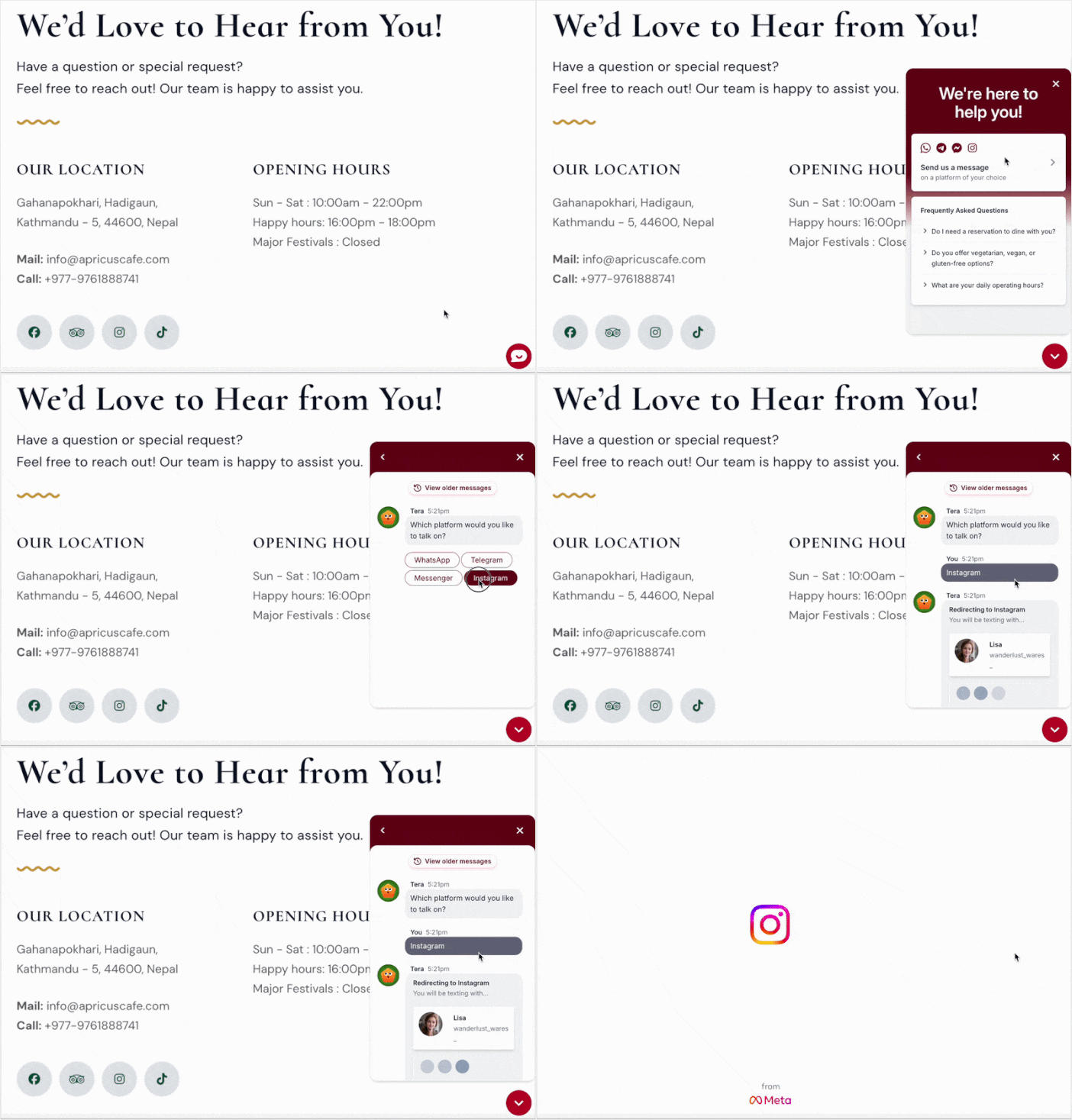
That connection is the whole point. Someone clicks the widget, picks a channel, and the conversation opens in WhatsApp, Messenger, Telegram, or Instagram. From that moment it’s a normal thread in a normal app.
Which answers the question this article started with:
- The message doesn’t disappear. It’s in your WhatsApp with their name on it, still there in the morning whether you replied or not.
- Nobody gets silence. Set the hours you’re around, and outside them the widget tells people when you’ll next be available. You can also nominate someone to take chats after hours.
- There’s no second inbox. The conversation lands in an app you already check, not a dashboard you have to remember to open.
Once you’re live, you can add more whenever you have time:
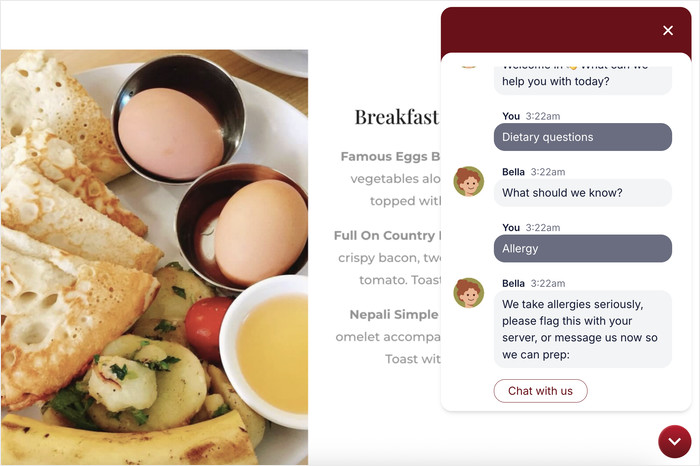
- FAQs answer your common questions instantly. You write them yourself in the plugin, so it only ever says what you told it to say. Three questions is a working setup.
- Smart Search matches what someone asks to your FAQs even when they don’t use your wording.
- Chat Funnels walk people toward the right conversation on their own.
Nobody hits a dead end or a “Sorry, I didn’t understand that.” If there’s an answer, they get it straight away. If there isn’t, the conversation carries on in an app you’ll open anyway.
To make things easier, the setup is install and activate, then four screens: add your channels, pick a theme, choose which pages it shows on, and finish.
Here are the details, so you can check them before you commit:
- Free version: on WordPress.org. Four messaging platforms, 10 FAQs, one agent
- Pro: from $49 a year. 30 FAQs and five agents on Basic, more on higher tiers
- Setup: Install, then four screens, no code, no theme files to edit
- Works with: any WordPress theme, and WooCommerce product and checkout pages
- Refunds: 14-day money-back guarantee
- Built by: Smash Balloon, making WordPress plugins for over 10 years, used by over 1.6 million people
It’s worth mentioning that Smart Search comes with an allowance. Use it up and the search keeps working, it just goes back to matching the words people type rather than what they mean.
Nothing switches off, nothing disappears for your customers, and the widget itself isn’t affected.
The free version covers what brought you here: four messaging platforms, ten FAQs, and a message that’s still there in the morning.
Live Chat vs Chatbot: What It Comes Down To
If you’re running a small team, you were never choosing between a robot and a person. You were choosing where a message waits while you sleep.
A chatbot can be the right answer, but it isn’t something you install and forget. It’s a writing project you have to finish, keep updating, and pay for by the volume you actually get.
A chat widget that hands off to a messaging app is the answer when the real constraint is that nobody’s free to reply right now. The message lands in an app you already have open, and it’s still there in the morning.
With WPChat, you can set up your chat widget in minutes, and chat with visitors on platforms they already use and trust every day
Get started with WPChat today and start connecting with your visitors!
To learn more, check out our step-by-step guide on how to add live a chat widget to your WordPress website.