Si quieres añadir chat de WhatsApp a tu sitio de WordPress sin pagar por un plugin, estás en el lugar correcto.
Uso WPChat, el plugin de WordPress click-to-chat de Smash Balloon, y la versión gratuita es legítimamente gratis para siempre.
Sin período de prueba, sin necesidad de tarjeta de crédito. Obtienes un botón de chat en los 4 canales (WhatsApp, Messenger, Telegram e Instagram), un perfil de agente y hasta 10 respuestas automatizadas de preguntas frecuentes, todo instalado en menos de 5 minutos.
Si quieres comparar WPChat con otras opciones primero, aquí tienes un resumen de plugins gratuitos de WhatsApp para WordPress que cubre las principales alternativas. De lo contrario, aquí tienes exactamente lo que obtienes, cómo instalarlo y dónde están los límites de la versión gratuita.
¿Existe un plugin gratuito de chat de WhatsApp para WordPress?
Sí. WPChat tiene una versión gratuita que es 100% gratis para siempre. Incluye un botón de chat para WhatsApp, Facebook Messenger, Telegram e Instagram, un perfil de agente y hasta 10 respuestas automatizadas de preguntas frecuentes. La instalación tarda menos de 5 minutos y no requiere codificación.
En este artículo
- ¿Qué es WPChat de Smash Balloon?
- ¿Qué obtengo con la versión gratuita de WPChat?
- ¿Es WPChat realmente gratuito?
- Plugin de chat de WordPress WPChat: Gratuito vs. Pro
- Cómo instalo la versión gratuita de WPChat
- Preguntas frecuentes
- ¿La versión gratuita de WPChat es realmente gratis para siempre?
- ¿Cuáles son los límites de WPChat Free?
- ¿La versión gratuita de WPChat funciona con WhatsApp Business?
- ¿Puedo actualizar de WPChat Free a Pro sin perder mi configuración?
- ¿Es WPChat el mejor plugin gratuito de chat de WhatsApp para WordPress?
- Empieza a usar WPChat gratis hoy mismo
¿Qué es WPChat de Smash Balloon?
WPChat de Smash Balloon es el plugin de WhatsApp para WordPress más fácil de usar. Te ayuda a mostrar un widget de chat bonito y personalizable en tu sitio en menos de 5 minutos.
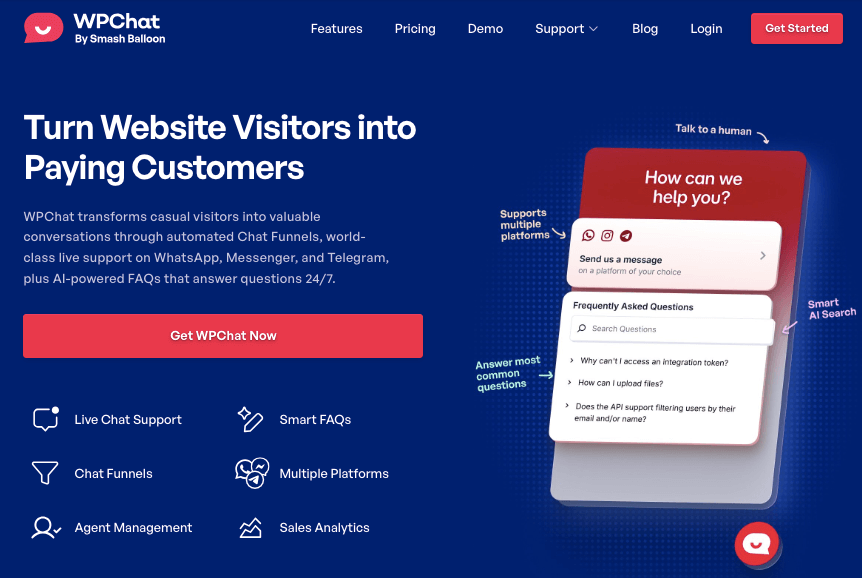
Está diseñado para ser fácil de usar, para que puedas ofrecer soporte instantáneo y responder a preguntas previas a la venta sin escribir una sola línea de código ni contratar a un desarrollador.
La conversación se traslada directamente a la aplicación de mensajería favorita de tus clientes, ya sea WhatsApp, Telegram, Instagram o Facebook Messenger, para que puedan chatear contigo en la plataforma que ya utilizan y en la que confían.
Lo mejor de todo es que la versión gratuita del plugin WPChat es 100% gratuita para siempre. Para ayudarte a hacer crecer tu negocio, también puedes actualizar a un plan de WPChat de pago para desbloquear funciones aún más potentes.
¿Qué obtengo con la versión gratuita de WPChat?
La versión gratuita de WPChat te proporciona un conjunto completo de herramientas para empezar a tener conversaciones significativas con los visitantes de tu sitio web.
Esto es lo que puedes hacer con ella:
- Chatea en todas tus plataformas favoritas — Conecta con los clientes no solo en WhatsApp, sino también en Telegram, Instagram y Facebook Messenger. La versión gratuita te permite gestionar conversaciones de todas estas plataformas con un único perfil de agente.
- Empieza a hablar con los clientes en minutos — Olvídate de contratar a un desarrollador o perder tiempo en configuraciones complicadas. Nuestro sencillo asistente de configuración pone tu widget de chat en funcionamiento en solo unos minutos, para que puedas empezar a hablar con los clientes hoy mismo.
- Conecta con los visitantes en sus términos — Convierte una visita fugaz en una conexión duradera. La conversación se traslada directamente a su aplicación de mensajería favorita para que los clientes puedan hacer una pregunta y continuar el chat en su teléfono, incluso después de abandonar tu sitio web.
- Crea confianza con una conexión humana — Crea un perfil profesional con tu nombre y foto para generar confianza de inmediato. Cuando los clientes ven que hablan con una persona real, ganan la confianza necesaria para hacer preguntas importantes antes de la venta.
- Ahorra tiempo y ofrece soporte 24/7 — Ofrece respuestas instantáneas de día o de noche añadiendo hasta 10 preguntas frecuentes a tu widget de chat. Ahorrarás tiempo al no tener que responder las mismas preguntas una y otra vez, mientras tus clientes obtienen la ayuda que necesitan de inmediato.
- Protege tu SEO y la experiencia del usuario — Como WPChat está diseñado para ser ligero y rápido, no ralentizará tu sitio. Protegerás tu posicionamiento en los motores de búsqueda y garantizarás que cada visitante, especialmente en dispositivos móviles, tenga una experiencia fluida.
Una cosa que vale la pena saber de antemano: la versión gratuita incluye un perfil de agente, lo que significa que un número de teléfono o cuenta maneja todas las conversaciones entrantes.
También limita las respuestas automatizadas de preguntas frecuentes a 10. Ambos límites son fáciles de manejar cuando estás empezando, pero si tu sitio crece y necesitas que varios miembros del equipo compartan conversaciones o más cobertura de preguntas frecuentes, es entonces cuando actualizar a Pro tiene sentido.
¿Es WPChat realmente gratuito?
Sí, absolutamente. La versión gratuita de WPChat es completamente gratuita y puedes usarla todo el tiempo que quieras. No hay cargos ocultos, en serio.
Si quieres desbloquear funciones más potentes para ayudarte a hacer crecer tu negocio, puedes actualizar fácilmente a un plan de pago de WPChat en cualquier momento.
Entonces, ¿cómo se comparan las versiones gratuita y de pago? Echemos un vistazo a continuación.
Aquí tienes un resumen rápido de lo que se incluye en cada nivel:
| WPChat Gratuito | WPChat Pro | |
|---|---|---|
| Botón de chat de WhatsApp | Sí | Sí |
| Canales | 4 (WhatsApp, Messenger, Telegram, Instagram) | 4 (WhatsApp, Messenger, Telegram, Instagram) |
| Perfiles de agente | 1 | Ilimitado |
| Preguntas Frecuentes Automatizadas | Hasta 10 | Ilimitado |
| Embudo de chat | No | Sí |
| Panel de análisis | No | Sí |
| Enrutamiento inteligente de agentes | No | Sí |
| Horarios de disponibilidad de agentes | No | Sí |
| Ideal para | Solopreneurs que gestionan sus propios chats | Equipos y sitios centrados en ventas |
Para una mirada más cercana a lo que hacen realmente los embudos de chat, aquí tienes cómo usar los embudos de chat en WPChat para guiar a los visitantes hacia una compra automáticamente.
Plugin de chat de WordPress WPChat: Gratuito vs. Pro
La versión gratuita de WPChat es una forma fantástica de empezar a hablar con los visitantes de tu sitio web.
Te proporciona las herramientas esenciales para responder preguntas en las plataformas de mensajería más populares desde el principio.
Pero a medida que tu negocio crece, aparecen nuevos desafíos.
¿Cómo gestionas un equipo cuando eres el único que responde a los chats? ¿Cómo puedes ahorrar más tiempo y guiar a los clientes automáticamente? ¿Cómo sabes qué está funcionando realmente?
Ahí es donde entra WPChat Pro. Viene con funciones potentes para que puedas construir un sistema de soporte profesional y convertir esas conversaciones en una fuente fiable de crecimiento.
Esto es lo que puedes lograr cuando actualizas a la versión premium de WPChat:
💬 Haz crecer fácilmente tu equipo de soporte
La versión gratuita es perfecta para un autónomo o una sola persona que gestiona chats en todas las plataformas.
Pero, ¿qué sucede cuando necesitas incorporar ayuda? Con WPChat Pro, puedes incorporar a todo tu equipo. Te permite añadir de 5 a agentes ilimitados y establecer sus horarios de conexión.
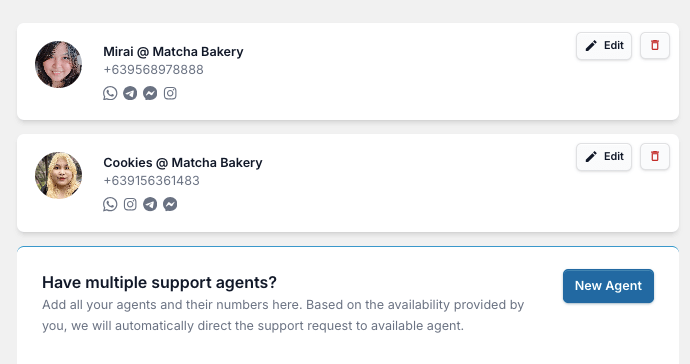
Cada miembro del equipo obtiene su propio perfil con nombre, foto y datos de contacto en WhatsApp, Telegram, Facebook Messenger e Instagram, para que los clientes sepan que hablan con una persona real, generando confianza y aumentando la confianza del cliente en tu marca.
💬 Guía a los clientes a la solución correcta, automáticamente
En lugar de simplemente esperar preguntas, puedes usar Embudos de Chat para guiar suavemente a los visitantes.
Piénsalo como un asistente útil que puede recomendar productos, hacer preguntas de cualificación o dirigir a los usuarios a la página correcta para que puedas obtener más clientes potenciales.
💬 Ofrece respuestas instantáneas a preguntas comunes, 24/7
Ahorra un tiempo valioso para ti y tu equipo creando un centro de ayuda completo con FAQs ilimitadas.
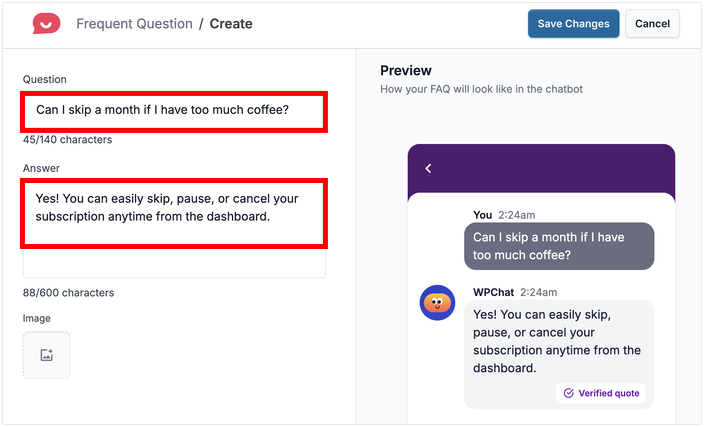
Esto ayuda a los clientes a encontrar las respuestas que necesitan al instante, a cualquier hora del día, todos los días.
💬 Ve qué funciona con análisis claros
Utiliza nuestro panel de análisis para ver tus horas de mayor actividad, cómo está rindiendo tu equipo y cómo están convirtiendo tus Funnels.
💬 Crea una experiencia de chat fluida y acorde a tu marca
WPChat Pro te ofrece control total del diseño sobre colores, iconos y avatares. Esto crea una experiencia coherente y profesional que genera confianza y hace que tus clientes se sientan como en casa.
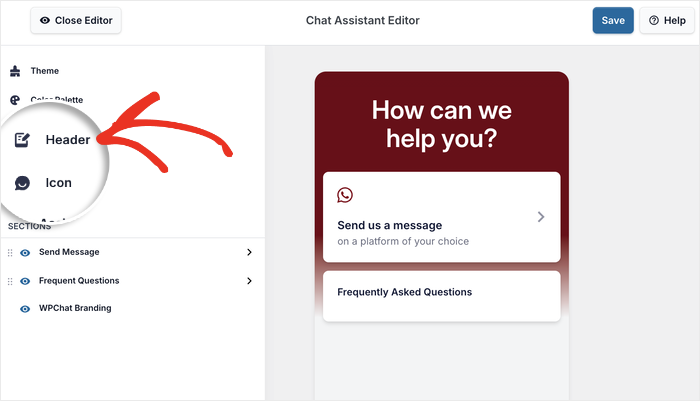
Como puedes ver, la actualización es un gran siguiente paso para un negocio en crecimiento que desea brindar soporte de clase mundial de una manera amigable y eficiente.
¡¿Listo para dar ese paso? Comienza hoy mismo con la versión premium de WPChat!
Cómo instalo la versión gratuita de WPChat
Empezar con WPChat es increíblemente fácil.
Te guiaré a través del proceso exacto que utilizo, paso a paso. En solo unos minutos, tendrás un widget de chat de WhatsApp en vivo en tu sitio.
Es importante tener en cuenta que WPChat funciona en sitios de WordPress.org autoalojados. Si no estás seguro de la diferencia, puedes consultar este útil artículo sobre WordPress.org vs WordPress.com.
¡Con eso, empecemos!
Configurar WPChat gratuito lleva menos de 5 minutos. Instalas el plugin desde WordPress, conectas tu número de WhatsApp a través de un asistente de configuración y eliges cómo se ve el botón de chat y dónde aparece en tu sitio. No se requieren credenciales de API ni codificación.
Paso 1: Instalar y activar el plugin WPChat
Primero lo primero, siempre empiezo instalando y activando el plugin desde el panel de WordPress.
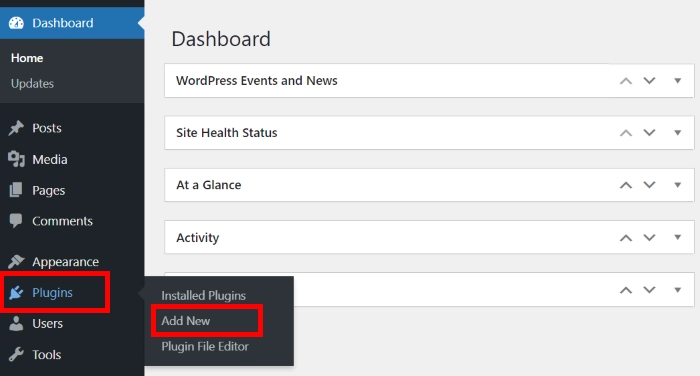
Desde tu menú de WordPress, en el lado izquierdo, navega a Plugins » Añadir nuevo.
En la siguiente página, puedes usar la barra de búsqueda en la esquina superior derecha y escribir “wpchat”.
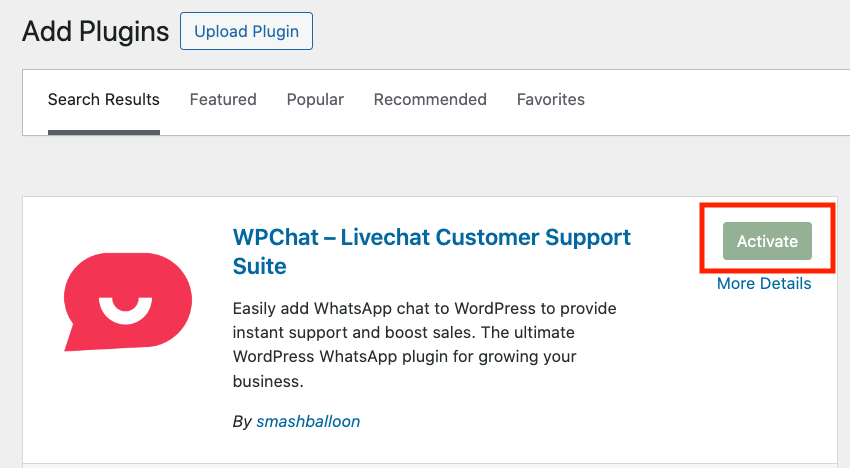
El plugin gratuito WPChat debería aparecer como el primer resultado. Haz clic en el botón Instalar ahora justo al lado del nombre del plugin WPChat.
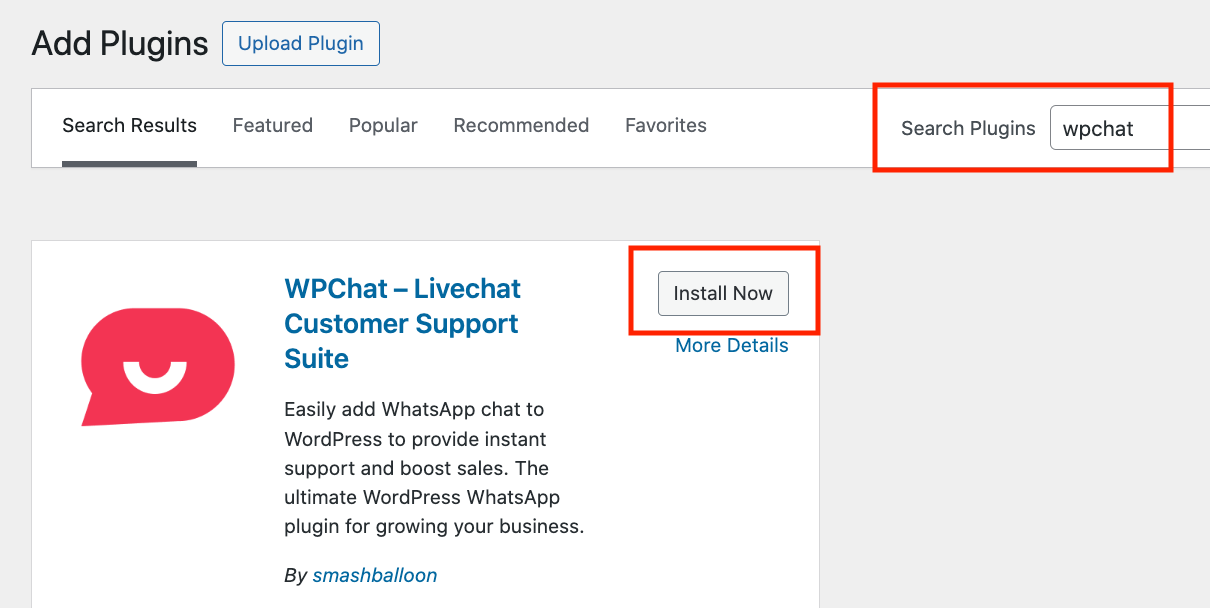
WordPress tarda solo un momento en instalarlo. Una vez que termine, el botón cambia a Activar, en el que puedes hacer clic de inmediato.
Paso 2: Configurar y conectar tu número de WhatsApp
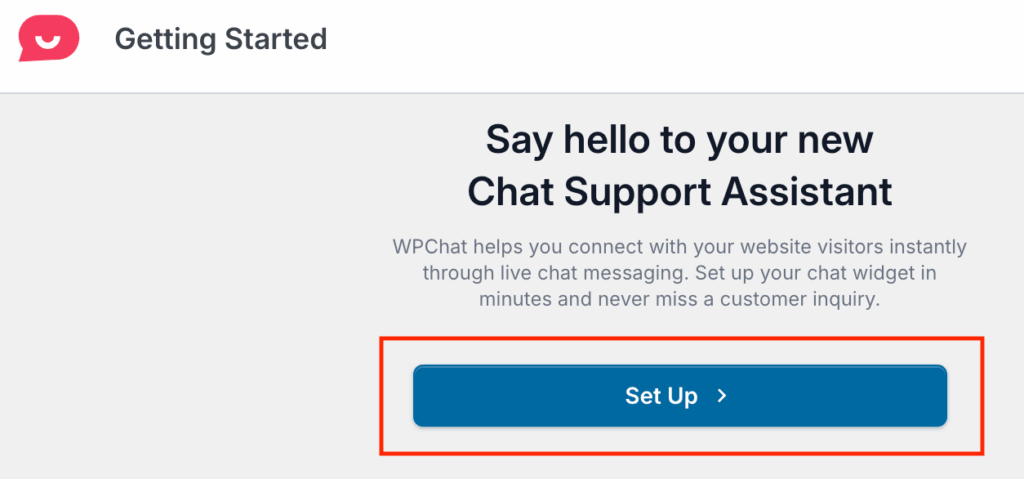
Una vez que el plugin esté activado, serás llevado automáticamente al panel principal de WPChat. Desde aquí, simplemente haz clic en el botón Configurar para iniciar el asistente de configuración amigable.
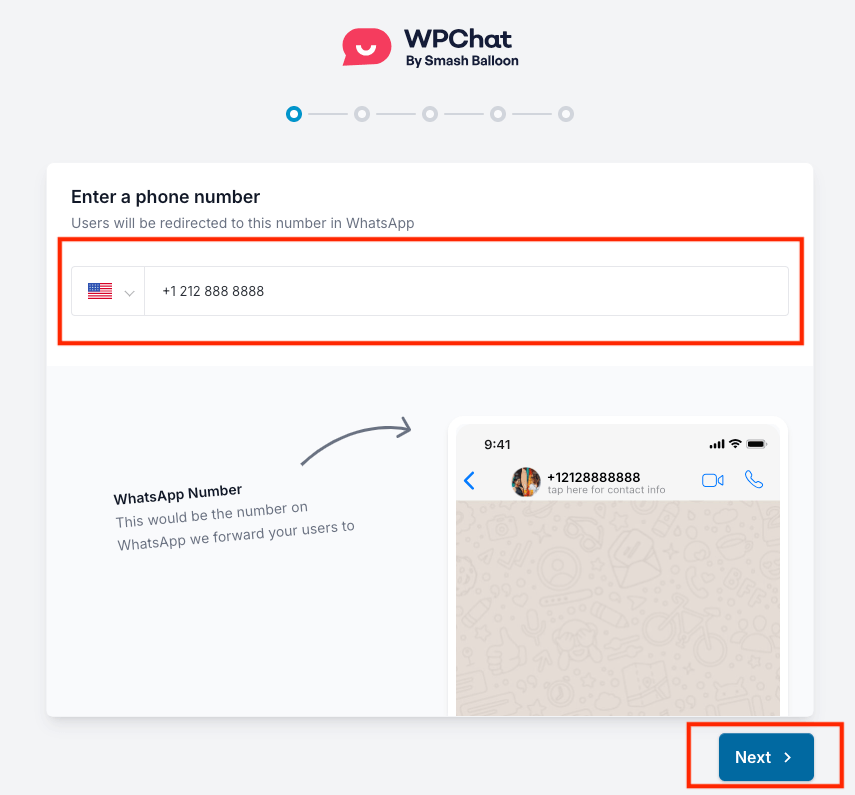
El primer y más importante paso es conectar tu número de WhatsApp.
Siempre reviso esta parte para estar seguro, así que ingresa el número de teléfono donde deseas recibir todos tus chats de clientes.
Una vez que hayas ingresado tu número, haz clic en Siguiente.
Empieza a chatear con tus visitantes gratis
La versión gratuita de WPChat es tuya para conservarla. Cuando estés listo para añadir más agentes, preguntas frecuentes ilimitadas o embudos de chat, WPChat Pro estará listo cuando tú lo estés.
Ver planes WPChat Gratuito y ProPaso 3: Personalizar tu widget de chat
Ahora, la parte divertida: hacer que tu widget de chat de WordPress se vea genial.
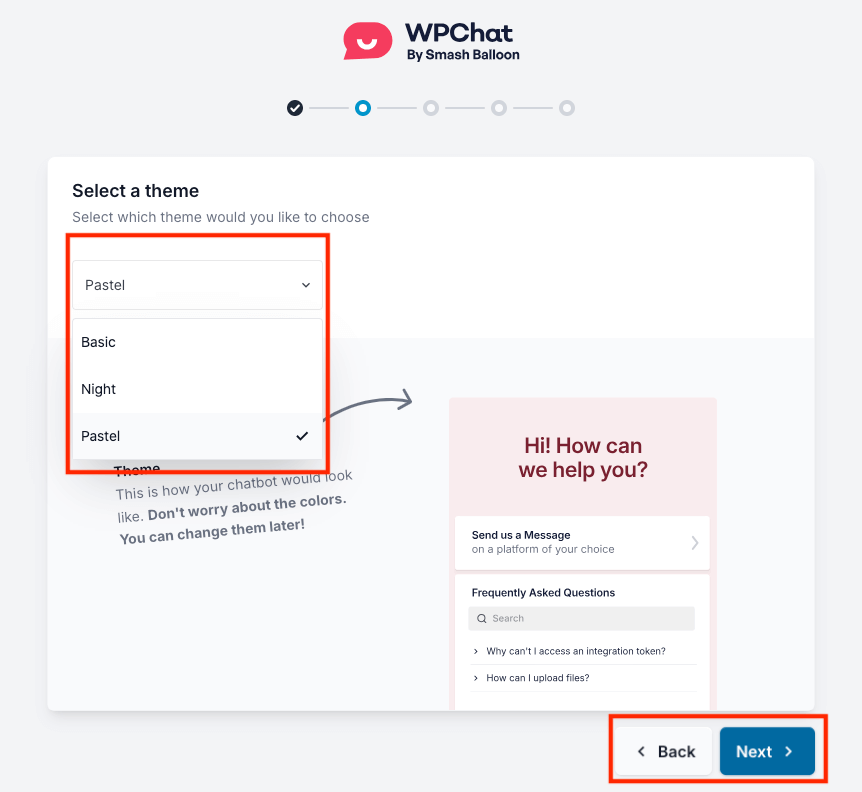
Primero, elegirás un tema para tu asistente de chat.
La versión gratuita viene con 3 hermosas opciones. Yo suelo elegir el tema Pastel porque sus colores suaves y amigables quedan genial en la mayoría de los sitios web, pero siéntete libre de elegir el que mejor se adapte a tu marca.
A continuación, configurarás la visibilidad del widget. Casi siempre recomiendo elegir Mostrar en todas las páginas para empezar.
Por supuesto, a veces necesitas más control.
Por ejemplo, en uno de mis sitios de comercio electrónico, utilizo la segmentación avanzada de WPChat Pro para mostrar el widget de chat de WordPress solo en las páginas de productos y de pago para ayudar a responder preguntas de última hora que conducen a una venta.
Por ahora, sin embargo, Mostrar en todas las páginas es la forma perfecta de empezar.
Después de haber realizado sus selecciones, haga clic en Guardar y continuar.
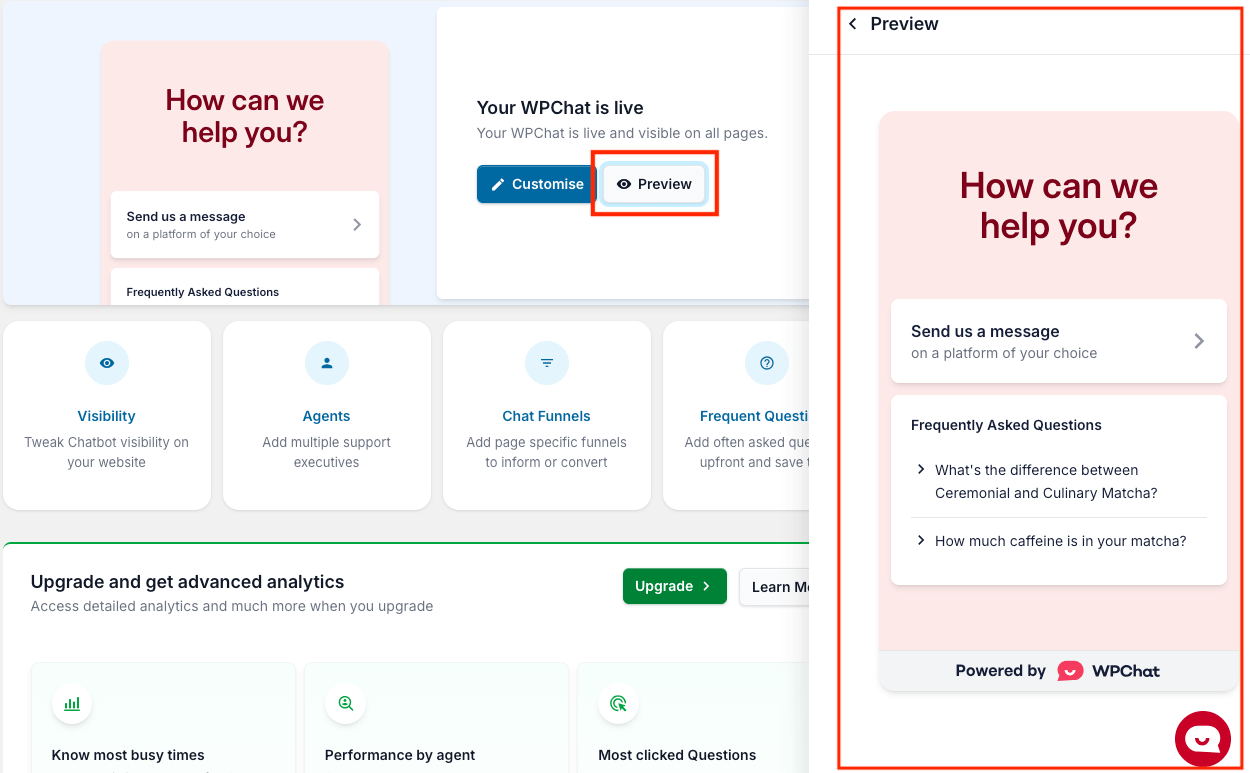
¡Tu widget de chat ya está en vivo! Puedes previsualizarlo en tu panel de WPChat, y siempre recomiendo abrir tu sitio web en una nueva pestaña para ver lo bien que queda.
Preguntas frecuentes
¿La versión gratuita de WPChat es realmente gratis para siempre?
Sí. No hay período de prueba ni se requiere tarjeta de crédito. La versión gratuita de WPChat es tuya para siempre. Puedes actualizar a Pro en cualquier momento para desbloquear agentes adicionales, embudos de chat y análisis, pero la versión gratuita nunca caduca ni te bloquea.
¿Cuáles son los límites de WPChat Free?
La versión gratuita incluye un perfil de agente, hasta 10 respuestas automatizadas de preguntas frecuentes y botones de chat en 4 canales (WhatsApp, Facebook Messenger, Telegram e Instagram). No incluye embudos de chat, el panel de análisis ni el enrutamiento inteligente de agentes. Si necesitas que varios miembros del equipo manejen conversaciones o más de 10 preguntas frecuentes, eso requiere WPChat Pro.
¿La versión gratuita de WPChat funciona con WhatsApp Business?
Sí. Puedes introducir un número de WhatsApp personal o un número de WhatsApp Business durante el asistente de configuración. WhatsApp Business es la mejor opción para la mayoría de los sitios porque añade un perfil de empresa, mensajes de saludo automatizados y etiquetas de conversación sin coste adicional. Para un desglose de la diferencia, aquí tienes una guía sobre WhatsApp Business App vs. WhatsApp Business API.
¿Puedo actualizar de WPChat Free a Pro sin perder mi configuración?
Sí. Tu perfil de agente, número de WhatsApp, respuestas a preguntas frecuentes y configuración de visualización se conservan al actualizar. Simplemente desbloqueas las funciones adicionales de Pro además de lo que ya tienes configurado.
¿Es WPChat el mejor plugin gratuito de chat de WhatsApp para WordPress?
Para la mayoría de los propietarios de sitios de WordPress, sí. La versión gratuita de WPChat cubre los 4 canales, se instala sin necesidad de código y funciona de forma ligera para no ralentizar tu sitio. Es el único plugin gratuito de WhatsApp creado por Smash Balloon, cuyos plugins funcionan en más de 1,75 millones de sitios de WordPress. Los principales límites son el límite de 1 agente y el techo de 10 preguntas frecuentes, ambos se amplían con Pro.
Espero que esta guía te haya mostrado lo fácil que es añadir un widget de chat profesional de WhatsApp a tu sitio de WordPress.
Con esta herramienta sencilla pero potente, ahora puedes empezar a construir conexiones más sólidas con tus visitantes, responder a sus preguntas al instante y proporcionar el tipo de soporte que los convierte en clientes leales.
Empieza a usar WPChat gratis hoy mismo
La versión gratuita de WPChat es un punto de partida real. Sin prueba, sin tarjeta de crédito. Desde el primer día obtienes un botón de chat en WhatsApp, Messenger, Telegram e Instagram, un perfil de agente y hasta 10 respuestas automatizadas de preguntas frecuentes.
Algunos límites a tener en cuenta a medida que creces: la versión gratuita te limita a un agente, 10 respuestas de preguntas frecuentes y no incluye embudos de chat ni el panel de análisis.
Ahí es precisamente donde WPChat Pro brilla. Cuando tu sitio crezca y necesites que tu equipo comparta la carga de conversaciones, o quieras ver qué páginas generan más chats, Pro lo cubre todo. Todo lo que configures gratis se transferirá cuando actualices.
A medida que tu negocio crezca, recuerda que puedes llevar tu soporte al siguiente nivel con la versión premium de WPChat.
Podrás añadir a todo tu equipo, automatizar conversaciones con Embudo de Chat y obtener análisis detallados para optimizar tus resultados.
¿Listo para potenciar tu atención al cliente?
¡Empieza hoy mismo con WPChat!
¿Interesado en ver cómo puedes usar WPChat Pro para hacer crecer tu negocio? Puede que te interese esta próxima publicación sobre cómo añadir chat de WhatsApp a tu sitio web de WordPress.